
Samsung’s One UI 8.5 Beta 2 Fixes Green Line Issue on Galaxy S23 Phones in Certain Conditions


Subscribe for Updates
Samsung recently opened the One UI 8.5 beta program for the Galaxy S23 series. Following Samsung’s announcement about expanding the One UI 8.5 beta programme to more devices, including the Galaxy S24 series, Z Fold6, Z Flip6, Galaxy S25 FE, S24 FE, Galaxy Tab S11, the electronics giant has now rolled out the beta program for Galaxy S23, S23+, and S23 Ultra devices.
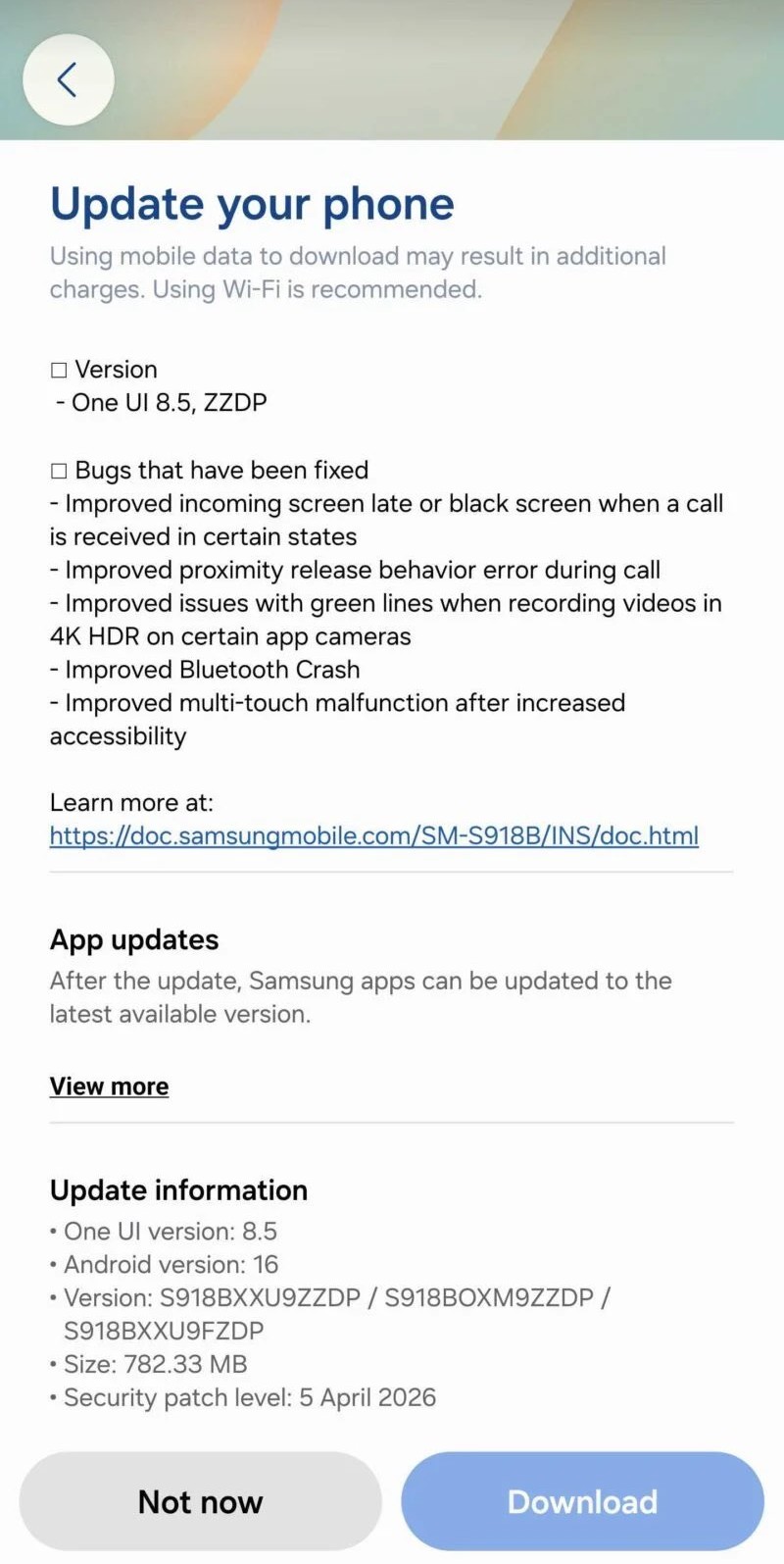
The original update weighed 4 GB in size with all the new features you can read in the full changelog. The latest beta 2 for S23 series features only bug fixes. This includes fixes for late or black screen when a call is received, fixed proximity release behavior error during call, issues with green lines when recording videos in 4K HDR on certain app cameras. The update also improved Bluetooth Crash and multi-touch malfunction.
What’s New in One UI 8.5 Beta 2 for Galaxy S23 phone?
Depending on the device you have, and the AI features Samsung implemented for the device. OneUI 8.5 beta runs on Android 16 and bumps the security patch level to April 5, 2026. It also brings the highly anticipated feature to the Samsung Quick Share app, which now supports transferring files to and from Apple Airdrop.
A major focus of One UI 8.5 is the expansion of Galaxy AI, with upgrades across multiple AI-powered tools. The update enhances language processing speed and accuracy, while features like Chat Assist, Browser Assistant, Interpreter, Note Assist, and Live Translate receive improved performance and reliability. Photo editing, video editing, transcription, and smart suggestions are now more consistent thanks to enhancements in Samsung’s AI algorithms. Overall, Galaxy AI becomes more deeply integrated across the interface, making everyday tasks quicker and more intuitive.
The Camera and Gallery apps also receive significant improvements. Image quality is enhanced with better stabilization, sharper details, and more reliable low-light performance. AI-powered editing tools in the Gallery now offer more accurate suggestions, improved object recognition, and faster loading times. Widgets such as the battery and weather widgets have also been upgraded with more precise data, cleaner layouts, and better animations, contributing to a more informative and visually appealing home screen experience.
Lastly, several native Samsung apps, including Samsung Health, Samsung Internet, Samsung Wallet, and Samsung Keyboard, are updated to align with the One UI 8.5 feature set. Users can expect UI refinements, more reliable performance, and enhanced security across these apps.
Full Changelog
One UI 8.5 firmware update, the full changelog is already available. Here’s what’s new in beta 2.
- Version
- One UI 8.5, ZZDP
- Bugs that have been fixed
- Improved incoming screen late or black screen when a call is received in certain states
- Improved proximity release behavior error during call
- Improved issues with green lines when recording videos in 4K HDR on certain app cameras
- Improved Bluetooth Crash
- Improved multi-touch malfunction after increased accessibility
- Learn more at:
- https://doc.samsungmobile.com/SM-S918B/INS/doc.html
- Update information
- One Ul version: 8.5
- Android version: 16
- Version: S918BXXU9ZZDP / S918BOXM9ZZDP / S918BXXU9FZDP
- Size: 782.33 MB
- Security patch level: 5 April 2026
How to download One UI 8.5 Beta?
Eager to be among the first to experience One UI 8.5? You can sign up through the Samsung Members app available on your compatible Galaxy device. Beta participants will get early access to the new features and can provide feedback to help refine the final release.
- How to Sign up for One UI 8.5 Beta Program
- One UI 8.5 beta leaked firmware downloads
- Samsung One UI 8.5 full changelog
- One UI 8.5 Beta features
Meet Expressive Launcher — A Fresh Way to Android
The wait is over. Expressive Launcher has graduated from beta and is now stable and available to everyone on the Google Play Store. Download it today and experience a fresh way to customize your Android home screen.

Get started
