
How to Download One UI 9 Beta from Any Region (No Root Required)

Subscribe for Updates
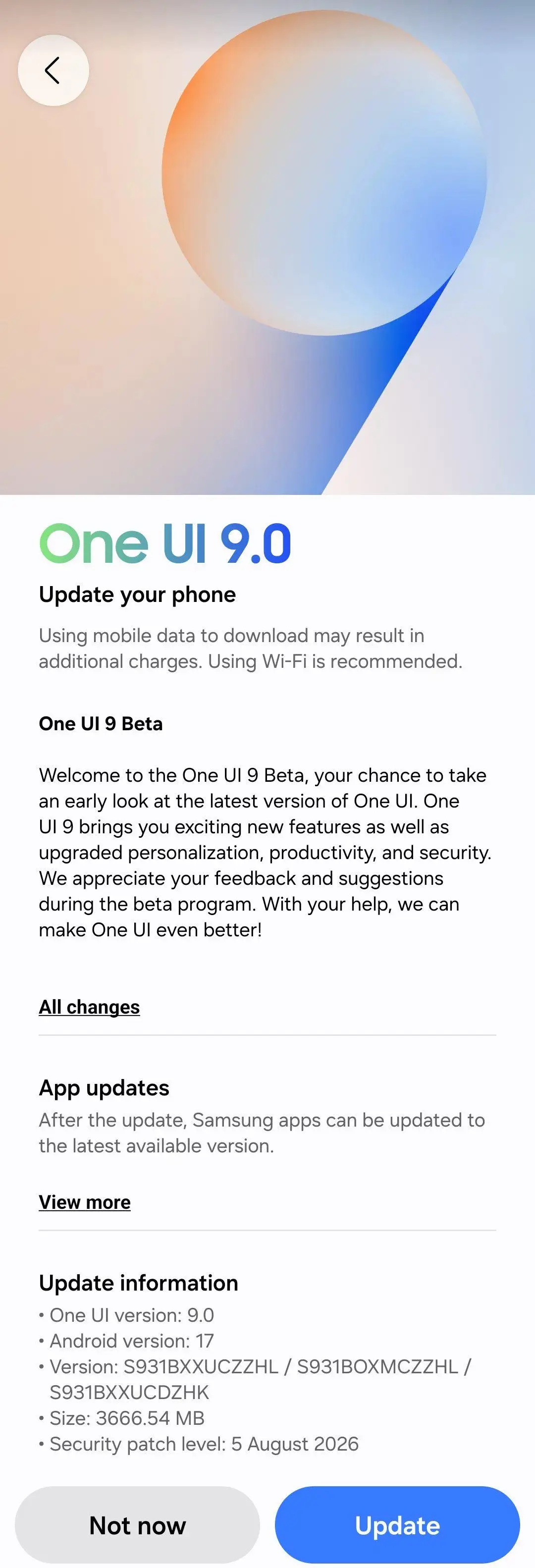
Samsung One UI 9 beta program has officially kicked off for several Galaxy device including the S25 series, S24 series, S23 series, foldable phone and more. However, there’s one caveat to it. Only a few regions are eligible to sign up for the beta program including South Korea, United States, India, the UK, and certain countries in Europe.
Every time Samsung launches a new One UI Beta testing phase, millions of Galaxy users find themselves locked out simply because of where they live. Historically, Samsung restricts beta registrations via the Samsung Members app to a select cluster of roll-out countries, most notably India (INS), Germany (EUX/DBT), the United Kingdom (EUX/BTU), South Korea (KOO), and the United States (TMB/ATT/USC).
For power users, the standard advice used to mean changing your active CSC with PC tools like SamFW or flashing entire regional firmware packages via Odin.
However, a new lightweight alternative has emerged through an open-source tool called Samsung Region Override. Created by developer Ritel-T, the utility leverages elevated ADB privileges via Shizuku to temporarily disguise your SIM operator, network MCC/MNC, and country identifiers without touching the underlying system partition, swapping physical SIMs, or tripping Knox.
How to Use Samsung Region Override & Shizuku to Access the One UI Beta
This guide breaks down how the tool works, which CSC/regions to target, and the step-by-step procedure to test for the One UI 9 Beta banner on your Galaxy phone.
Region Override vs. Hardware CSC
Before jumping in, it is essential to understand what the Samsung Region Override GitHub tool
can and cannot do:
- What it does: It intercepts and spoofs the SIM operator identity and runtime country code reported by Android telephony services to client apps (like Samsung Members and Galaxy Store) without requiring root.
- What it does NOT do: It does not rewrite your phone’s permanent factory bootloader model or base software CSC.
Crucial Compatibility Rule: This method works best if your phone model matches the regional firmware branch receiving the beta (e.g., global multi-CSC devices
SM-S...Bor variants native to an active test market). If your phone is an unsupported carrier-locked regional variant, Samsung Members may still detect the device model and refuse the banner.
Which CSC / Region to Choose
When launching a disguise, pick a region matching an active beta testing market for your specific device tier:
| Target Region / Country | Primary CSC Code | When to Choose This |
| India | INS | Top recommendation for global devices. India frequently opens beta slots across flagship (S-series), FE (Fan Edition), and select A-series models simultaneously. (SM-S...B) |
| Germany / Europe | EUX (or DBT) | Best choice if your phone originated from the European Economic Area or runs standard European multi-CSC firmware. (SM-S...B) |
| United Kingdom | EUX (or BTU) | Recommended alternative for European models if German servers hit capacity limits. |
| South Korea | KOO | Primarily suited if you own a Korean domestic model (SM-...N). |
| United States | TMB / XAA | Only suitable for North American Snapdragon variants (SM-...U / U1). |
Step-by-Step Tutorial: Sideloading Region Override
DO NOT USE AN eSIM: This tool should only be used on a physical SIM slot (even an expired or inactive SIM card works). Attempting to spoof an eSIM can corrupt the carrier profile, disable telephony, or require a complete network reset.
Prerequisites
- DO NOT USE AN eSIM. Works only on physical SIM.
- Model & Regional Compatibility: Your phone model must be eligible for the target country’s beta firmware branch (e.g., European
SM-S...Bdevices usingEUX/ UK / Germany, IndianSM-S...BusingINS, or Korean variantsSM-...NusingKOO). - Stable Firmware Base Version: Ensure your phone is running the required latest stable build (e.g., One UI 8.5). If you are behind on security patches, Samsung’s FOTA server will not deliver the beta OTA.
- Wi-Fi Connection: Connect to Wi-Fi. Spoofing your SIM will temporarily take your cellular connection and mobile data offline.
- Samsung Account: Be logged into an active Samsung Account on your device.
- A compatible Samsung Galaxy device eligible for One UI 9.
- Shizuku installed and running via Wireless Debugging or ADB.
- The official Samsung Region Override APK (v4.0.0 or later).
- An active SIM or eSIM in the device.
Step 1: Set Up & Authorize Shizuku
You can follow our detailed tutorial on how to setup Shizuku. Or follow the steps below.
- Download and install Shizuku from the Google Play Store or GitHub.
- Open your phone’s Settings > Developer Options.
- Enable Wireless debugging, tap Pair device with pairing code, and enter the code into Shizuku’s pairing prompt.
- Start the Shizuku service. Confirm that Shizuku reports “Shizuku is running.
Step 2: Configure Samsung Region Override
- Install and open the Samsung Region Override APK.
- When prompted, tap Allow to grant Shizuku permission.
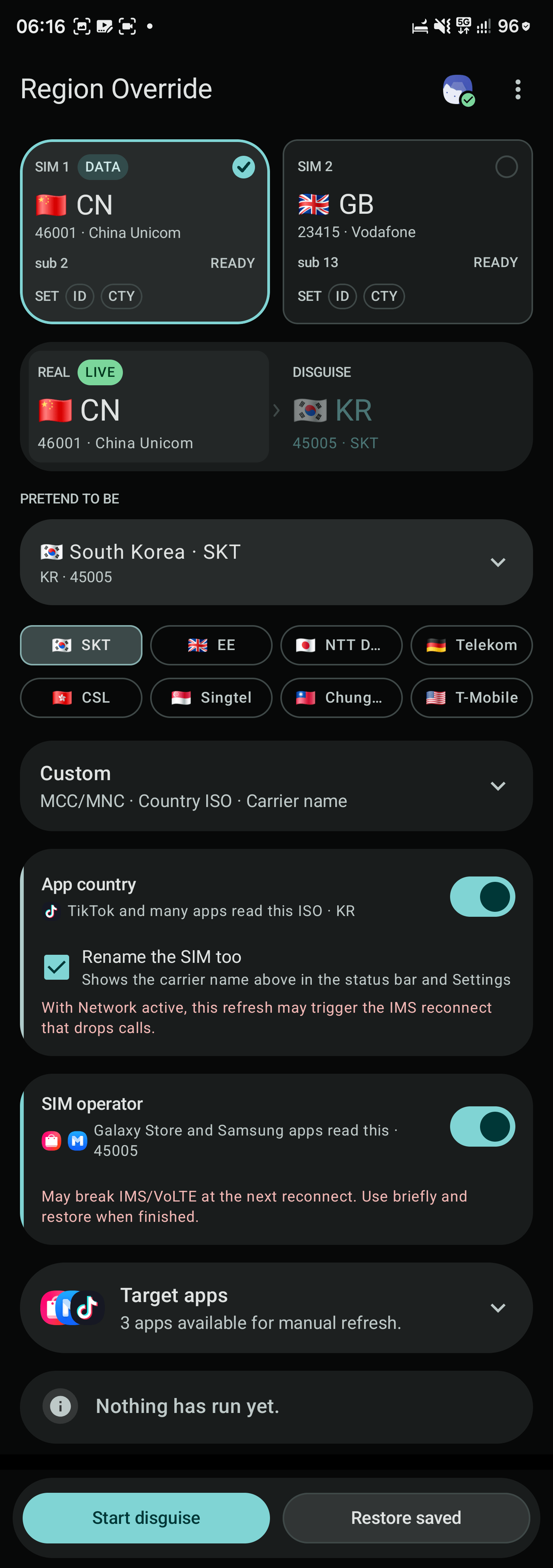
- Under the SIM selection tab, ensure your active data physical SIM card is selected (the tool clearly flags your primary data card).
- Under the region/preset menu:
- Select your target country (e.g., India – INS or Germany – EUX).
- Toggle the operational layers:
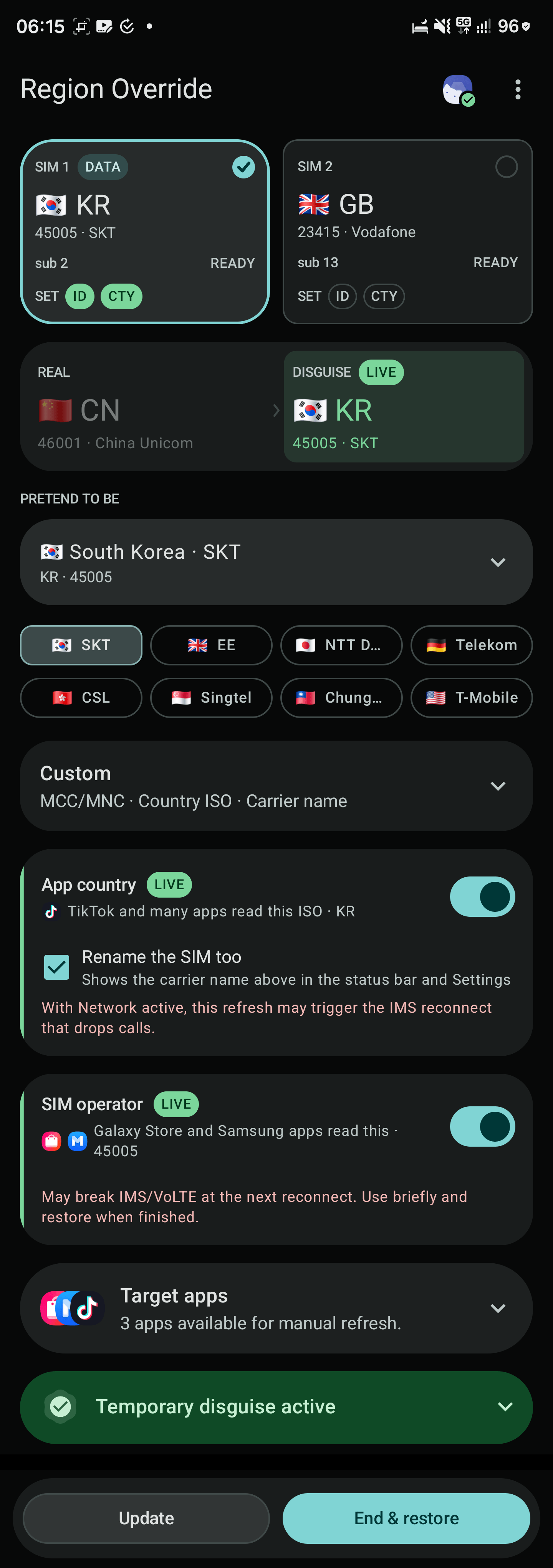
- App Country: Turn ON.
- SIM Operator / Network: Turn ON (this switches the network MCC/MNC read by Samsung apps).
- Tap Start disguise. A status indicator/notification will appear showing the active spoofed carrier.
Step 3: Clear Samsung Members Cache & Check for the Banner
- In the Samsung Region Override app, scroll down to the Target apps section.
- Locate Samsung Members and select Stop & open (or tap Cache to clear its runtime cache).
- Samsung Members will launch fresh under the spoofed telephony identity.
- Look at the top rotating promotional banner carousel on the Samsung Members home screen.
- If enrollment is active for your model, the “One UI 9 Beta Registration” banner will appear.
- Tap the banner, click Enroll, and accept the beta terms.
Step 4: Fallback (If the Banner Fails to Appear)
If your region is spoofed but Samsung Members does not update its storefront:
- Install Root Activity Launcher or Shortcut Maker from the Play Store.
- Search for the following activity:
com.sec.android.app.SecSetupWizard.UI.CountrySelectionActivity - Launch the activity directly.
- Manually set the country to match your spoofed region (e.g., United Kingdom or India).
- Force close Samsung Members, reopen it, and check the banner again.
Step 4: Download the OTA Update
- Once enrolled, go to Settings > Software update > Download and install.
- Check for updates. The One UI 9 Beta OTA package should begin downloading directly from Samsung’s official update servers.
Step 5: Restore Network Settings
Leaving a fake SIM operator active long-term can disrupt IMS services, VoLTE calling, or SMS message routing.
- Restore your SIM immediately: Disguising your MCC/MNC interrupts IMS registration (VoLTE/VoWiFi) and normal cellular calls.
- Pull down the notification shade and tap Restore now (or reopen the app and tap End & restore).
- If you changed the country via the Setup Wizard activity, revert it to your home region.
- Your official OTA download will continue uninterrupted over Wi-Fi, and your SIM profile will return to normal service.
Enjoy One UI 9 on your device!
Meet Expressive Launcher — A Fresh Way to Android
The wait is over. Expressive Launcher has graduated from beta and is now stable and available to everyone on the Google Play Store. Download it today and experience a fresh way to customize your Android home screen.
Get started
