
Magisk v31.0 Released with Material 3 UI, Built-in Terminal, Android 17 Support, and More


Subscribe for Updates
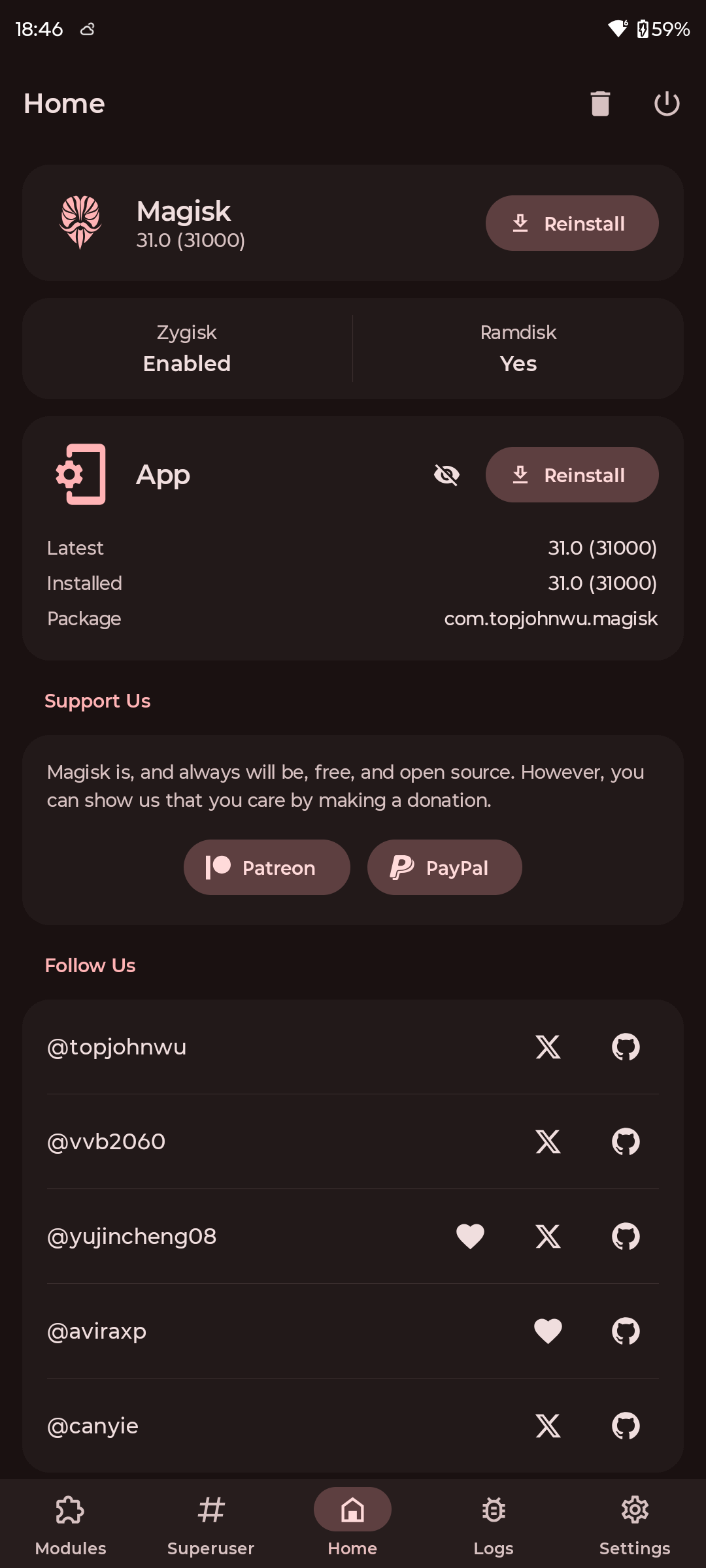
Magisk v31.0 is now available, delivering one of the biggest changes to the popular Android rooting and systemless modification tool in years. While recent Magisk releases have concentrated heavily on internal restructuring, Rust migration, Android compatibility, and improvements to the core rooting framework, Magisk v31.0 brings the application itself back into the spotlight with a complete UI rewrite.
Developer John Wu, better known as topjohnwu, has rebuilt the Magisk app’s entire user interface from the ground up using Jetpack Compose and Material 3. The old Android View, Fragment, XML layout, Databinding, and related legacy architecture have effectively been removed from the new application.
The new architecture has enabled several significant functional additions, including a built-in terminal emulator with TTY and ANSI support, the ability to download and extract boot images directly from remote OTA URLs, and numerous improvements throughout MagiskBoot, Zygisk, MagiskPolicy, resetprop, MagiskInit, and DenyList.
Most importantly for Android enthusiasts looking ahead, Magisk v31.0 introduces Zygisk support for Android 17 / API level 37!
- Also read:
What’s new in Magisk v31.0
Completely redesigned Magisk app
The biggest change in v31.0 is the Magisk app itself.
The project had accumulated years of legacy Android code, including XML layouts, Databinding, Fragments, and KAPT. Rather than continuing to maintain that architecture, the developer has replaced the entire UI layer with Jetpack Compose and Material 3.
This gives Magisk a modern foundation for future development while also allowing the interface and user experience to be redesigned around current Android development practices.
The legacy View and Fragment architecture has been completely removed from the new app.
Built-in terminal emulator
Magisk v31.0 adds a built-in terminal emulator with full TTY and ANSI support.
This is particularly useful for advanced users and module developers because terminal-based operations can now be performed directly from Magisk instead of relying on a separate terminal application.
The terminal can be used for tasks such as module flashing and running module action scripts, making Magisk more than just a graphical interface for managing root.
Remote OTA boot-image extraction
Another useful addition is support for downloading and streaming boot-image extraction directly from remote OTA URLs.
Previously, users working with boot images could have to download firmware packages separately and manually locate and extract the required image before patching it with Magisk.
The new functionality streamlines that process by allowing Magisk to work directly with remote OTA sources and extract the boot image on the fly.
This should be particularly useful for advanced users who regularly patch boot images when updating rooted devices.
Android 17 support arrives
Magisk v31.0 also prepares the project for the next generation of Android.
Zygisk now supports Android 17 (API 37), allowing compatible Magisk functionality and modules to continue working as Google’s Android platform evolves.
This follows the project’s recent work on Android 16 and Android 16 QPR2 compatibility, showing that maintaining compatibility with newer Android releases remains a major priority for Magisk.
Zygisk support for Meta Quest
Zygisk has also been updated to support lazy partition zygotes on Meta Quest devices running Horizon OS.
While this won’t matter to most Android phone users, it expands Magisk’s compatibility with Android-based platforms beyond conventional smartphones and tablets.
MagiskBoot improvements
MagiskBoot, which handles much of Magisk’s boot-image processing, receives several technical improvements in v31.0.
The update adds support for dynamic zImage payload sizes, removing the need for exact-size padding during repacking.
It also updates AVB hash descriptor image sizes to match the unpacked image size and lowers the default XZ and LZMA compression presets to reduce memory usage during repacking.
These changes aren’t necessarily visible to ordinary users, but they can improve reliability and compatibility when Magisk processes different types of boot images.
MagiskPolicy parsing fix
MagiskPolicy receives a small but important fix for identifiers containing hyphens.
Since MagiskPolicy works with Android’s SELinux policies, fixes in this area can improve compatibility with device configurations and policies that previously triggered parsing problems.
New resetprop compact option
The resetprop utility gains a new --compact option, which can also be used in its shorter form, -c.
The option allows users and scripts to compact Android property storage areas.
This is primarily an advanced-user and developer-facing change rather than something most Magisk users will interact with directly.
MagiskInit boot-mode improvement
MagiskInit has also been updated to properly prioritize charger-mode detection before force_normal_boot.
Although it is a relatively small change, MagiskInit operates very early in Android’s boot process, making correct handling of different boot modes important for device compatibility.
DenyList adds WebView Zygote
Magisk’s DenyList functionality receives another small update, with webview_zygote added as an unmount target.
This extends the processes that Magisk can account for when applying its DenyList behavior on newer Android versions.
Magisk v31.0 complete changelog
According to the official Magisk changelog, the major changes in version 31.0 include:
- App: Complete interface rewrite using Jetpack Compose and Material 3
- App: Removal of the legacy View and Fragment architecture
- App: Built-in terminal emulator with full TTY and ANSI capabilities
- App: Terminal support for module flashing and action scripts
- App: Remote OTA downloading and streaming boot-image extraction
- MagiskBoot: Dynamic zImage payload-size support
- MagiskBoot: Updated AVB hash descriptor image-size handling
- MagiskBoot: Lower XZ/LZMA compression defaults to reduce repacking memory usage
- Zygisk: Android 17 / API 37 support
- Zygisk: Support for Meta Quest / Horizon OS lazy partition zygotes
- MagiskPolicy: Fix identifier parsing for names containing hyphens
- resetprop: Add
--compact/-c - MagiskInit: Improve charger-mode detection priority
- DenyList: Add
webview_zygoteas an unmount target
The official Magisk changelog identifies the release as v31.0 and lists these changes as part of the September 2026 release cycle.
Download Magisk v31.0
Magisk v31.0 is marked as a pre-release on GitHub. That distinction matters more than usual because the application UI has been completely rewritten.
Even if the core Magisk functionality is mature, replacing an application’s entire presentation and architecture layer can introduce bugs that weren’t present in the previous implementation.
Legacy Magisk app remains available temporarily. If users encounter problems with the Compose-based Magisk application, Magisk v31.0 Legacy remains available.
This is a sensible transition strategy. Instead of forcing every user onto the new application architecture immediately, Magisk is temporarily maintaining the older View-based application as a fallback.
APK Download
Here, download the latest Magisk ZIP, IMG, and APK. Simply rename it Magisk.zip to get the zip file. Following are the direct download links right from the Github repository of the project.
- Magisk-v31.0.apk (Direct DL Link)
- Join Telegram Channel
- Full Magisk downloads repository
Installation and Compatibility
As with previous versions, Magisk v31.0 can be installed through the Magisk app using the direct installation method. However, with Magisk 30, you can’t simply update the app. You will need to flash it with TWRP recovery; and with the boot image in some cases. The APK is available for download from the official GitHub release page, weighing in at approximately 11.3 MB.
Users should be aware that, as always, rooting and modifying system components carry inherent risks, including potential security vulnerabilities and warranty violations. It’s recommended to back up your device before installation and to understand the implications of granting root access to applications.
Installation and Uninstallation
How to install Magisk? Check out the updated installation guide for more info.
Installation: Magisk can be installed via a custom recovery like TWRP by flashing the Magisk zip file, or by patching the boot image and flashing it using fastboot or ADB.
Uninstallation: Users can easily uninstall Magisk either through the app or by flashing an uninstall zip in recovery mode.
Meet Expressive Launcher — A Fresh Way to Android
The wait is over. Expressive Launcher has graduated from beta and is now stable and available to everyone on the Google Play Store. Download it today and experience a fresh way to customize your Android home screen.
Get started
