
One UI 8.5 Beta Program Released Globally: Here’s How to Download!


Subscribe for Updates
Samsung Electronics has unveiled the One UI 8.5 beta program, delivering innovative tools that simplify creation, connectivity, and security. Designed to help users accomplish more with minimal effort, One UI 8.5 brings seamless functionality, streamlined device management, and robust security enhancements.
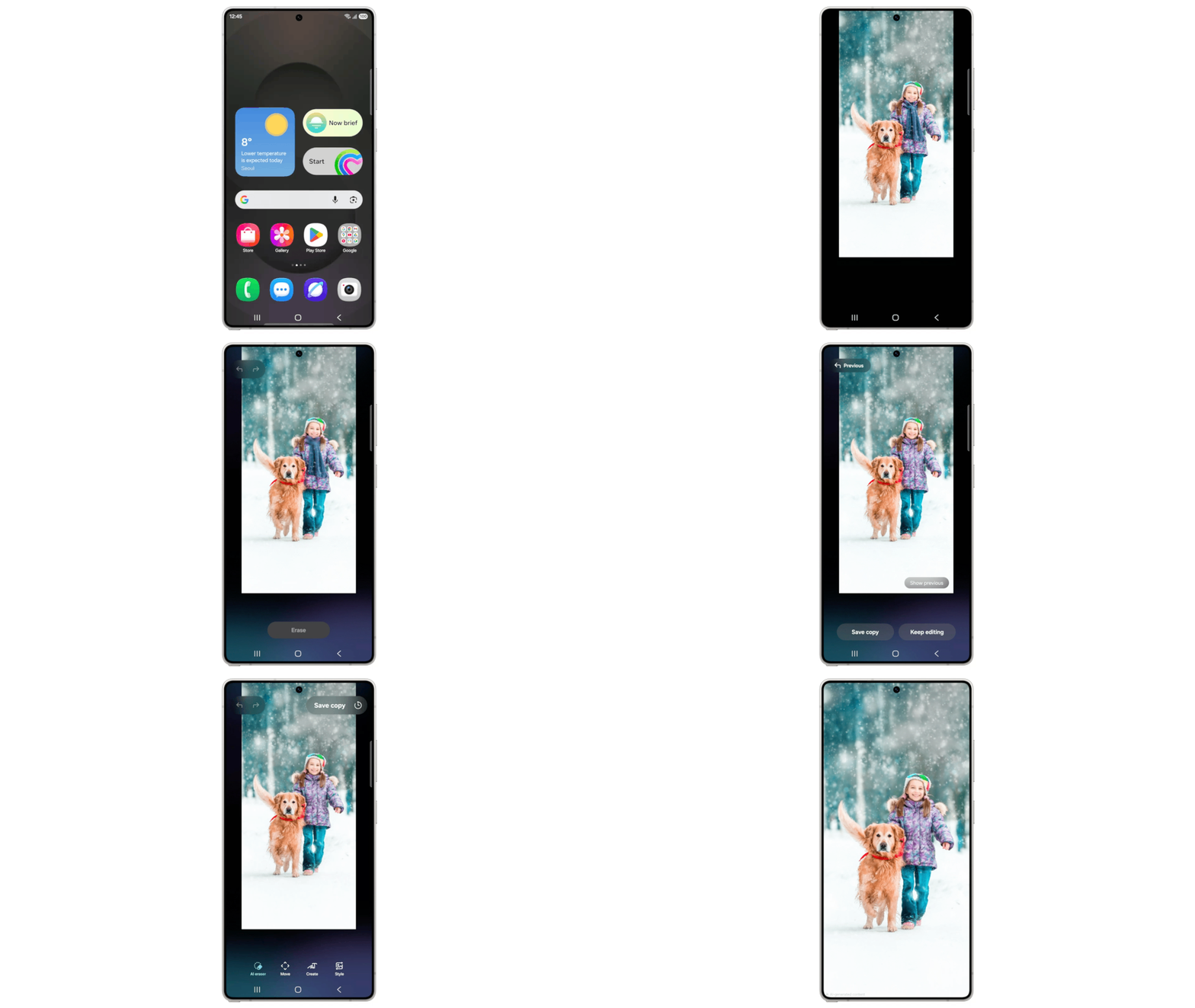
One UI 8.5 transforms the content creation experience with intuitive tools from conception to sharing. The updated Photo Assist enables uninterrupted image generation, allowing continuous editing without saving each version. Users can review their complete edit history and select their preferred results effortlessly.
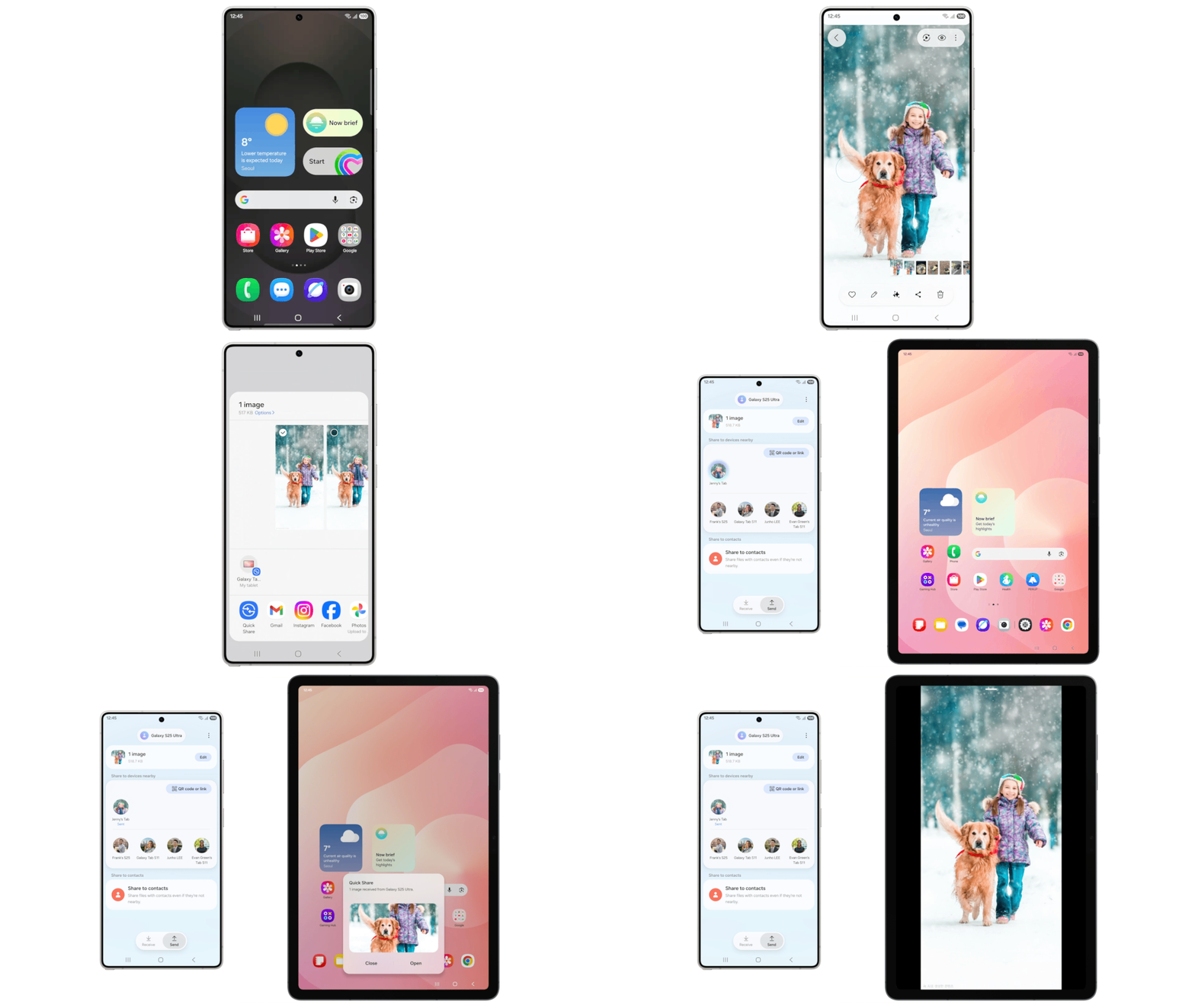
Sharing content becomes more efficient with Quick Share improvements that intelligently identify people in photos and automatically recommend sending images directly to relevant contacts.
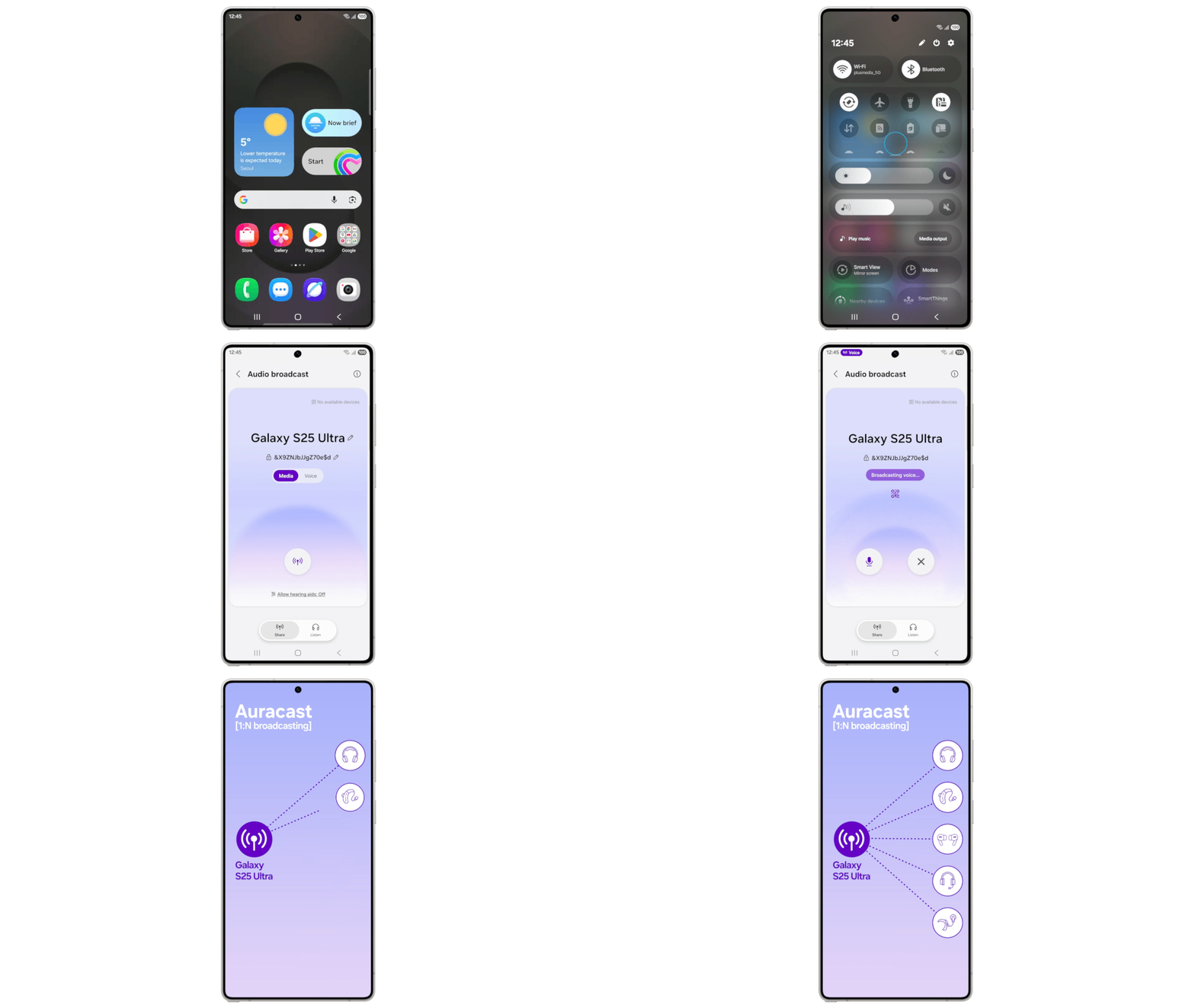
Managing multiple devices is simpler with new cross-device features for file management, network sharing, and inter-device communication. Audio Broadcast facilitates effortless communication with nearby LE Audio-compatible devices through Auracast technology. Beyond streaming media audio, users can now broadcast their voice using their Galaxy phone’s built-in microphone—perfect for group scenarios like guided tours or events.
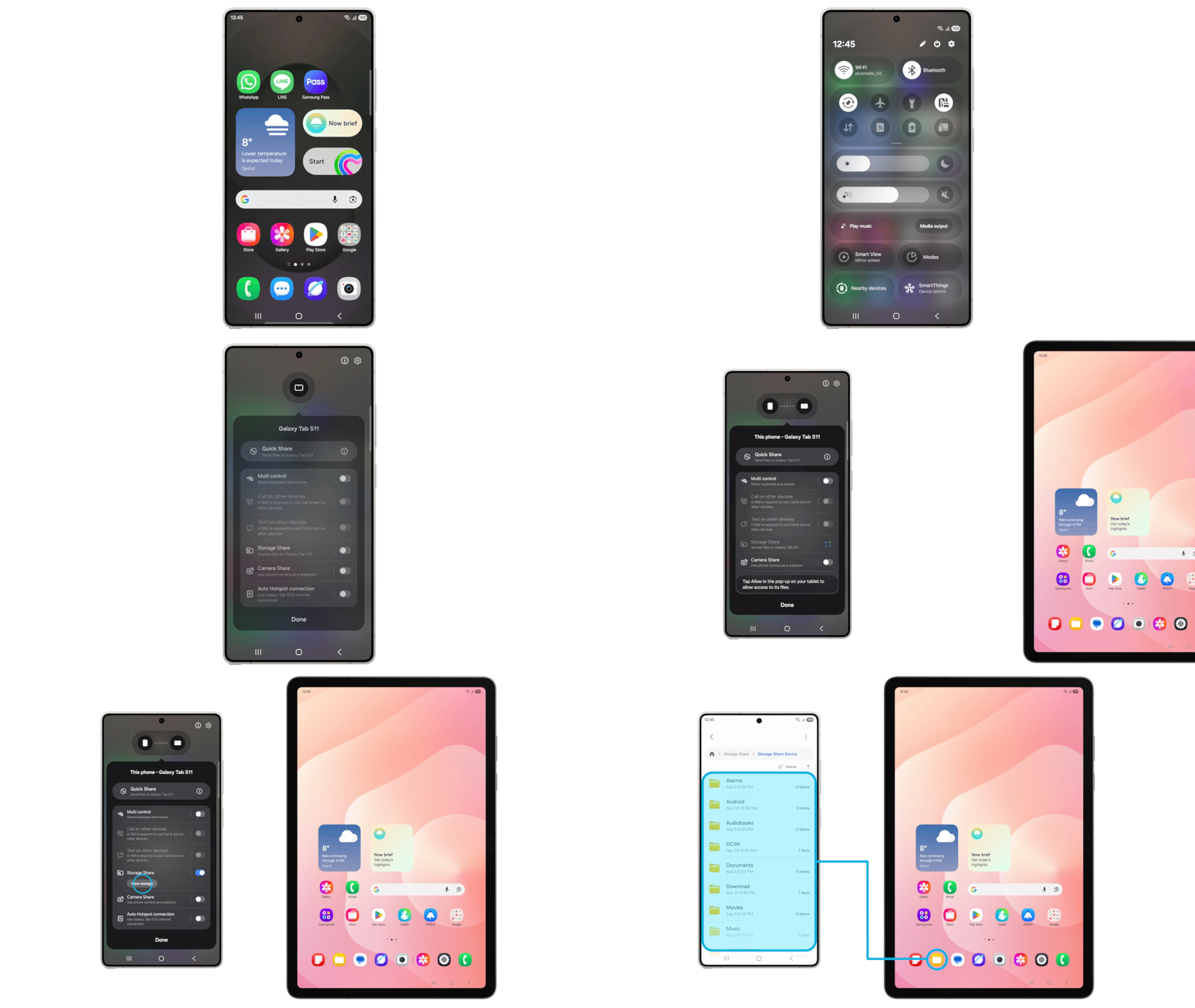
Storage Share enhances the Galaxy ecosystem’s fluidity by displaying files from other Galaxy devices—tablets and PCs included—directly within the My Files app. Users can also access their phone’s files from other Samsung devices, including their television.
One UI 8.5 reinforces device protection while providing transparent control over security settings. Theft Protection safeguards phones and personal data if devices are lost or stolen. Failed Authentication Lock adds another security layer by automatically locking the screen after multiple unsuccessful identity verification attempts via fingerprint, PIN, or password. Identity Check now protects additional settings, offering expanded security coverage.
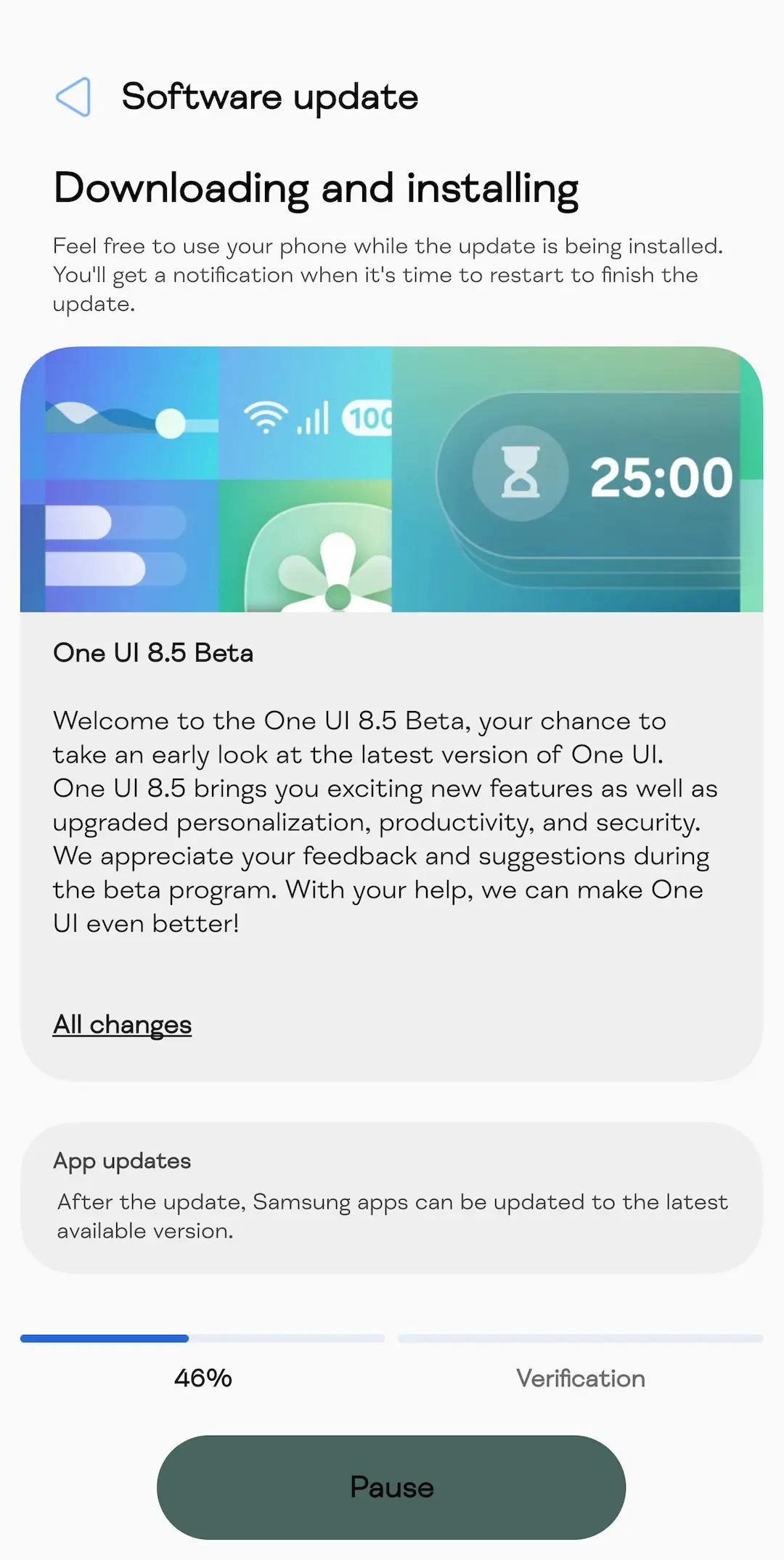
The One UI 8.5 beta program launches for Galaxy S25 series users on December 8 in select markets: Germany, India, Korea, Poland, the UK, and the US. Galaxy users can register for the beta program through the Samsung Members app.
What’s new in Samsung One UI 8.5?
Core System Enhancements: Performance and Stability
Samsung has focused heavily on under-the-hood improvements that may not be immediately visible but significantly impact daily usage. The firmware enhances device stability while optimizing memory and power management for smoother performance throughout the day.
Core system components have received optimization treatments that result in faster app launches and more fluid transitions between applications. Users will notice improved responsiveness across the interface, with animations that feel more polished and deliberate rather than rushed or laggy.
Connectivity Improvements
One UI 8.5 brings notable enhancements to connectivity features, ensuring more stable Wi-Fi and Bluetooth connections. The update also improves interactions between Samsung ecosystem devices, making it easier to transition between your Galaxy phone, tablet, smartwatch, and other connected devices.
The introduction of Storage Share exemplifies this ecosystem approach, allowing users to access files from their Samsung phones, tablets, and PCs directly within the My Files app. This cross-device file access extends even to Samsung TVs, creating a truly unified experience.
Galaxy AI: Smarter and More Integrated
Artificial intelligence continues to be a cornerstone of Samsung’s software strategy, and One UI 8.5 expands Galaxy AI capabilities across multiple tools and applications.
Continuous Image Generation
Photo Assist now allows users to generate AI images using different features without saving each iteration. This workflow improvement means you can experiment freely with various AI editing options, review all your creations in history, and select only your favorites for saving. This addresses a common frustration where users had to save multiple versions before finding their preferred result.
Enhanced Bixby Intelligence
Samsung’s voice assistant receives several meaningful upgrades that make it more conversational and useful:
Natural Language Understanding: Bixby now better understands device control requests even when you don’t use exact commands or feature names. Simply describe what you need in your own words, and Bixby will identify the appropriate setting or feature.
Instant Answers: Whether you need quick information or detailed explanations, Bixby provides instant responses without requiring multiple searches or app switching.
Conversation History: Users can now access past conversations with Bixby through a side panel in the Bixby app, making it easier to reference previous interactions or pick up where you left off.
AI-Powered Enhancements Across Apps
Language processing speed and accuracy have improved throughout the system. Features like Chat Assist, Browser Assistant, Interpreter, Note Assist, and Live Translate deliver more reliable performance. Photo editing, video editing, transcription, and smart suggestions benefit from enhanced algorithms that provide more consistent results.
Camera and Gallery Improvements
Samsung has refined its already impressive camera system with enhancements that improve both capture quality and post-processing capabilities.
Image Quality Enhancements
Users can expect better stabilization for sharper photos and videos, improved detail preservation, and more reliable low-light performance. These improvements ensure that your Galaxy device continues to compete with the best smartphone cameras available.
AI-Powered Gallery Tools
The Gallery app’s AI-powered editing tools now offer more accurate suggestions, improved object recognition, and faster loading times. These enhancements make photo editing more intuitive and efficient, whether you’re making quick adjustments or diving into advanced editing features.
Customization Revolution: The New Quick Settings Panel
Perhaps the most celebrated feature in One UI 8.5 is the extensively redesigned and customizable Quick Settings panel. While Samsung has historically offered some customization in this area, the new implementation provides unprecedented control.
What’s New in Quick Settings
Complete Layout Control: Users can add, remove, reorder, and reorganize controls in the quick panel to match their preferences and workflow. This level of customization ensures that your most-used toggles are always easily accessible.
Flexible Organization: Multiple layout configurations allow you to create a Quick Settings panel that reflects your personal style and usage patterns. Whether you prefer a compact layout with many options or a more spacious arrangement with larger toggles, One UI 8.5 accommodates your preferences.
The community response to this feature has been overwhelmingly positive, though some users have noted design similarities to iOS’s Control Center. Regardless of its inspiration, the implementation provides Samsung users with flexibility that was previously unavailable.
Enhanced Security and Privacy Features
In an era where digital security is paramount, One UI 8.5 introduces several features designed to protect your data and device.
Theft Protection
The new Failed Authentication Lock automatically locks your screen after too many failed attempts to verify your identity using fingerprints, PIN, pattern, or password. Identity Check now protects even more settings, providing additional layers of security against unauthorized access.
Auto Blocker Improvements
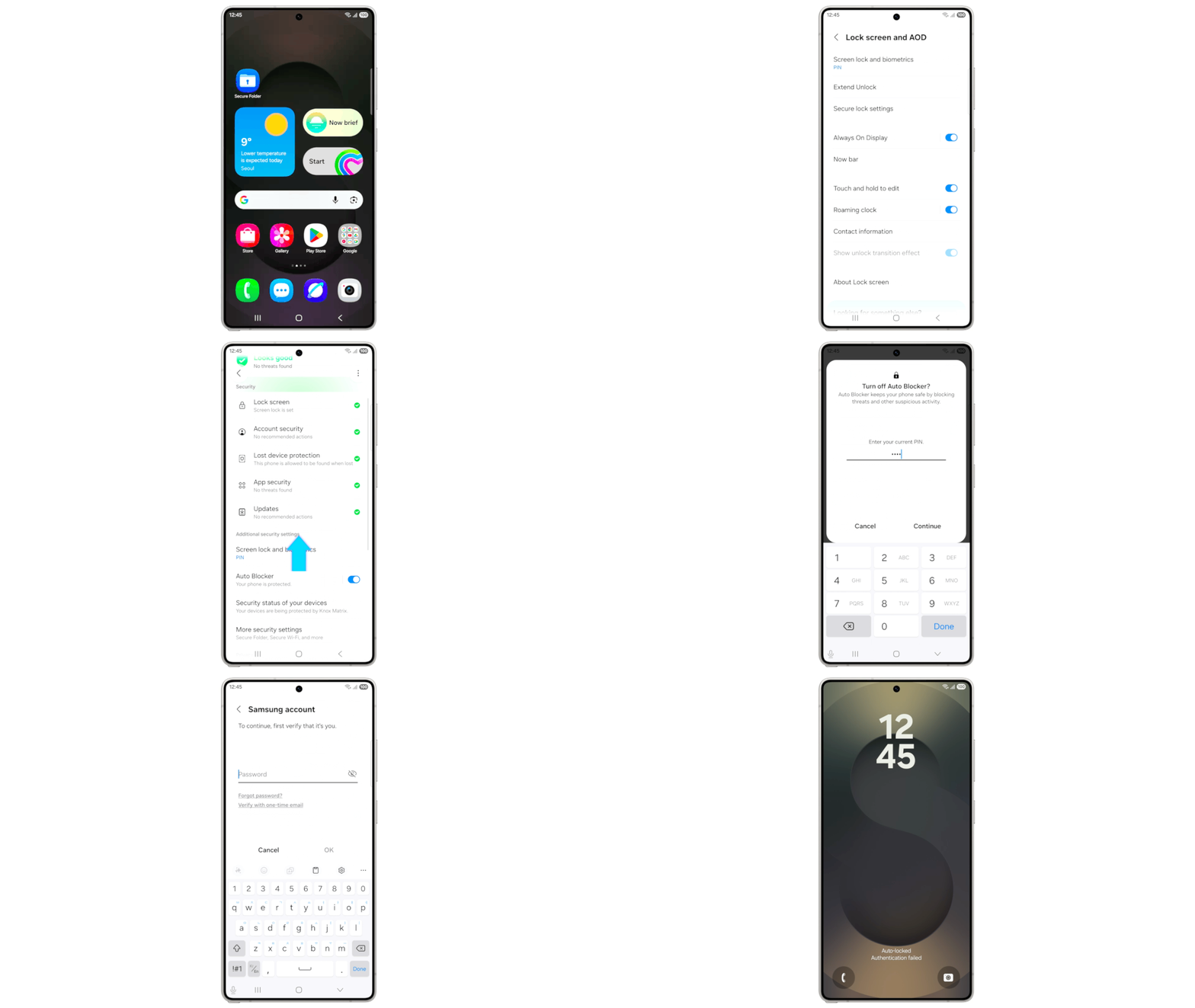
Users can temporarily disable Auto Blocker’s security protection when needed, with a new option to automatically re-enable it after 30 minutes. This ensures you don’t inadvertently leave your device vulnerable after performing legitimate actions that required temporarily lowering security settings.
Built-In App Locking
One of the most requested features has finally arrived: native app locking functionality. Previously, users had to rely on Samsung’s Secure Folder or third-party solutions to lock individual apps. The new built-in feature offers a more straightforward approach, allowing you to lock sensitive apps like banking, messaging, or photos without duplicating them in Secure Folder.
Battery and Power Management
Samsung has redesigned the battery settings interface and enhanced power-saving capabilities to help users get the most from their devices.
Revamped Battery Information
The redesigned Battery settings screen makes it easier to check remaining time, charging status, and daily usage patterns over the past week. This improved visualization helps users understand their battery consumption patterns and make informed decisions about power management.
Improved Power Saving Modes
Power saving mode now offers two distinct options:
Standard Mode: Provides moderate savings with customizable limits, allowing you to balance battery conservation with functionality.
Maximum Mode: Turns off all non-essential features to make your battery last as long as possible, ideal for situations where charging isn’t immediately available.
User Interface Refinements
One UI 8.5 includes numerous visual enhancements that create a more cohesive and polished experience throughout the system.
Lock Screen Enhancements
Automatic Layout Adjustment: Wallpapers featuring people or pets now fit perfectly every time. When you choose a photo for your Lock screen, the layout adjusts automatically so the clock and widgets don’t cover important parts of the picture.
Customizable Clock Fonts: Users can now adjust the thickness of more font styles to match their preferred aesthetic, providing greater personalization options for the Lock screen clock.
Weather Improvements
The Weather widget has been enhanced with precipitation graphs that appear when rain or snow is expected in the next few hours. Additionally, users can now check pollen levels for trees, grass, and ragweed—a valuable feature for allergy sufferers.
The Weather app itself has received new animations and improved data visualization, making it more engaging and informative.
Enhanced Auracast Audio Features
One UI 8.5 makes it easier than ever to use Auracast for audio broadcasting and listening.
Streamlined Menu Organization
Options for both broadcasting and listening are now located in the Audio broadcast menu in Settings, providing a centralized location for all Auracast features.
Voice Broadcasting
In addition to media sound, you can now broadcast your voice using your phone’s built-in microphone through Auracast. This feature enables new use cases for sharing audio with people around you.
Samsung Health Updates
Samsung’s health and fitness platform receives several meaningful improvements in One UI 8.5.
Enhanced Weekly Reports
Weekly health reports now include data from your medication tracker and mindfulness sessions, providing a more complete picture of your overall wellness.
Improved Sharing Experience
Users can mix and match exercise statistics with photos from their workouts to create the perfect social media post, making it easier to share fitness achievements with friends and followers.
Watch Integration
You can now start favorite or recommended meditations directly on your Galaxy Watch without picking up your phone. Additionally, the Galaxy Watch8 and Galaxy Watch Ultra support antioxidant measurements directly from the watch, even when not connected to your phone.
Productivity Enhancements
Several features in One UI 8.5 focus on improving productivity and workflow efficiency.
Partial Screen Recording
Users can now select only the part of the screen they want to record, rather than capturing the entire display. This feature is particularly useful for creating tutorials or sharing specific content without revealing unnecessary information.
Calculator Improvements
Numbers and formulas copied to your clipboard are now suggested when you open the Calculator app, allowing you to enter them with a quick tap and save time on calculations.
DeX Window Memory
Samsung DeX now remembers your app window sizes and positions. When you open an app again, it appears exactly as you left it, eliminating the need to constantly resize and reposition windows.
Accessibility Improvements
Samsung continues its commitment to accessibility with several new features in One UI 8.5.
Bluetooth Hearing Aid Controls
Users can now access settings for Bluetooth hearing aids directly from the Accessibility shortcut. A pop-up appears that allows you to change your hearing program, turn Ambient sound on or off, and adjust other settings without navigating through multiple menus.
Enhanced Magnification Controls
New options allow the magnified area to follow the cursor as you type or move when you change focus using the keyboard. When using a mouse, the magnified area can shift as you move the pointer to the edge of the screen.
Dwell and Corner Actions
The Auto action after pointer stops feature has been divided into two separate features:
Dwell Action: Set custom actions when your mouse stops moving for a certain amount of time.
Corner Actions: Set different actions for each corner of the screen.
Quick Share Enhancements
Samsung’s file-sharing solution receives useful updates in One UI 8.5.
Privacy-Focused Sharing
Users can now configure Quick Share to only receive files from devices signed in to their Samsung or Google account, preventing unwanted sharing requests from strangers.
Photo Sharing Suggestions
When sharing pictures that include friends or family, Quick Share can recognize who’s in them and suggest sharing directly with those people, making it faster to share photos with the right contacts.
Clock App Improvements
Samsung’s Clock app has been updated with features that enhance both functionality and visual appeal.
Weather Alarm Backgrounds
Your alarm screen can now display current weather conditions as a background when it rings, helping you prepare for the day ahead before you even get out of bed.
Time Zone Converter
A new slider in the Clock app makes it easy to check time differences between places around the world at a glance—perfect for travelers and anyone who regularly communicates with people in different time zones.
Redesigned Native Apps
Several Samsung applications have been updated to align with the One UI 8.5 feature set and design language.
Phone App Redesign
The phone app features a cleaner interface with reduced visual clutter, improved navigation between contacts, recent calls, and the dialer, and updated graphics and animations that bring it in line with contemporary design standards.
Samsung Internet, Wallet, and Keyboard
These essential apps have received UI refinements, more reliable performance, and enhanced security features, ensuring they work seamlessly with the broader One UI 8.5 experience.
File Management Improvements
The My Files app now automatically organizes files by their source in the Recent/Downloads area. Files are grouped based on where they originated—downloads, shared files, camera, and other sources—making it faster to locate specific items without searching through chronological lists.
Reminders and Calendar Features
One UI 8.5 introduces early alerts for reminders, allowing you to receive notifications before tasks are due. You can choose how far in advance to receive alerts for each reminder, ensuring you never forget important commitments.
How to Join the One UI 8.5 Beta Program?
Eager to be among the first to experience One UI 8.5? You can sign up through the Samsung Members app available on your compatible Galaxy device. Beta participants will get early access to the new features and can provide feedback to help refine the final release.
Meet Expressive Launcher — A Fresh Way to Android
The wait is over. Expressive Launcher has graduated from beta and is now stable and available to everyone on the Google Play Store. Download it today and experience a fresh way to customize your Android home screen.

Get started
