September 2026 Pixel Drop: Pixel VIP Redesign, Wear OS Upgrades, and Comprehensive Bug Fixes
Subscribe for Updates
Google has officially released the September 2026 Pixel Drop alongside its monthly maintenance patch for eligible Pixel smartphones, tablets, and smartwatches. Rolling out to 21 active device models powered by Android 17. The device list spans from the Pixel 6 series up to the flagship Pixel 10 family. This release combines key software enhancements with an extensive battery of system-wide stability and thermal fixes.
The latest Pixel Drop for Android 17 has arrives with the long awaited performance improvements and thermal improvements by targeting graphics fixes. This eliminates game lag, frame drops, and elevated surface temperatures during intensive workloads on Tensor-powered devices!
Key Takeaways: September 2026 Update
- Refined VIP Management: An overhauled Pixel VIP home screen widget adds single-tap calling, direct messaging, at-a-glance unread indicators, and a floating contact switcher.
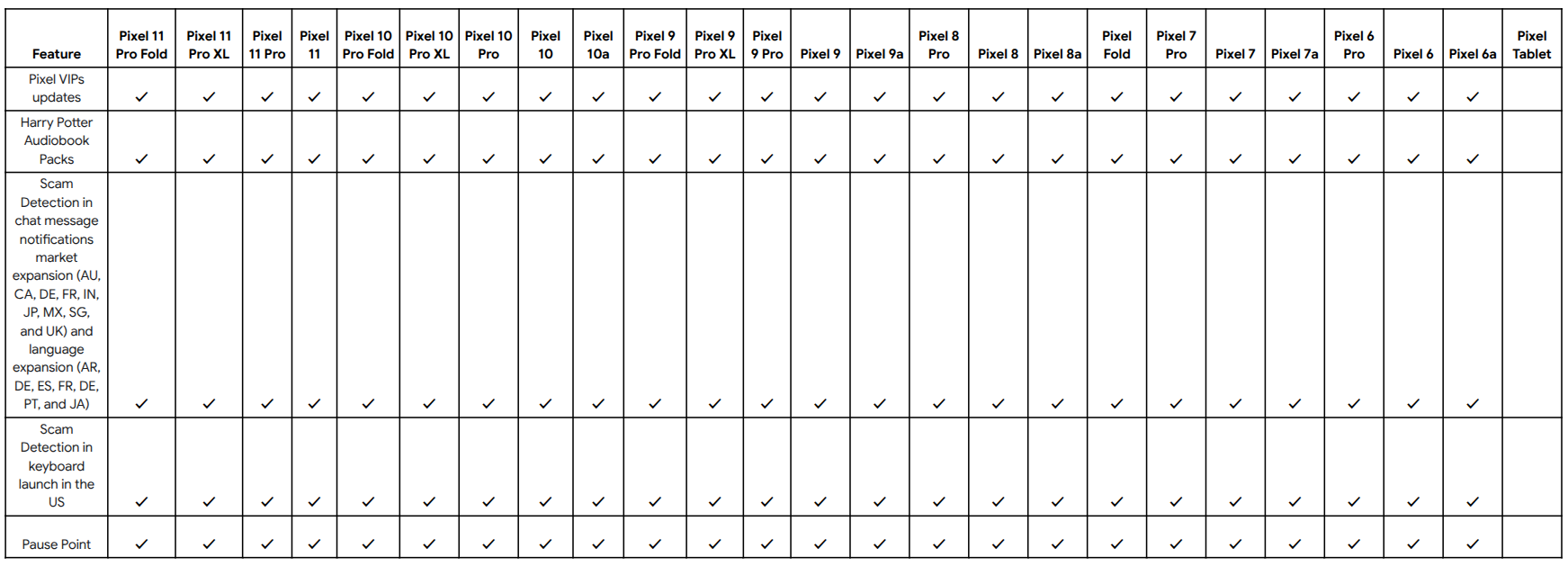
- Security & Habit Tracking: Gboard integrates on-device Scam Detection warning chips, while the intentional app-delay feature “Pause Point” expands back to older hardware.
- Performance & Thermal Mitigations: Targeted graphics fixes eliminate game lag, frame drops, and elevated surface temperatures during intensive workloads on Tensor-powered devices.
- Connectivity & Crash Patches: Resolves persistent Wi-Fi/Bluetooth toggle freezes, application install/uninstall crashes on Pixel 10 devices, and cellular connectivity drops.

Update: Call Screen is now live in India. Avoid unwanted calls by letting Call Screen answer unknown numbers for you. You’ll see who’s calling and why, so you can decide whether to pick up or not.

What’s New in the September 2026 Pixel Drop
Rather than rolling out massive platform-level overhauls ahead of upcoming Quarterly Platform Releases (QPR), the September 2026 Pixel Drop focuses on communication utilities, security expansions, and cross-device convenience.
Overhauled Pixel VIP Widget
Designed to prioritize essential communication, the upgraded Pixel VIP experience introduces direct-action functionality:
- Single-Tap Actions: Users can initiate calls or compose messages directly from the home screen without opening the Contacts or Phone apps.
- At-a-Glance Notification Badges: Badges now surface urgent, unread correspondence directly on the contact’s icon.
- Floating Navigation Menu: A persistent floating bottom carousel allows users with multiple configured VIPs to cycle between contacts seamlessly.
Proactive Security: Inline Gboard Scam Detection
Building on network-level filtering, Google has integrated Scam Detection directly into Gboard. Powered by local, on-device machine learning:
- Typing a reply in supported messaging applications analyzes incoming context entirely offline without external server transmission.
- If suspicious patterns (such as fraudulent payment requests or phishing lures) are identified, Gboard displays a high-visibility warning chip above the keyboard row.
- General notification-level Message Scam Detection expands internationally across nine additional regions, including India, the UK, Canada, France, Germany, and Japan.
Extended “Pause Point” Device Rollout
Previously introduced on newer flagship hardware, Google’s intentional friction feature, Pause Point, has expanded to Pixel 6 and newer models. Built directly into Digital Wellbeing, Pause Point injects a brief, configurable delay before launching habit-forming applications, encouraging mindful phone usage.
Wear OS & Pixel Watch Enhancements
Eligible smartwatches receive targeted gesture and assistant improvements:
- Refined Raise to Talk recognition reduces voice-query latency.
- Expanded One-Handed Gestures integrate into third-party navigation and playback applications.
- Select flagship watches receive offline assistant optimizations and contextual proactive prompt cards.
Detailed Bug Fixes and Technical Improvements
Alongside feature additions, Google’s September maintenance patch resolves critical framework, graphics, and interface defects across the Pixel lineup.
Device Applicability Legend:
*[1] Pixel 6 through Pixel 10 series (including a-series, Pro, Fold, and Tablet)
*[2] Pixel Tablet exclusive
*[3] Pixel 10 series exclusive (Pixel 10, 10 Pro, 10 Pro XL, 10 Pro Fold, 10a)
Display, Thermal, & Graphics Resolution
- Thermal & GPU Throttling Fix: Addressed a critical bug that triggered high device temperatures, frame-rate stuttering, and input lag during sustained, graphics-intensive gaming sessions.
- Tablet Camera Driver Stability: Resolved an unhandled kernel exception causing system-level crashes under specific camera preview conditions.
Framework & Performance Optimization
- System Intelligence Database Lag: Eliminated a defect where Android System Intelligence locked background I/O operations, rendering the UI unresponsive during SQLite database queries.
- App Lifecycle Crashes: Fixed a framework crash occurring on Pixel 10 devices during concurrent package installation, removal, or APK updates.
- Home Screen Widget Persistence: Corrected an issue where customized third-party widgets vanished from the launcher grid following a reboot.
- Magnification Inversion Bug: Fixed an input handler error where enabling the screen magnification accessibility shortcut caused swipe gestures to scroll in the opposite direction.
Connectivity & Hardware Handshakes
- Network Toggle Freeze: Resolved an issue on Pixel 10 models where turning on Wi-Fi or Bluetooth became temporarily unresponsive.
- Telephony Interruption: Fixed carrier-handshake failures that caused unexpected service drops or failed mobile data negotiations under congested network towers.
User Interface & System Visuals
- External Display Handling: Fixed an unexpected crash when connecting or disconnecting external monitors over USB-C DisplayPort alternate mode.
- Notification Shade Fixes: Addressed multiple lock screen notification overlap bugs, clipping errors, and un-swipeable notification cards.
- Quick Settings Internet Panel: Streamlined transition animations to eliminate visual jank when pulling open the network switcher.
Fix Breakdown by Device Category
| Functional Area | Issue Resolved | Target Hardware Tier |
| Graphics | Elevated thermals, choppy frame rates, and GPU lag | Pixel 6 through Pixel 10 |
| Connectivity | Wi-Fi and Bluetooth toggles failing to initialize | Pixel 10 Family |
| Package Manager | System crash during app install, uninstall, or update | Pixel 10 Family |
| Camera | System kernel crash under specific capture conditions | Pixel Tablet Exclusive |
| Telephony | Intermittent mobile data dropouts and connection failures | Pixel 6 through Pixel 10 |
| Accessibility | Magnification shortcut causing reversed touch scrolling | Pixel 6 through Pixel 10 |
How to Install the September 2026 Pixel Update
The September 2026 update is distributed as an over-the-air (OTA) package phased across global carriers and unlocked pools:
- Open Settings on your Pixel device.
- Scroll down and select System, then tap Software updates.
- Tap System update, then select Check for update.
- If the build is live for your carrier profile, tap Download and install.
- Allow the background installation process to compile, then tap Restart now when prompted.
The rollout is happening in phases, so if you don’t see it yet, it should arrive over the coming weeks.
Method 2: Manual Installation
Alternatively, you can get Android 16 on select Pixel devices by downloading the full Factory Images listed below and install them via the new Android Flash Tool portal.
You will need to enable USB Debugging (ADB access) and OEM Unlocking before flashing the Android 16 stable image.
For advanced users, manual installation options include:
- Android Flash Tool Files (Install)
- Factory Image Files (Downloads)
- Apply OTA images — can be installed without data reset and bootloader unlocking
- Installation Instructions (Install)
- Download Android 16 GSI (Generic System Image)
Frequently Asked Questions
Which Pixel models are eligible for the September 2026 update?
The update supports 21 distinct Pixel devices running Android 17. This includes the Pixel 6, 6 Pro, 6a, Pixel 7 series, Pixel 8 series, Pixel 9 series, Pixel Fold, Pixel Tablet, and the entire Pixel 10 family.
Does the September 2026 update fix gaming lag and overheating?
Yes, the release specifically resolves a major graphics bug that triggered elevated surface temperatures, aggressive thermal throttling, and choppy frame rates during intensive 3D gaming tasks.
Is Gboard Scam Detection available worldwide?
The inline Gboard Scam Detection feature is initially rolling out to Pixel 6 and newer devices in the United States. However, the broader notification-based Message Scam Detection has expanded to nine additional countries, including India, Japan, Canada, the UK, and Germany.
What should I do if my home screen widgets disappeared after updating?
This update directly patches the framework bug that caused widgets to disappear upon rebooting. Once the September 2026 patch is installed, re-added widgets will remain pinned across system restarts.
Experience Expressive Launcher
Clean, fluid Material 3 customisation engineered specifically for modern Android setups. Available now on Google Play, or join the community for regular updates.
Get on Google Play