
Best Pokémon GO Spoofer for Android in 2026


Subscribe for Updates
Anyone who plays Pokémon GO knows that the game can sometimes be a bit restrictive. If we live in rural areas or simply don’t have time to go out and hunt little monsters around the city, the experience ends up being incomplete. That is why many of us look for ways to explore the world virtually, and here, you will learn more about how to change location on Android.
Why has the search for a Pokémon GO Spoofer for Android grown so much?
The truth is that the motivation behind using a Pokémon GO spoofer goes far beyond simple “cheating.” For most of us, it is about a level playing field. Players who live in large urban centers, like Tokyo or New York, have access to dozens of PokéStops and gyms, while those who live in more remote areas often barely find a single Pokémon to catch.
Furthermore, there are regional Pokémon — those creatures exclusive to distant continents that, in practice, would be impossible to get without a very expensive international trip. By changing the location via GPS, we can participate in global events, catch rarities, and complete our Pokédex without having to leave the couch. It is a way to democratize access to the game’s content and optimize our limited time.
Why we recommend the AnyGo app for Android
If you are looking for a solution that is safe and, above all, easy to use, we strongly recommend the iToolab AnyGo Android app. What sets this app apart from other complicated methods is that it does not require our phone to be “rooted,” which keeps the device’s warranty and security intact.
AnyGo was developed with a total focus on practicality. Some of the features that make it the best Pokémon GO spoofer for Android in 2026 include:
- Game and Social Modes: It easily switches between game mode (focused on AR) and social mode (to change location in apps like Instagram or WhatsApp).
- Exclusive Cooldown Timer: This is, without a doubt, the best part. The app calculates the necessary waiting time to perform a new location “jump,” which helps us avoid actions that could be flagged by the game, keeping our account much safer.
- Fluid Controls: The interface is clean and allows us to navigate the map intuitively.
How to use AnyGo to optimize your hunt?
Setting up iToolab AnyGo is a simpler process than most of us imagine. To start our virtual journey, we need to follow a few basic steps on our Android device:
- Download and Install: First, we access the official iToolab AnyGo for Android website and download the APK file. After downloading, just tap the file to start the installation (if the system asks, we allow the installation from unknown sources).
- Prepare Android: With the app installed, we need to enable “Developer Mode.” To do this, we go to Settings > About Phone and tap the build number seven times. Then, in Developer Options, we look for the “Select mock location app” function and choose AnyGo.
- Start the Adventure: Now just open AnyGo, grant location permissions, and choose our destination on the map. With the app configured, we can explore the modes that make AnyGo one of the best Pokémon GO spoofers for Android:
How to use Game Mode
Step 1: Activate the Game mode in the right menu of the app. Remember that it is important to keep your game updated to avoid compatibility issues.
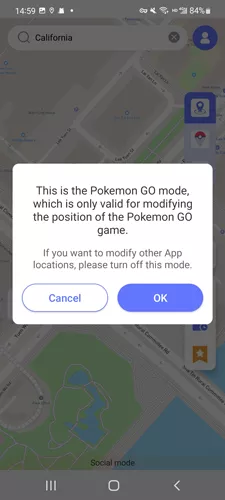
Step 2: Once active, the system will optimize the GPS connection so that your character’s movement within the game is fluid and continuous, perfectly simulating a real walk.
Step 3: Use the on-screen controls to define your movements. Unlike static modes, Game Mode allows you to interact with the Pokémon GO environment (catching, spinning stops, battling) while maintaining the stability of the simulated location.
How to use Instant Teleport
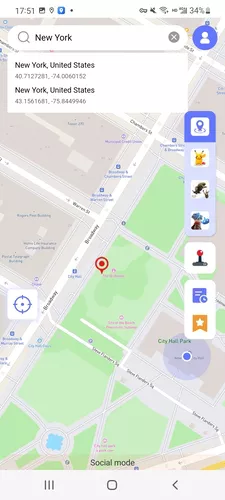
Step 1: On the main map screen, click on the search bar located at the top of the interface.
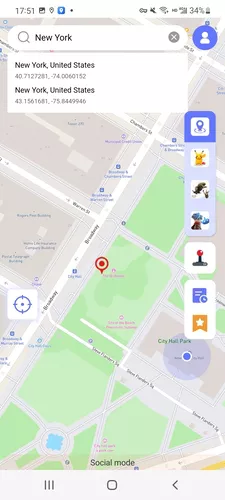
Step 2: Enter the name of the location or the geographic coordinates where we want to go and click “Search.”
Step 3: As soon as the map focuses on the destination, select the “Teleport” button.
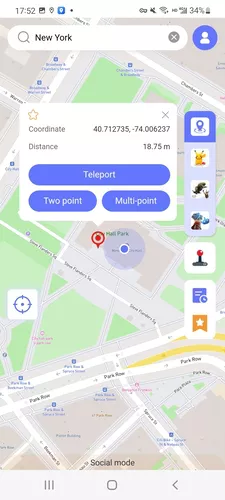
Step 4: AnyGo will automatically update your location. Observe the cooldown timer displayed on the screen; it is our guide on how long we need to wait before catching a new Pokémon or spinning a PokéStop, ensuring the safety of our account.
How to use Two-Spot Mode
Step 1: On the map, click on any point that will serve as your final destination.
Step 2: In the menu that appears, select the “two-spot” option;
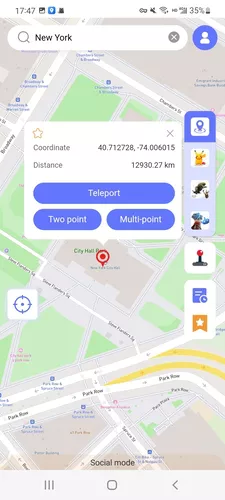
Step 3: Notice that the character will start moving towards the marked point.
Step 4: Adjust the movement speed by dragging the progress bar at the top of the screen. We can speed up to cover greater distances or slow down for something more natural.
Step 5: If we need to stop, we can click “Pause” or “End” the route at any time. If we want to check the progress inside the game, just click on the game icon in the bottom right corner.
Conclusion
After testing several options, we feel that the AnyGo location changer offers the best balance between stability and security. The gaming experience becomes much more relaxed, and the fact that it does not need a connected PC to work makes everything much more portable and practical.
It is worth remembering that, although spoofing tools are useful, we always recommend responsible use to avoid issues with Niantic. For those who want to test it, the app offers very competitive plans that are worth every penny for the peace of mind and ease they provide. And, as a gift for you, we have secured a 20% discount promotional code: just use “LABR8F” when signing up! If you want to raise the level of your gameplay without technical complications, iToolab AnyGo for Android is, without a doubt, the right choice for this year. Enjoy the hunts!
Meet Expressive Launcher — A Fresh Way to Android
The wait is over. Expressive Launcher has graduated from beta and is now stable and available to everyone on the Google Play Store. Download it today and experience a fresh way to customize your Android home screen.

Get started
