
Download Google Health 5.0 APK: The New Fitbit App!


Subscribe for Updates
If you’ve been a loyal Fitbit user for years, you may have noticed something different on your phone recently — a new icon, a fresh look, and a name you didn’t quite expect: Google Health. That’s right, one of the most beloved fitness tracking apps in the world just got a major overhaul, and it’s more than just a cosmetic change.
Google has officially rebranded the Fitbit app as the Google Health app, marking a pivotal moment in the company’s health and wellness strategy. But what does this actually mean for you? Is it just a new coat of paint, or is this a genuinely transformative shift in how we track and understand our health? Let’s break it all down.
What Is the Google Health App?
At its core, the Google Health app is the evolution of the Fitbit app — the same app millions of people have used to track their steps, sleep, heart rate, and workouts. But Google isn’t just slapping a new label on an old product. This rebrand represents a deliberate, ambitious vision: to create a centralized wellness destination that brings together fitness tracking, medical data, AI-powered coaching, and third-party integrations under one roof.
The transition began rolling out on May 19, 2026, with existing Fitbit users receiving an automatic app update. No new download required. No data lost. Just a new experience waiting to be explored.
Google acquired Fitbit back in 2021, and ever since, health enthusiasts and tech watchers have been wondering: what’s the plan? The answer, it turns out, was patient and deliberate. Rather than rushing a rebrand, Google spent years building the infrastructure, AI capabilities, and integrations needed to make the Google Health app something genuinely worth switching to.
The Fitbit brand isn’t disappearing entirely; Fitbit hardware continues to exist, but the software side of the house is now firmly under the Google Health umbrella.
New Google Health App Features
A Redesigned, More Intuitive Layout
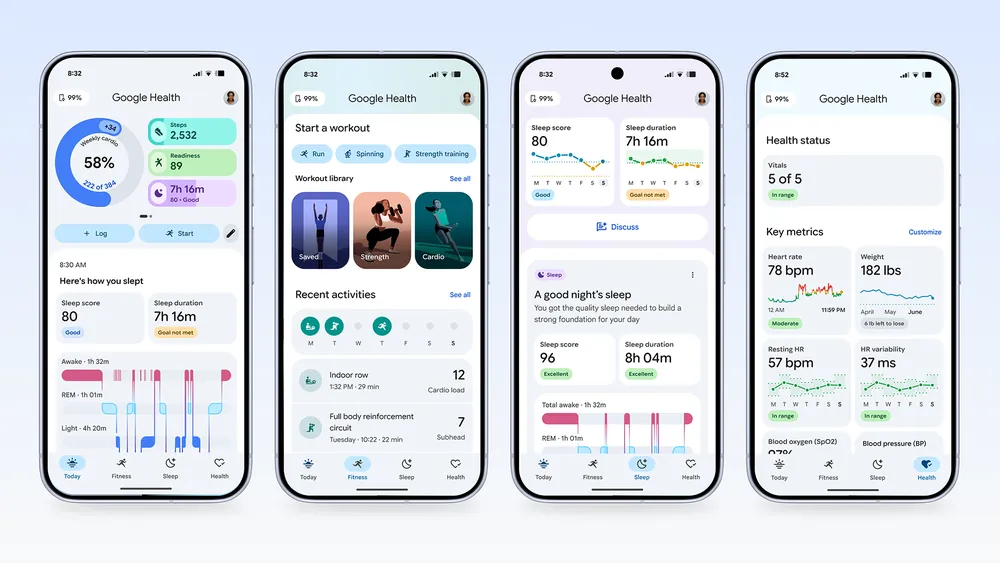
The first thing you’ll notice is the new four-tab structure:
- Today — Your daily snapshot, customizable with your most-used metrics
- Fitness — Workouts, activity tracking, and your personalized weekly plan
- Sleep — In-depth sleep analysis, consistency tracking, and coaching
- Health — Vitals, medical records, and a comprehensive view of your overall health
This tabbed approach is a meaningful improvement over the previous layout. Instead of hunting through a cluttered dashboard, you can now dive deep into any specific area of your wellbeing with just a couple of taps. It’s clean, logical, and designed with intention.
Customizable Dashboards
One of the most user-friendly additions is the ability to customize the dashboards at the top of the Today and Health tabs. Want your resting heart rate and blood oxygen front and center? Done. Prefer to lead with step count and calories? No problem. This kind of personalization makes the app feel like your health companion, not a generic tracker.
Richer Data and Trend Analysis
The Google Health app doesn’t just show you numbers — it helps you understand what those numbers mean over time. You can now sync, log, and view data across:
- Activity (steps, calories, active minutes)
- Fitness (workouts, cardio load, exercise history)
- Sleep (duration, stages, consistency)
- Vitals (heart rate, SpO2, skin temperature, stress)
- Medical records (lab results, medications, and more — US only)
The trend-spotting capabilities are particularly valuable. Health isn’t about any single day; it’s about patterns. Seeing how your sleep quality correlates with your activity levels, or how your resting heart rate changes over a month, can be genuinely eye-opening.
Unparalleled App and Device Connectivity
One of the strongest arguments for the Google Health app is its ecosystem compatibility. The app integrates with:
- Health Connect (Android’s health data standard)
- Apple Health
- Google Health APIs
- Popular third-party apps like Peloton, MyFitnessPal, and hundreds more
This means you’re not locked into the Google/Fitbit ecosystem. If you use a Peloton bike for cardio and MyFitnessPal for nutrition tracking, all of that data flows into your Google Health dashboard. That kind of interoperability is rare and genuinely useful.
Medical Records Integration (US)
This is one of the most ambitious features in the app. In the United States, users can sync their medical records directly into the Google Health app. This includes:
- Lab results
- Vital signs from clinical visits
- Medication lists
Imagine being able to see your doctor-measured blood pressure alongside your Fitbit’s daily readings, all in one timeline. The app handles this data with serious care: records are securely stored, you control how they’re used, and you can delete them at any time.
⚠️ Important note: The app is not intended to diagnose or treat medical conditions. Always consult a healthcare professional for medical advice.
Social Features and Expanded Leaderboards
Health is more fun — and more sustainable — when it’s social. Google Health has expanded its leaderboard features, allowing you and your friends to track each other’s steps and cardio load. Friendly competition remains one of the most effective motivators for staying active, and this feature leans into that psychology well.
Improved Cycle Tracking
For users who track their menstrual cycles, the Google Health app brings meaningful upgrades:
- Improved logging for smoother daily input
- Irregularity trend detection to spot patterns that might warrant medical attention
- A fully interactive calendar for a more visual, intuitive experience
These improvements show a thoughtful approach to reproductive health tracking — an area where accuracy and sensitivity really matter.
Google Health Coach Powered by Gemini
The Google Health Coach is an AI-powered coaching system built on Google’s Gemini technology.
What Does the Health Coach Do?
The Health Coach isn’t just a chatbot that answers generic health questions. It’s deeply integrated into every corner of the app:
On the Today Tab:
You receive timely, personalized insights based on your actual data. Slept poorly last night? The coach might suggest a lighter workout. Had an unusually active week? It might prompt you to prioritize recovery.
On the Fitness Tab:
The coach powers a weekly plan feature that adapts to your fitness level and goals. You can:
- Get workout suggestions tailored to your schedule and energy levels
- Create and save workouts using natural language (“Give me a 30-minute low-impact cardio session I can do at home”)
This natural language interface is a genuinely novel addition to fitness apps. Instead of navigating menus and selecting from pre-set options, you just talk to the app.
On the Sleep Tab:
The coach helps you understand your weekly sleep consistency and progress toward better rest. Rather than just showing you a sleep score, it explains why your sleep quality has changed and what you can do about it.
On the Health Tab:
Perhaps most impressively, the coach can generate summaries of your medical records — translating clinical language into plain-English explanations you can actually understand.
⚠️ Disclaimer: Google Health Coach requires a Google Health Premium subscription and is not intended for medical diagnosis or treatment. AI responses may be inaccurate — always check with your healthcare provider.
The Premium Factor
Full access to the Health Coach requires a Google Health Premium subscription (sold separately). This is the app’s monetization model, and it’s a reasonable one — the free version of the app still provides substantial value, while Premium unlocks the AI-powered features that make it truly exceptional.
What’s Still Missing (and What to Watch For)
No product launch is perfect. A few things worth noting:
- Medical records integration is US-only for now. International users are missing out on one of the most compelling features.
- Health Coach requires Premium, which adds a recurring cost. The pricing details haven’t been fully disclosed, so users will need to evaluate whether the AI features are worth the subscription.
- Gemini integration means AI limitations apply — responses can be inaccurate, and the app is explicit that it’s not a medical device.
As the app matures, it will be worth watching whether Google expands medical record integration globally and how the AI coaching evolves.
Download Google Health 5.0 APK
Get the latest Google Health 5.0 stable from the official Play Store or download the APK from below.

APK Download
Starting with Android 11, Google released apps in Split APKs (multiple APKs) format. This means the app is split into several packages, including the base and config APK files. This resolves the compatibility issue and enables the installation of apps like the Google APK on any Android device with varying DPI, screen resolution, screen size, architecture, and more.
- Google Health 5.0 stable download
- APK Mirror (rename .APKM to .ZIP)
- Then install Split APKS/XAPK/APKM/ZIP using SAI Installer (FOSS)
Meet Expressive Launcher — A Fresh Way to Android
The wait is over. Expressive Launcher has graduated from beta and is now stable and available to everyone on the Google Play Store. Download it today and experience a fresh way to customize your Android home screen.

Get started
