
Download Major Android Auto 17 Beta Update: Visual Redesign and New Features


Subscribe for Updates
The major Android Auto 17 beta update rolled out right after the Google IO 2026 concluded. It features the new Gemini 3.5 flash powering the AI in your phone and Android Auto.
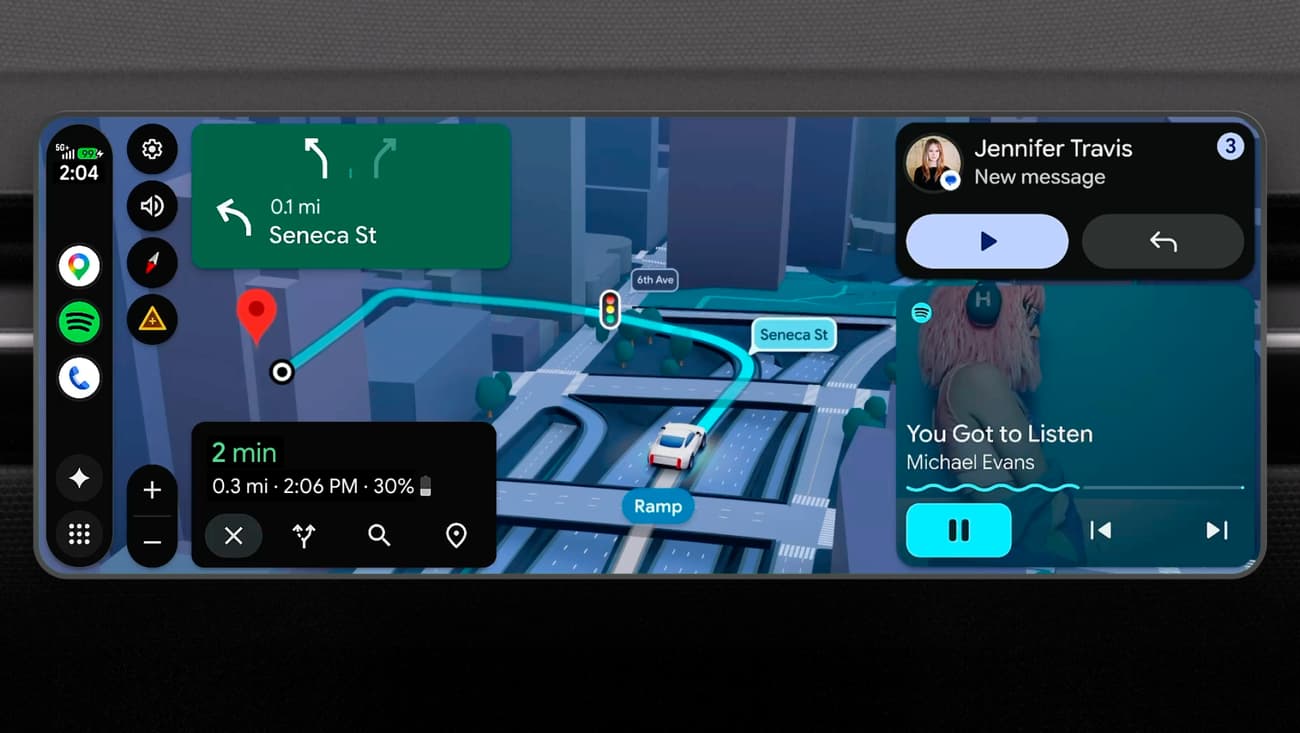
Android Auto is also about to receive a visual redesign and new features. Google showcased its new and improved Material 3 Expressive design, enhanced with Gemini Intelligence. It will possibly come to Android Auto for cars, but selected models only.
The firm announced a sweeping set of updates to Android Auto and cars with Google built-in that promise to make every journey smarter, more entertaining, and more personalized than ever before. A stunning visual overhaul and an AI-powered ordering of your dinner on the way home.
Gemini rolling out to Android Auto globally
Google’s Gemini AI is now widely available in Android Auto. Gemini is designed to help you get things done while you drive like answering questions, brainstorming, researching topics; all through voice, without distraction.
Gemini Intelligence is an upgrade to the Gemini that will come to Android Auto later this year for supported devices as well.
Context-Aware Intelligence
Gemini Intelligence understands the context. It reads across your messages, emails, and calendar to give you relevant, timely assistance. The example Google gives is telling: if a friend texts asking for your address, Magic Cue — a feature of Gemini Intelligence — will understand the question, find the right information from your personal data, and offer to reply on your behalf with a single tap.
This is AI working for you rather than waiting to be explicitly commanded. It’s a shift from reactive to proactive assistance.
Order Dinner While You Drive
Perhaps the most consumer-friendly demonstration of Gemini’s capabilities is food ordering. Android Auto is launching integration with DoorDash that lets you order food entirely by voice while driving:
“Order my usual fish tacos on DoorDash for pickup, but double the order.”
Gemini confirms the order with a single tap, your food is prepared while you’re on the road, and it’s ready when you arrive. This is the kind of seamless, real-world utility that makes AI feel genuinely valuable rather than gimmicky.
Cars with Google Built-In: Going Even Deeper
What’s coming to Android Auto?
A Fresh New Look: Android Auto’s Visual Overhaul
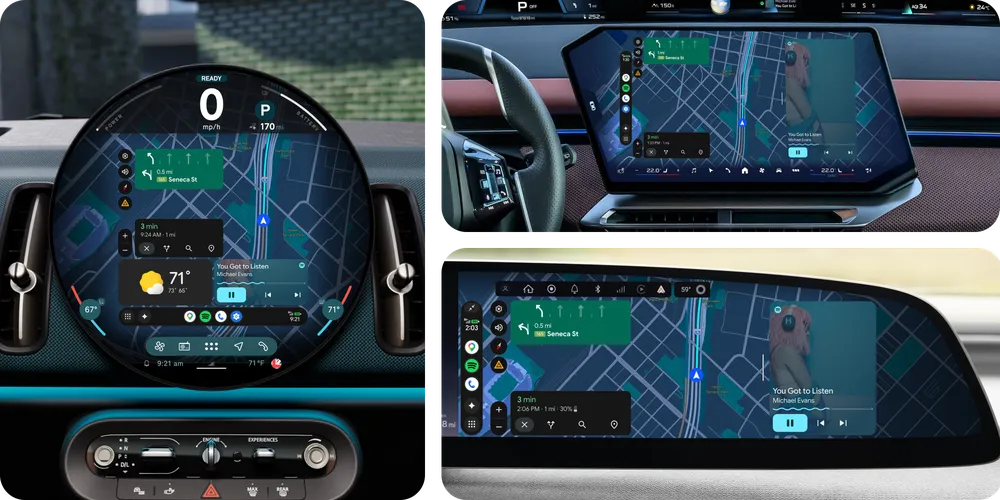
The most immediately noticeable change is the complete visual refresh of Android Auto. Google describes this as an experience “designed to feel yours uniquely.” The new interface brings Material 3 Expressive design directly from your Android phone to your car dashboard. This includes expressive fonts, fluid animations, and custom wallpapers.
Adaptive to Any Screen Shape
One of the more technically impressive aspects of this refresh is its adaptability. Car screens come in all kinds of shapes and sizes — ultrawide rectangles, circles, unconventional custom panels. The new Android Auto is built to look great on all of them. This kind of adaptive design is harder to pull off than it sounds, and it signals that Google is thinking seriously about the diversity of the automotive ecosystem.
Widgets at a Glance
The new interface also introduces widgets — small, information-rich panels that give you what you need without pulling your eyes off the road. These include:
- Shortcut contacts — reach your most-called people with a single tap
- Garage door openers — yes, really
- Weather overviews — know what’s coming before you arrive
- Custom shortcuts — personalized to your daily routines
While the widgets code is already present in the Android Auto APK, it has not been activated just yet. The key insight here is that widgets work even while you’re navigating, which means you don’t have to choose between getting directions and having quick access to other essential information.
Immersive Navigation: The Biggest Maps Update in a Decade
At the heart of this visual update is what Google is calling Immersive Navigation — described as the biggest update to Google Maps in over ten years. That’s a bold claim, but the feature set backs it up.
Your map is no longer a flat, abstracted representation of the world around you. With Immersive Navigation, it comes alive with:
- Vivid 3D views of buildings, overpasses, and terrain
- Critical road detail overlays including individual lanes, traffic lights, and stop signs
- Real-time guidance to help you make confident turns and lane changes
For anyone who has ever missed a turn because the map didn’t clearly show which lane to be in, or felt anxious about a complex highway merge, this is genuinely useful — not just visually impressive.
Live Lane Guidance in Cars with Google Built-In
The Immersive Navigation story gets even better for owners of cars with Google built-in. In eligible vehicles, the feature gains live lane guidance that uses your car’s front-facing camera to analyze the actual road in real time. It detects which lane you’re currently in and gives you live, accurate advice as you change lanes or approach exits.
Download Android Auto 17 Beta APK
Get the latest Android Auto 17.0.1621 beta from the official Play Store or download the APK from below.

APK Download
Starting with Android 11, Google released apps in Split APKs (multiple APKs) format. This means the app is split into several packages, including the base and config APK files. This resolves the compatibility issue and enables the installation of apps like the Google APK on any Android device with varying DPI, screen resolution, screen size, architecture, and more.
- Android Auto 17 beta download
- APK Download
- APK Mirror (rename .APKM to .ZIP)
- Then Install Split APKS/XAPK/APKM/ZIP using SAI Installer (FOSS)
Meet Expressive Launcher — A Fresh Way to Android
The wait is over. Expressive Launcher has graduated from beta and is now stable and available to everyone on the Google Play Store. Download it today and experience a fresh way to customize your Android home screen.

Get started
