
First Look at Google’s Material 3 Expressive Redesign with Gemini Intelligence for Android


Subscribe for Updates
At the Android Show 2026, Google pulled back the curtain on Gemini Intelligence, a sweeping transformation of Android from a traditional operating system into what the company is calling an intelligence system. It features a proactive AI system with multi-step app automation, smart autofill, the Rambler voice-to-text feature, custom widget creation, and smarter Chrome browsing. Here’s a complete breakdown of every feature, what it means for users, and when it’s coming to your device.
What Is Gemini Intelligence, Exactly?
Gemini Intelligence is Google’s new Design Language built upon the existing Material 3 Expressive design.
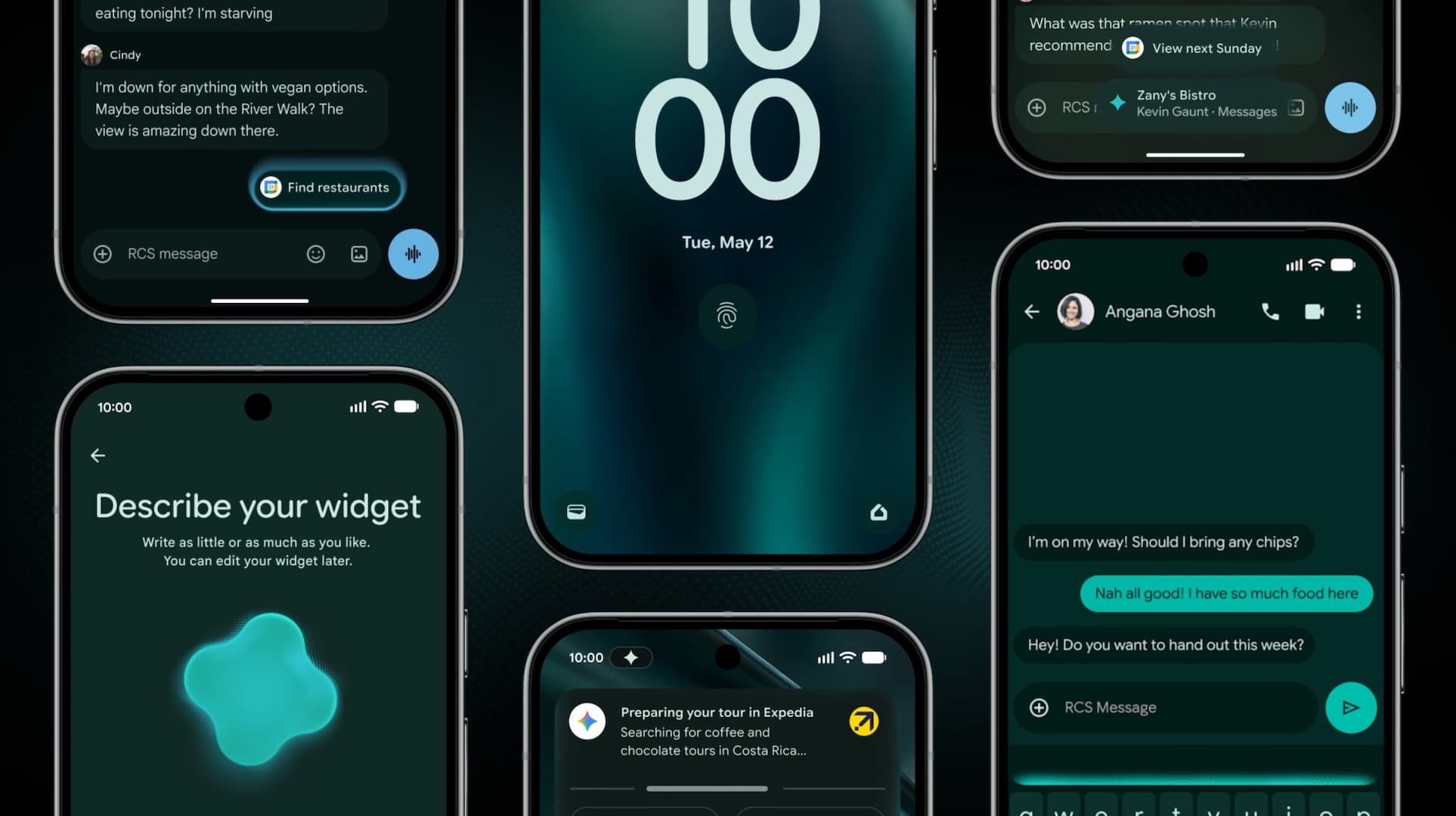
Gemini Intelligence comes with a refined visual identity built on Material 3 Expressive, but with Apple’s Liquid Glass-like UI. However, instead of glass, Google has implemented a blur effect. Take a look.
This design system prioritizes:
- Purpose-driven animation — movements that guide attention rather than distract it.
- Reduced visual noise — a cleaner interface that helps you focus.
- Functional beauty — aesthetics that serve usability, not just appearance.
The redesign acknowledges something important: as our devices become more intelligent, the interface itself needs to become calmer. When AI is doing more work in the background, the foreground should communicate clearly and quietly.
Gemini Intelligence is Google’s umbrella initiative to deeply embed its most advanced AI model — Gemini — into the core fabric of Android. Rather than AI existing as a separate app you open when you need it, Gemini Intelligence weaves proactive, context-aware assistance into your everyday device interactions.
The keyword here is proactive. Traditional AI assistants are reactive — you ask, they answer. Gemini Intelligence flips this model. Your phone begins to anticipate, automate, and act on your behalf, all while keeping you firmly in control.
Rolling out first on the Samsung Galaxy S26 and Google Pixel 10 this summer, Gemini Intelligence features will later expand to Android watches, cars, glasses, and laptops later in 2026.
Feature Deep Dive: Everything Gemini Intelligence Can Do
1. Automate Multi-Step Tasks Across Apps
This is arguably the most transformative feature in the entire announcement. For years, the dream of a truly autonomous mobile assistant has remained just that — a dream. Gemini Intelligence makes it real.
Here’s what it can do:
- Book a spin class seat — Gemini navigates the app, finds the front-row bike you prefer, and reserves it without you lifting a finger.
- Cross-app workflows — Say you receive a course syllabus in Gmail. Gemini can read it, identify the required books, and add them all to your shopping cart automatically.
- Visual context triggers actions — Long-press the power button while looking at a grocery list in your notes app, ask Gemini to build a delivery cart, and it handles the rest.
- Photo-to-action — Snap a photo of a travel brochure in a hotel lobby, ask Gemini to find a similar tour on Expedia for six people, and track the progress via live notifications.
Why this matters: We spend enormous mental energy on micro-decisions and logistics — finding the right app, copying data between them, filling in details. Gemini Intelligence eliminates this friction layer entirely. The cognitive load of managing your digital life shrinks dramatically.
Privacy and control are built in: Gemini only acts when you command it, stops the moment a task is complete, and always requires your final confirmation before any irreversible action.
2. Browse Smarter with Gemini in Chrome
Starting in late June, Android devices will gain a significantly upgraded web browsing experience through Gemini in Chrome.
Key capabilities include:
- Research assistance — Gemini can summarize complex articles, compare information across multiple web pages, and synthesize findings for you.
- Chrome Auto Browse — This takes automation to the web itself. Need to book a dentist appointment or reserve a parking spot? Chrome Auto Browse handles those mundane web tasks on your behalf.
3. Intelligent Autofill: Fill Out Forms in a Single Tap
Forms on mobile are a universal frustration. Tiny text fields, repetitive data entry, switching between apps to find reference numbers — it’s death by a thousand cuts. Google’s solution is elegantly simple: let Gemini fill them out for you.
Autofill with Google is getting a Gemini-powered upgrade:
- Uses Personal Intelligence — Gemini’s understanding of your connected apps and personal data — to populate complex forms automatically.
- Works across apps and Chrome on Android.
- Is strictly opt-in: you decide whether to connect Gemini to Autofill, and you can toggle this connection on or off at any time in settings.
The Privacy Question
Any time AI accesses personal data to perform tasks, privacy becomes paramount. Google has been explicit here: this is opt-in only, and users maintain full control. The connection between Gemini and Autofill is transparent and configurable. That said, users should still take the time to understand what data they’re sharing and review their settings periodically — good AI hygiene is becoming as important as good password hygiene.
4. Rambler: Turn Spoken Thoughts Into Polished Text
Here’s a feature that will resonate with anyone who’s ever tried to dictate a message and cringed at the transcript. We speak differently than we write. We hedge, repeat ourselves, trail off mid-thought, and pepper our speech with filler words.
Rambler bridges this gap intelligently.
How Rambler works:
- Speak naturally — no need to carefully compose your words.
- Rambler extracts the meaningful content.
- It assembles your thoughts into a concise, polished message.
- A clear indicator shows when Rambler is active. Audio is transcribed in real-time and not stored or saved.
Multilingual by Design
Rambler can seamlessly process a message that switches between English and Spanish (or countless other language combinations) and render it coherently.
This is a genuinely global feature, not an afterthought localization. For billions of multilingual speakers worldwide, this could make voice input finally feel natural rather than forced.
Use cases where Rambler shines:
- Quickly drafting emails or messages during a commute
- Capturing ideas during a brainstorm session
- Writing in your second or third language with confidence
- Sending professional messages when you’re moving fast and thinking out loud
5. Create My Widget: Build Custom Widgets with Natural Language
Android widgets have always been one of the platform’s distinguishing features over iOS. Gemini Intelligence takes them to the next level with Create My Widget — a generative UI feature that lets you describe what you want and watch it appear.
Examples of what you can build:
- Meal preppers: Ask for “three high-protein meal prep recipes every week” — a custom dashboard appears on your home screen, resizable and ready to use.
- Cyclists: Request a weather widget that shows only wind speed and rain probability — nothing else clutters the display.
- Commuters, parents, fitness enthusiasts — virtually any information need can be surfaced as a widget tailored precisely to you.
Generative UI
This is the first step in what Google calls generative UI — interfaces that are built dynamically based on your needs rather than pre-designed by engineers. The implications are enormous.
Today, you choose from a library of pre-made widgets. Tomorrow, you describe what you want and it materializes. This is analogous to the shift from searching through file folders to simply asking Google a question. The interface becomes invisible; the information becomes immediate.
Create My Widget also works on Wear OS watches, meaning your wrist display can be just as personalized as your phone’s home screen.
Meet Expressive Launcher — A Fresh Way to Android
The wait is over. Expressive Launcher has graduated from beta and is now stable and available to everyone on the Google Play Store. Download it today and experience a fresh way to customize your Android home screen.

Get started
