
Download Snapseed 4.0: Here with Completely Redesigned UI (APK)


Subscribe for Updates
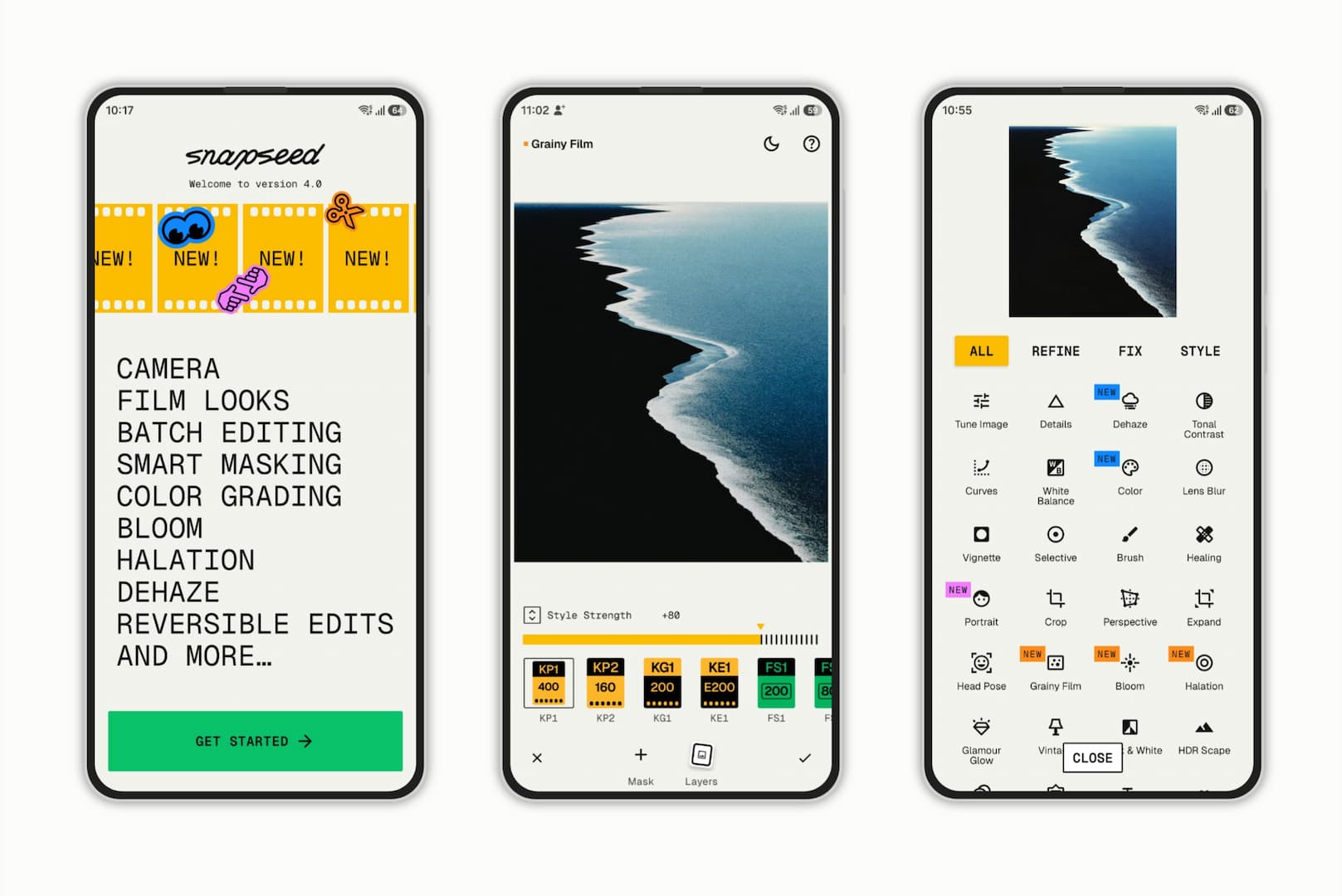
Snapseed gets its most ambitious update yet. After months of anticipation — and quite a few late nights from the development team — Google’s beloved free photo editor has received a landmark update. Snapseed 4.0 is rolling out now for both Android and iOS, and it’s not a minor refresh. This is a ground-up rethinking of how the app works, informed directly by community feedback.
Snapseed 4.0 is a significant leap, from casual to a more serious mobile editor user. It features non-destructive workflow, batch processing, and new analog-inspired effects, giving Snapseed a feature set that competes seriously with paid alternatives — all while staying free.
Snapseed, one of the most beloved free photo editors on the market, got a surprise update for the mobile photo editor app by releasing a landmark update to Snapseed after an extended period of inactivity. After almost a year, Snapseed 4.0 is now live on both platforms with
- Redesigned UI: Faster editing, a new favorites bar, and streamlined tool views.
- Core Upgrades: Non-destructive & Batch editing are here!
- Pro Features: Smart Masking, Snapseed Camera, and major updates to Portrait & Film.
- New Tools: Master color & lighting with Color HSL, Dehaze, Halation, and Bloom.
- New Film styles
- Non-destructive editing
- Batch editing, Smart masking
- Improved RAW editing
- 30+ editing tools with no ads or subscriptions
iOS had been sitting on version 3.0 since last year, so both Android and iOS users are receiving a significantly updated interface with this release. The Play Store listing has been refreshed to reflect version 4.0, and as of today, the Android update is widely available.
What’s New in Snapseed 4.0
Core Editing Overhaul
The biggest structural change is the introduction of non-destructive editing — you can now re-edit a photo at any point without losing your original edit stack. For anyone who has ever flattened a Snapseed edit and wished they could go back, this is transformative.
Other workflow improvements include:
- A new Gallery view that displays all your past edits and enables multi-image import
- Batch editing — select a photo, copy its style, and paste it across multiple images at once
- Pinnable tools — pin your most-used tools for faster access
- A revamped Toolbox designed to make discovering new tools more intuitive
- Streamlined in-tool interface — adjust parameters and switch modes with fewer taps; sliders and carousels are now visible simultaneously
The Snapseed Camera
A dedicated camera mode is now baked into the app, offering:
- Shooting directly with your saved custom looks applied in real time
- Preservation of originals so you can always return to re-edit in post
- Free film-inspired looks built right in
- Full pro controls for manual shooting
New and Improved Effects
Masking & Region-Based Editing
You can now quickly add masks to images within many effects, enabling precise, region-specific adjustments without jumping through hoops.
Updated Films Tool
The Films options have been rebuilt to more accurately emulate classic historical film stocks — a meaningful upgrade for photographers who rely on analog aesthetics.
Updated Portrait Tool
The Portrait tool has received more powerful effects, making it a stronger option for skin retouching and facial enhancement.
Unified Crop & Rotate
These two tools have been merged into a single, streamlined tool — a small but welcome quality-of-life change.
Brand New Effects
Four entirely new effects make their debut in 4.0:
| Effect | What It Does |
|---|---|
| Dehaze | Adds or removes atmospheric haze, fog, or smog |
| Color | Tunes hue, saturation, and luminance of specific colors (like an HSL panel) |
| Bloom | Makes bright lights bleed into surrounding areas to mimic film |
| Halation | Adds red halos around highlights to simulate analog film behavior |
The Color tool in particular is a long-requested feature — granular color channel control has historically required desktop software or more complex mobile apps.
What’s Specifically New for iOS (3.20 → 4.0)
Many of the above features were already available on iOS in earlier forms. The iOS-specific additions in this update are:
- Pinning as many favorite tools as desired (previously limited)
- Revamped Toolbox with faster scanning while keeping the image visible
- Streamlined interface showing carousels and sliders simultaneously
- Bloom and Halation effects (new to iOS)
- New film-inspired looks
A Word on the UI Changes
Giles-O was candid in the announcement about the elephant in the room: Snapseed has a deeply loyal user base with strong muscle memory for the old interface, and version 4.0 asks them to relearn certain workflows.
The team’s stated rationale is that the changes reduce total taps for the most common tasks and unlock capabilities like batch editing that weren’t possible before. The core Snapseed interaction philosophy — swipe-based edits, speed, precision — remains intact.
Critically, the team also confirmed:
- Snapseed remains completely free with no ads
- The team is actively listening to community feedback and has a track record of acting on it
- Faster update cycles going forward — no more multi-year gaps between major releases
- Improved RAW support is already in development
Download Snapseed 4.0 APK
Get the latest Snapseed 4.0 stable from the official Play Store or download the APK from below.

APK Download
Starting with Android 11, Google released apps in Split APKs (multiple APKs) format. This means the app is split into several packages, including the base and config APK files. This resolves the compatibility issue and enables the installation of apps like the Google APK on any Android device with varying DPI, screen resolution, screen size, architecture, and more.
- Snapseed 4.0 stable download
- APK Download
- APK Mirror (rename .APKM to .ZIP)
- Then Install Split APKS/XAPK/APKM/ZIP using SAI Installer (FOSS)
Thanks to @ShishirShelke1 for the image.
Meet Expressive Launcher — A Fresh Way to Android
The wait is over. Expressive Launcher has graduated from beta and is now stable and available to everyone on the Google Play Store. Download it today and experience a fresh way to customize your Android home screen.

Get started
