
Here’s the Upgraded Google Gemini AI for Cars


Subscribe for Updates
Gemini finally comes to cars with Google Built-In, as Google is officially rolling out the update starting today. If you have a Google built-in car, you should see that the Google Assistant has upgraded to Gemini. How to know? When you press the mic button, it should show the Gemini logo.
General Motors also recently published a press release stating that “GM brings Google Gemini to millions of vehicles on the road.”
Imagine this: you’re cruising down the highway, hands on the wheel, and instead of fumbling with your phone or barking rigid commands at an outdated voice assistant, you simply talk — naturally, freely, the way you’d chat with a knowledgeable co-pilot sitting right next to you. Gemini can understand the context and answer you. Something like how far is the next gas station or EV station?
That’s exactly the experience Google claims to be rolling out as Gemini, its advanced AI assistant, replaces Google Assistant in cars with Google built-in.

What Is “Cars with Google Built-In”?
Before diving into what’s new, a quick primer. “Cars with Google built-in” refers to vehicles that have Google’s suite of services — Google Maps, Google Play, Google Assistant, and now Gemini — embedded directly into the car’s infotainment system, without needing to plug in a phone. Since its debut in 2020, Google made a promise: your car will keep getting smarter over time, just like your smartphone does.
That promise is now being fulfilled in a big way.
Why Google Assistant is retiring
Google Assistant was genuinely useful, but it had a ceiling. It worked best with specific, memorized commands. Say it wrong, and you’d get an error. Add a little nuance — “actually, skip the slow songs” — and it would get confused.
Gemini is built differently. It’s a large language model, capable of understanding context, follow-up questions, and the kind of messy, natural way humans actually speak. Bringing that capability into the car — one of the most distraction-prone environments imaginable — is a significant leap forward in both convenience and safety.
What Gemini in Your Car Can Do
Smarter Navigation Conversations
Finding a place to stop used to mean drilling down through menus or issuing very precise commands. With Gemini, you can just describe what you want.
Picture asking: “I need to grab lunch, find some highly rated sit-down restaurants along the way. I’m not in a rush, and I’d like to eat outside.” Gemini pulls information from Google Maps and surfaces relevant options. Then you can keep the conversation going — “What’s the parking like?” or “Do they have vegetarian options?” — without starting over from scratch.
This conversational back-and-forth is a game-changer for road trips and daily commutes alike.
Real-Time Traffic Intelligence
Gemini keeps you informed about what’s happening on the road ahead. Driving past a stadium? Ask whether there’s an event tonight and whether traffic will be a problem. Spot an accident? Report it hands-free: “I see an accident in the right lane” — and Gemini will pass that information along to help other drivers through Google Maps.
Handling Messages Safely
One of the most dangerous things drivers do is glance at their phone for messages. Gemini addresses this head-on by letting you manage your texts entirely through voice.
Ask Gemini to summarize your new messages, then respond contextually: “Reply to Jane that I’m on my way and add my ETA.” Change your mind mid-sentence? No problem: “Actually, also ask her if I should pick up dessert.” Gemini handles the edit without you having to repeat yourself.
Music and Radio, Your Way
The days of needing to know a station’s exact name or frequency are over. Ask for what you feel like hearing: “Play a jazz radio station” or get hyper-specific with a streaming service like YouTube Music: “Play upbeat ’70s folk-rock for a mountain drive, but skip the slow ballads.”
Gemini Live features
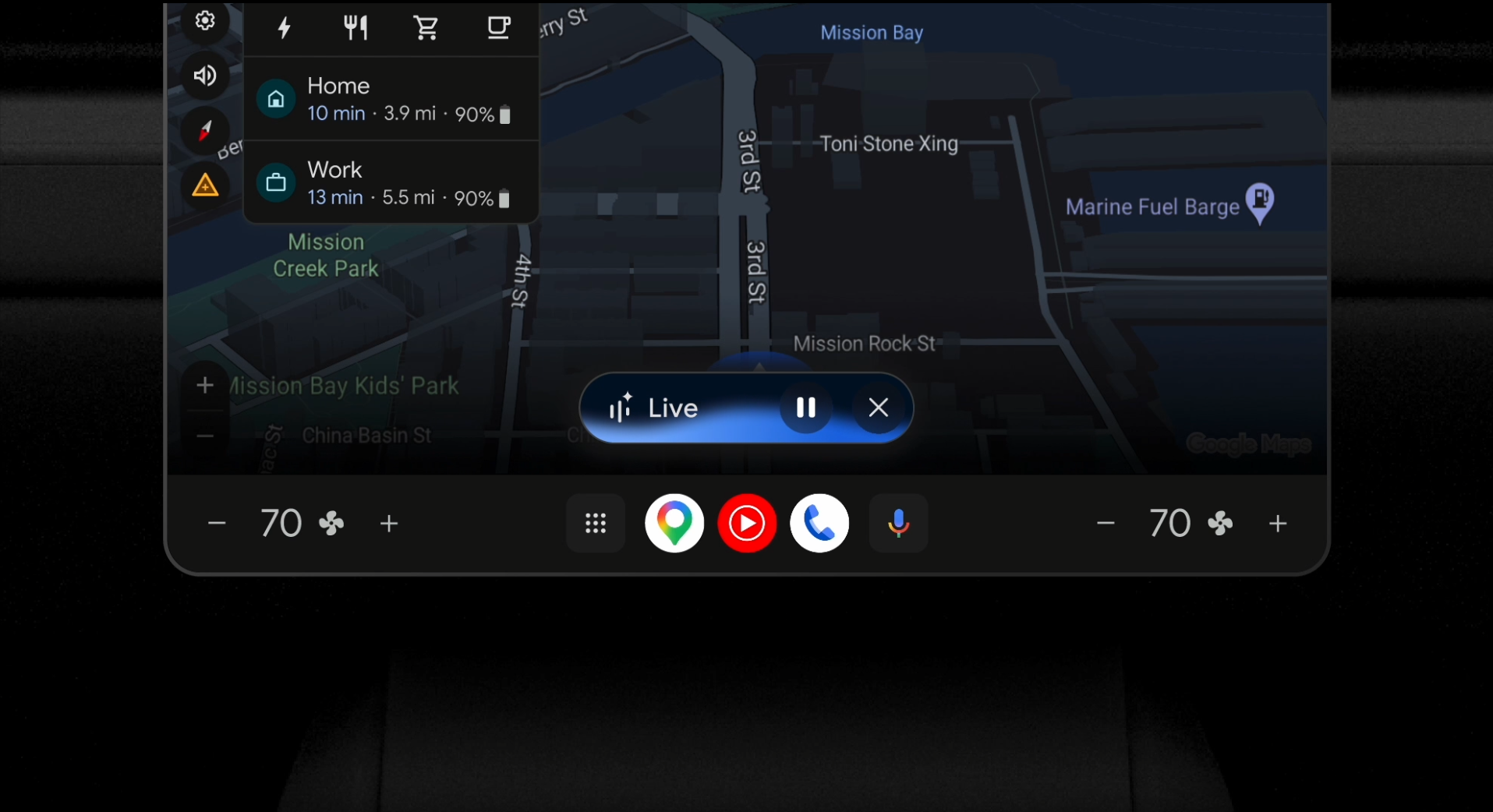
One of the most exciting additions is Gemini Live, currently in beta. It transforms driving time into productive, enriching time — the kind of thing that makes a two-hour commute feel worthwhile.
Tour guide
Heading somewhere new? Tell Gemini where you’re going and ask for history, trivia, or local lore. “I’m heading to Lake Tahoe — can you share some history and fun facts?” If something sparks your curiosity mid-answer, just interrupt: “Wait, Mark Twain had a connection to the area? Tell me that story.”
Gemini keeps up with your train of thought rather than forcing you to restart a new query.
Activity Planning on the Fly
Gemini Live is also a solid travel planner. Ask for hiking recommendations near your destination, then follow up with specifics about trail difficulty, views, or seasonal conditions. It’s like having a well-traveled friend who’s done their research sitting shotgun.
To activate Gemini Live, just tap the dedicated button on your screen or say “Hey Google, let’s talk.”
Your Car’s Owner’s Manual, Finally Accessible
This might be one of the most quietly brilliant features of the update. Modern cars are extraordinarily complex. They’re packed with features most drivers never discover simply because the owner’s manual is a 400-page PDF nobody reads.
Google has worked directly with automakers to integrate Gemini with manufacturer-provided owner’s manuals. That means you can ask questions like:
- “How should I prepare my car for an automatic car wash?”
- “My garage ceiling is low and my trunk is hitting it — how do I program the trunk to not open all the way?”
And you’ll get answers specific to your exact vehicle model. The depth of these answers will vary by brand and model, but the concept alone is a huge improvement over hunting through menus or Googling your car’s VIN number.
EV Drivers Get Dedicated Intelligence
Electric vehicle owners have a particular set of needs that Gemini is well-positioned to address.
Ask about your current battery level, estimate your battery percentage on arrival at your destination, or locate a nearby charger — all through natural conversation. And because Gemini references Google Maps data, it can also help you make the most of a charging stop: “Are there any cafes near my destination while I charge?”
For anyone navigating range anxiety on longer trips, this kind of real-time, contextual EV support is genuinely valuable.
Climate controls simplified
Adjusting your car’s climate has always been a minor but persistent annoyance — especially while driving. Gemini makes it intuitive. Instead of hunting for the right button or menu, just describe the problem: “It’s foggy and freezing in here.”
Gemini interprets your meaning and takes action — turning up the heat and activating the defroster — without you having to specify individual controls.
How to Get the Upgrade
If your vehicle supports Google built-in and you’re signed into your Google Account in the car, you should see a prompt offering the upgrade to Gemini. Once enabled, you can access it the same way you always accessed Google Assistant — say “Hey Google,” tap the microphone icon on your home screen, or press your steering wheel’s voice button.
The rollout is starting in English in the United States first, with more languages and countries to follow in the coming months.
How to get Gemini on Android Auto?
Gemini activation is server-side. The latest Android Auto 15.7 already has the has the code for Gemini. It will soon start replacing the legacy Google Assistant with Gemini AI on Android Auto starting today!
Download Android Auto 16.8 APK

APK Download
Starting with Android 11, Google released apps in Split APKs (multiple APKs) format. This means the app is split into several packages, including the base and config APK files. This resolves the compatibility issue and enables the installation of apps like the Google APK on any Android device with varying DPI, screen resolution, screen size, architecture, and more.
- Android Auto 16.8 beta download
- APK Mirror (rename .APKM to .ZIP)
- Then Install Split APKS/XAPK/APKM/ZIP using SAI Installer (FOSS)
Meet Expressive Launcher — A Fresh Way to Android
The wait is over. Expressive Launcher has graduated from beta and is now stable and available to everyone on the Google Play Store. Download it today and experience a fresh way to customize your Android home screen.

Get started
