
Samsung One UI 9 (Android 17) Beta Program Begins! Here’s How to Sign Up


Subscribe for Updates
Samsung has officially kicked off its One UI 9 beta program, and if you’re rocking a Galaxy S26 series device, you’re first in line to experience what the company is calling its most intuitive and personalized mobile experience yet. Built on top of Android 17, One UI 9 beta brings a thoughtful mix of creative tools, deeper customization, meaningful accessibility upgrades, and tightened security — all ahead of the full rollout expected later this year with upcoming Galaxy flagship devices.
Samsung officially announced One UI 9 today for the Galaxy S26 series. Let’s break down everything you need to know.
What Is One UI 9 Beta?
Every year, Samsung runs a beta program before rolling out its major One UI update to the public. This gives enthusiasts a chance to get early access to new features, while also helping Samsung collect real-world feedback before the stable release.
One UI 9 is particularly significant because it’s built on Android 17, Google’s latest major Android release. That means Galaxy S26 users aren’t just getting Samsung-level polish — they’re getting the freshest version of Android underneath it all, earlier than most Android users ever will.
The full One UI 9 experience, including advanced AI features, will debut with upcoming Galaxy flagship devices later in 2025. But the beta already gives us a compelling preview of where Samsung is heading.
What’s New in One UI 9 Beta: A Feature-by-Feature Breakdown
Samsung Notes Gets a Creative Upgrade
One of the more delightful additions in One UI 9 beta is the refresh to Samsung Notes. The app has long been a productivity staple on Galaxy devices, but now it’s becoming a more expressive creative space.
New additions include:
- Decorative tapes — think digital washi tape for annotating and decorating your notes
- A wider variety of pen line styles — giving artists and note-takers more expressive options than ever before
These might sound like small touches, but for anyone who uses Samsung Notes seriously, these additions are meaningful. Especially great for students, artists, and professionals.
Contacts Meets Creative Studio
Another smart quality-of-life improvement: the Contacts app now offers direct access to Creative Studio, Samsung’s AI-powered creative tool. This means you can create personalized profile cards for your contacts without needing to jump between apps.
It’s a small workflow improvement, but it reflects a broader design philosophy Samsung seems to be doubling down on — reducing friction by bringing tools closer to where users already are.
Note: Creative Studio requires the app to be installed, a network connection, and a Samsung Account login. Availability may vary by country and device.
Quick Panel Gets Smarter and More Flexible
The Quick Panel — that control center you pull down from the top of your screen — has been redesigned for greater user control. Here’s what’s changed:
- Brightness, sound, and media player are now independently adjustable, rather than grouped together
- More size options give users the ability to configure the panel layout to their individual preferences
This is exactly the kind of granular control power users have been asking for. Instead of a one-size-fits-all approach, Samsung is finally letting you make the Quick Panel truly yours.
Accessibility: One UI 9 Takes a Big Step Forward
Samsung has consistently improved accessibility across One UI updates, and version 9 continues that trend with some genuinely impactful changes.
Adjustable Mouse Key Speed
For users who rely on Mouse Key — which lets you control the on-screen cursor using the keyboard — One UI 9 now allows you to adjust the cursor speed. This enables smoother, more precise cursor control and is a meaningful improvement for users with motor impairments who depend on this feature.
A Unified TalkBack Experience
Previously, Galaxy devices offered TalkBack features from both Google and Samsung as separate packages, which could be confusing and redundant. One UI 9 combines these into a single, unified TalkBack package, streamlining the experience for users who rely on screen readers.
This kind of consolidation matters — it means fewer settings to configure, less confusion, and a more consistent experience overall.
Text Spotlight — Making Reading Easier
Perhaps the most immediately useful accessibility addition is Text Spotlight. This new feature displays selected text in a floating window, either larger or more clearly than it appears in context. For users with low vision or reading difficulties, this is an elegant solution that doesn’t disrupt the existing reading flow.
Security: One UI 9 Adds Smarter App Threat Detection
Alongside creativity and accessibility, Samsung is also tightening the security net in One UI 9.
When the system detects a newly installed high-risk app, One UI 9 will now:
- Warn the user about the potential threat
- Block the app from executing or installing further
- Recommend deletion through security policy updates
This proactive approach goes beyond simply flagging suspicious apps after the fact. By blocking execution and nudging users toward deletion, Samsung is making it considerably harder for malicious software to take hold — even if a user inadvertently downloads it.
Samsung’s security policy updates are designed to improve device security through service operation policy changes and may include updates to a list of potential high-risk apps based on Samsung’s internal assessment.
When and Where Can You Join the One UI 9 Beta?
The beta program is rolling out this week, starting with the Galaxy S26 series.
Samsung has confirmed that the full One UI 9 experience — including advanced AI features designed to make mobile interaction “easy and effortless” — will arrive with upcoming Galaxy flagship devices later this year.
Given Samsung’s track record, we can expect One UI 9 to eventually roll out to a wide range of Galaxy devices, from the S series to the A series and beyond. But for now, Galaxy S26 owners in the beta markets get to shape the future of One UI.
Supported Devices
- Galaxy S26
- Galaxy S26+ (implied as part of S26 series)
- Galaxy S26 Ultra (implied as part of S26 series)
Available Markets (at Launch)
- 🇩🇪 Germany
- 🇮🇳 India
- 🇰🇷 Korea
- 🇵🇱 Poland
- 🇬🇧 United Kingdom
- 🇺🇸 United States
How to Sign Up & Download One UI 9?
Galaxy S26 users in the above markets can apply to join via the Samsung Members app. Just open the app, look for the beta program enrollment section, and follow the prompts.
Keep in mind that availability may vary by region, carrier, OS version, and device model — so not every S26 user in these markets is guaranteed a spot, especially in the early stages.
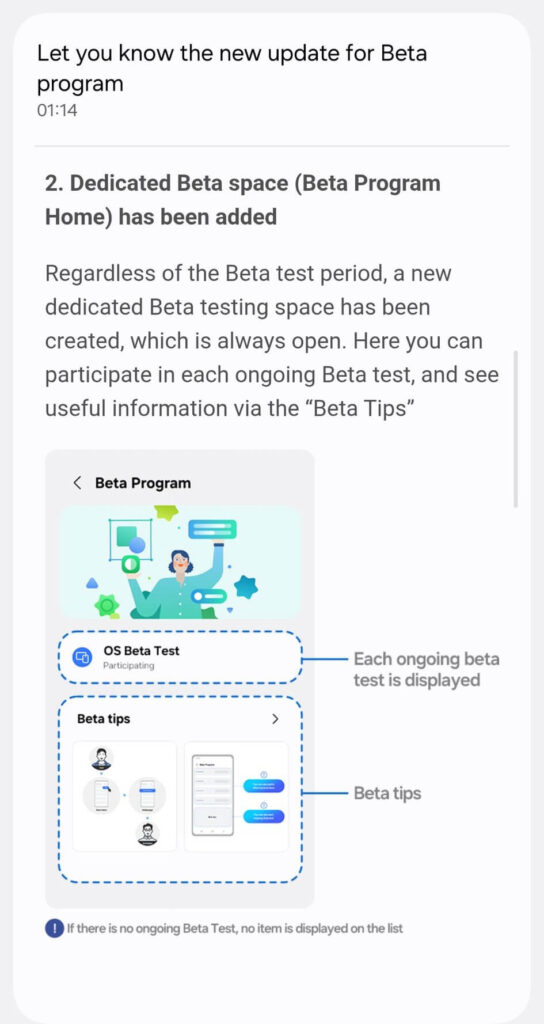
Samsung added a new Beta Program Home wherein Samsung Members can see all the details of the ongoing beta test all the time. They can join and leave the One UI beta anytime.
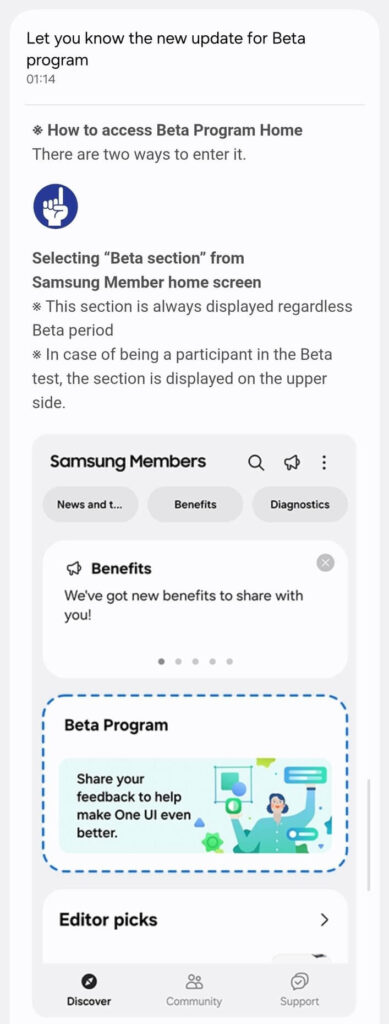
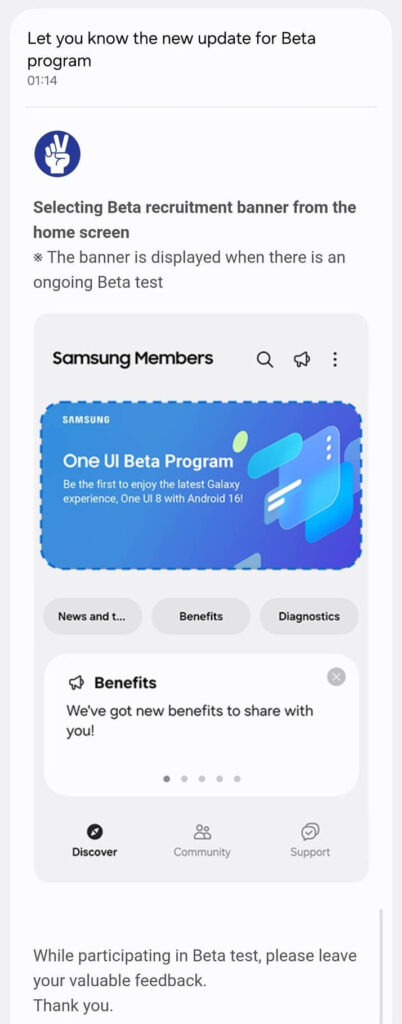
Easier joining and leaving One UI Beta Program
Today, in another leak, the details of One UI 8 Beta Program has surfaced, revealing some important details. There is a new way to join One UI Beta Program and users can exit at any moment of time.
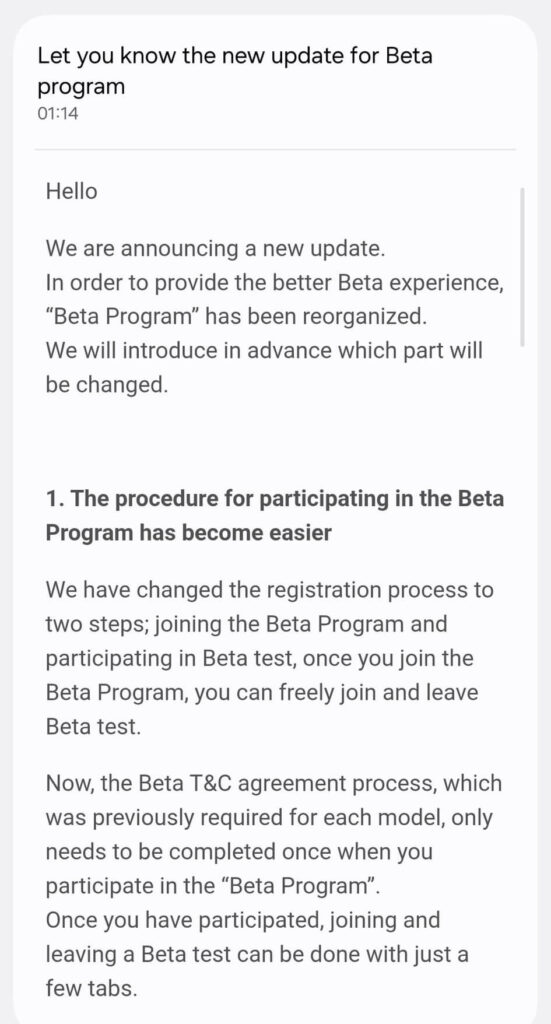
Samsung separates joining beta and participating in beta. Users can join and leave at any stage of the beta program.
Beta spaces are always open, and Beta Tips provide all the details of the particular beta version.
Here are the details:
Meet Expressive Launcher — A Fresh Way to Android
The wait is over. Expressive Launcher has graduated from beta and is now stable and available to everyone on the Google Play Store. Download it today and experience a fresh way to customize your Android home screen.

Get started
