
Download Android Auto 16.3 Stable Update + APK

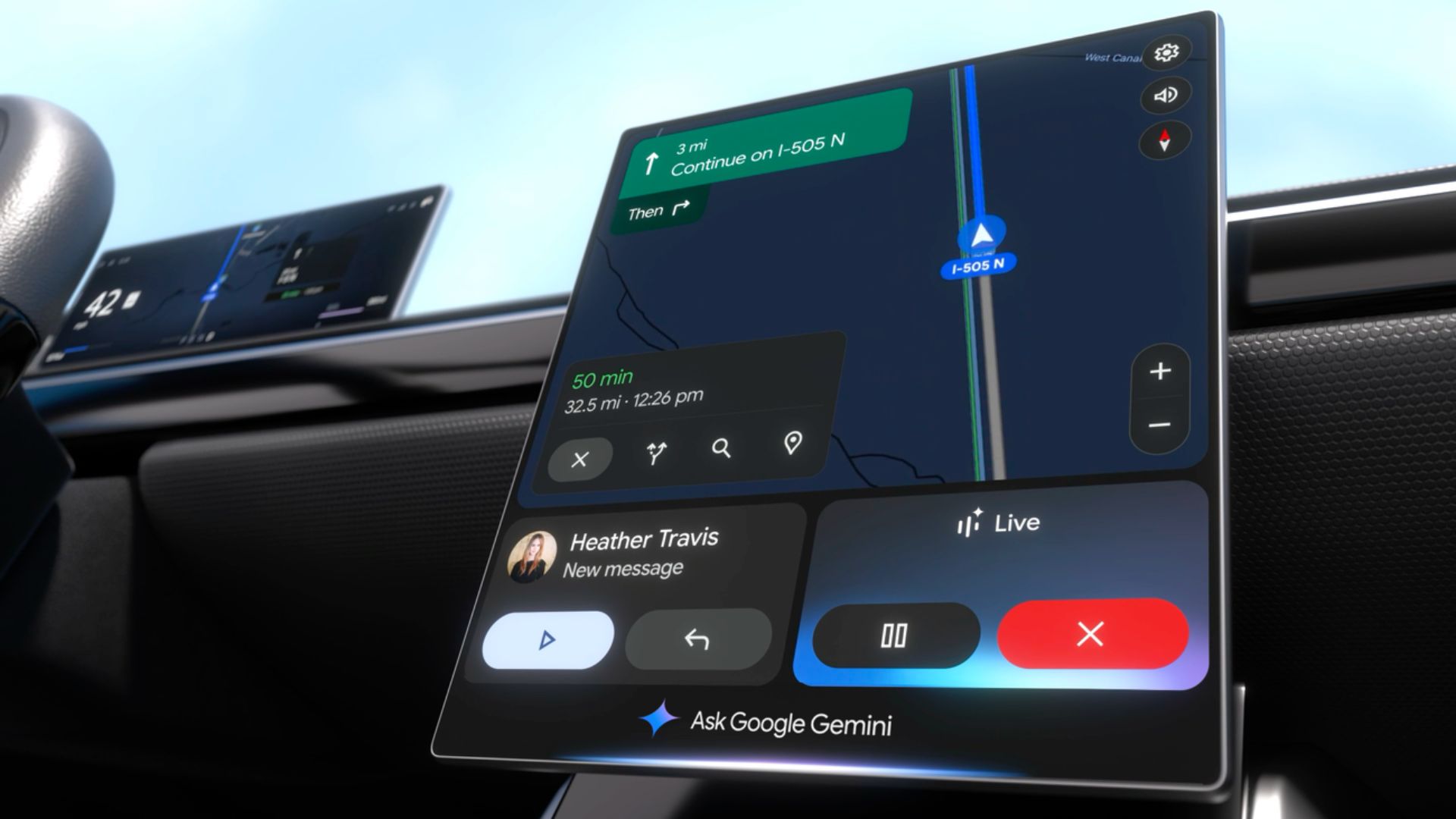
Google has officially released the Android Auto 16.3 stable update for production users. While the company rarely provides detailed changelogs for its in-car software, this version comes on the heels of major visual shifts and under-the-hood preparation for Gemini AI integration.
If you haven’t received the update via the Google Play Store yet, we have the official Android Auto 16.3 APK available for manual download below.
Google has rolled out Android Auto 16.3 to its stable channel, introducing several significant updates. The latest Android Auto update brings new features, including redesigned Home Screen widgets, alongside Gemini AI integration for select users.
Gemini now replaces the traditional Google Assistant on Android Auto, reflecting Google’s ongoing shift away from its original voice assistant. Since Gemini’s announcement, Google Assistant’s capabilities have been gradually diminished, and the company recently confirmed plans to remove the native assistant entirely from Android in favor of Gemini.
Despite this transition, Google’s implementation strategy appears inconsistent. Users report experiencing unpredictable switches between Google Assistant and Gemini AI on Android Auto. Since the activation is controlled server-side, users have no control over which assistant appears at any given time.
The rollout remains uneven across regions. While some users in the United States and Germany have successfully accessed Gemini on their vehicle head units, many others continue defaulting to Google Assistant despite running the latest Android Auto versions.
What’s New in Android Auto 16.3?
The jump to version 16.1 is primarily focused on stability and bug fixes, but early testers and power users have noted a few specific shifts:
1. The “Wavy Progress Bar” Mystery
In version 16.0, Google introduced a Pixel-inspired “wavy” progress bar for media playback (Spotify, YouTube Music). However, many users reported that this new UI broke steering wheel playback controls.
- The Update: Reports suggest that Android Auto 16.1 may have reverted this change for some users to ensure stability while Google fixes the control issues. If your progress bar returned to a straight line, this is likely why.
2. Preparation for Gemini AI
Google is in the middle of a phased rollout to replace Google Assistant with Gemini AI in the car. While version 16.1 doesn’t “unlock” Gemini for everyone (as it is a server-side switch), the backend code in this update contains the necessary hooks to support more natural, context-aware voice interactions.
3. Media Player Layout Adjustments
Following the Material 3 design philosophy, version 16.1 continues to refine the media player. The play/pause button has moved to the left side of the controls in many apps, a controversial change intended to make the interface more “driver-centric.”
4. General Bug Fixes
- Improved connection stability for wireless Android Auto adapters.
- Reduced latency in Google Maps navigation on older head units.
- Fixes for “No Signal” errors on certain Samsung and Pixel devices.
Android Auto Gemini Integration is Broken
Google’s rollout of Gemini as a replacement for Google Assistant in Android Auto was met with initial enthusiasm. Users anticipated enhanced capabilities and more sophisticated responses to complex queries. However, what started as a promising upgrade has devolved into a frustrating experience for many drivers.
When Gemini first appeared for some users approximately a month ago, the experience was positive. The AI assistant demonstrated superior ability to handle complex queries compared to Google Assistant. It had proper integration with Android Auto’s core functions. Seamless operation across essential driving features.
However, without warning or explanation, the system reverted to Google Assistant, creating mild annoyance but maintaining basic functionality. This sudden switch raised questions about the stability of Gemini’s deployment.
As of 2026, Google Assistant is completely useless as the maker has completely abandoned the native assistant in favour of Gemini AI. However, Gemini isn’t available widely on Android Auto. The newer version of Gemini also seems to be nerfed. So users are stuck on a broken assistant for Android Auto.
Text Messaging: Users cannot send text messages through voice commands, eliminating one of Android Auto’s most essential safety features for hands-free communication while driving.
Phone Calls: Voice-activated calling has ceased to work, forcing drivers to manually interact with their devices—a dangerous proposition while on the road.
What’s new in Android Auto 16.3?
Our APK Analysis series breaks down what’s included in the latest APK of the updated Android apps.
Here is the new code we found:
<public type=”drawable” name=”ic_oem_triumph_motorcycles_limited”/>
Android Auto adds integration for Triumph Motorcycles Ltd, the largest UK-owned motorcycle manufacturer.
<public type=”drawable” name=”hd_radio_logo_full” />
<public type=”drawable” name=”hd_radio_logo_long”/>
<public type=”drawable” name=”hd_radio_logo_semi”/>
<public type=”drawable” name=”hd_radio_logo_tintable_text”/>
The radio logo has been upgraded for your cars!
<public type=”drawable” name=”front_defrost” id=”0x7f08027a” /> <public type=”drawable” name=”rear_defrost” id=”0x7f080b3e” />
Android Auto adds functionality for front and rear defrost. Possibly through the car head unit or Gemini AI in supported vehicles.
<public type=”id” name=”settingslib_expressive_footer_container” id=”0x7f0b0898″ /> <public type=”id” name=”settingslib_footer_image” id=”0x7f0b089a” /> <public type=”id” name=”settingslib_footer_text” id=”0x7f0b089b” />
The footer container gets Material 3 Expressive design.
<public type=”drawable” name=”cielo_dashboard_landscape”/>
<public type=”drawable” name=”cielo_dashboard_lhd”/>
<public type=”drawable” name=”cielo_dashboard_rhd”/>
The dashboard LHD and RHD suggest Android Auto is adjusting to left-hand driving as well as right-hand driving and will change features accordingly. While this may be specific to a Cielo dashboard, we may see adoption in more cars.
<public type=”string” name=”settings_customize_add_gemini_shortcut_activity_title”/>
<public type=”string” name=”settings_customize_add_gemini_shortcut_query_helper_text”/>
<public type=”string” name=”settings_customize_add_gemini_shortcut_query_hint”/>
The first shortcut available for activation is Google Gemini. However, it may only show up on Google Pixel devices for now.
Apart from the custom widgets, Google is making it easier for Android Auto to reconnect and now shows a notification if your phone is wirelessly connected. A WiFi notification text will be displayed for wireless reconnect or wireless turn-on.
This will make it easier to diagnose connectivity issues on Android Auto. Here is the code we found:
<public type=”string” name=”android_auto_reconnect_wifi_action_text”/>
<public type=”string” name=”wireless_reconnect_wifi_notification_text”/>
<public type=”string” name=”wireless_turn_on_wifi_notification_title”/>
Another useful feature is getting more information on Android Auto. Instead of just time and body, you will now get time, sender, and body.
Download Android Auto 16.3 APK
Get the latest Android Auto 16.1.660404 stable from the official Play Store or download the APK from below.


APK Download
Starting with Android 11, Google released apps in Split APKs (multiple APKs) format. This means the app is split into several packages, including the base and config APK files. This resolves the compatibility issue and enables the installation of apps like the Google APK on any Android device with varying DPI, screen resolution, screen size, architecture, and more.
- Android Auto 16 stable download
- APK Download
- APK Server
- APK Mirror (rename .APKM to .ZIP)
- Then Install Split APKS/XAPK/APKM/ZIP using SAI Installer (FOSS)
Is it worth updating?
Yes. While there are no massive visual overhauls, the stability fixes are in the 16.x branch is critical for users experiencing disconnects or lag in Google Maps. If you are a fan of the new Material 3 design language, this update ensures your car’s interface stays in sync with your phone’s OS.
