
Download Oxygen OS 16 for OnePlus Devices | Full Changelog and Feature List


Subscribe for Updates
OnePlus launches OxygenOS 16 featuring deep AI integration, enhanced cross-device connectivity, and a refined user experience. Built on the foundation of speed and smoothness that OnePlus is known for, this latest iteration introduces intelligent features designed to seamlessly integrate into users’ daily digital lives while maintaining the brand’s commitment to a burdenless experience.
OxygenOS 16 comes with Android 16, AI-powered Plus Mind, Private Computing Cloud security, enhanced cross-device connectivity, and creative tools. Discover what’s new in this comprehensive overview of features, rollout schedule, and how intelligent features integrate into your daily digital life.
Here’s a quick rundown of top Oxygen OS 16 features:
- Light and shadow design
- OnePlus AI gets better with Plus Mind gets Gemini integration
- AI productivity for more Smartworks
- AI PlayLab
- Parallel Processing 2.0
- Fast and smooth Flow motion
- Seamless cross eco connectivity with Mac and Windows PC
- New Lockscreen Customization with Flux Themes 2.0
- New Homescreen Freedom with icons shapes
- Split Control Centre customizations
- Dark mode icons
- Enhanced Security
- Improved Fluid Cloud
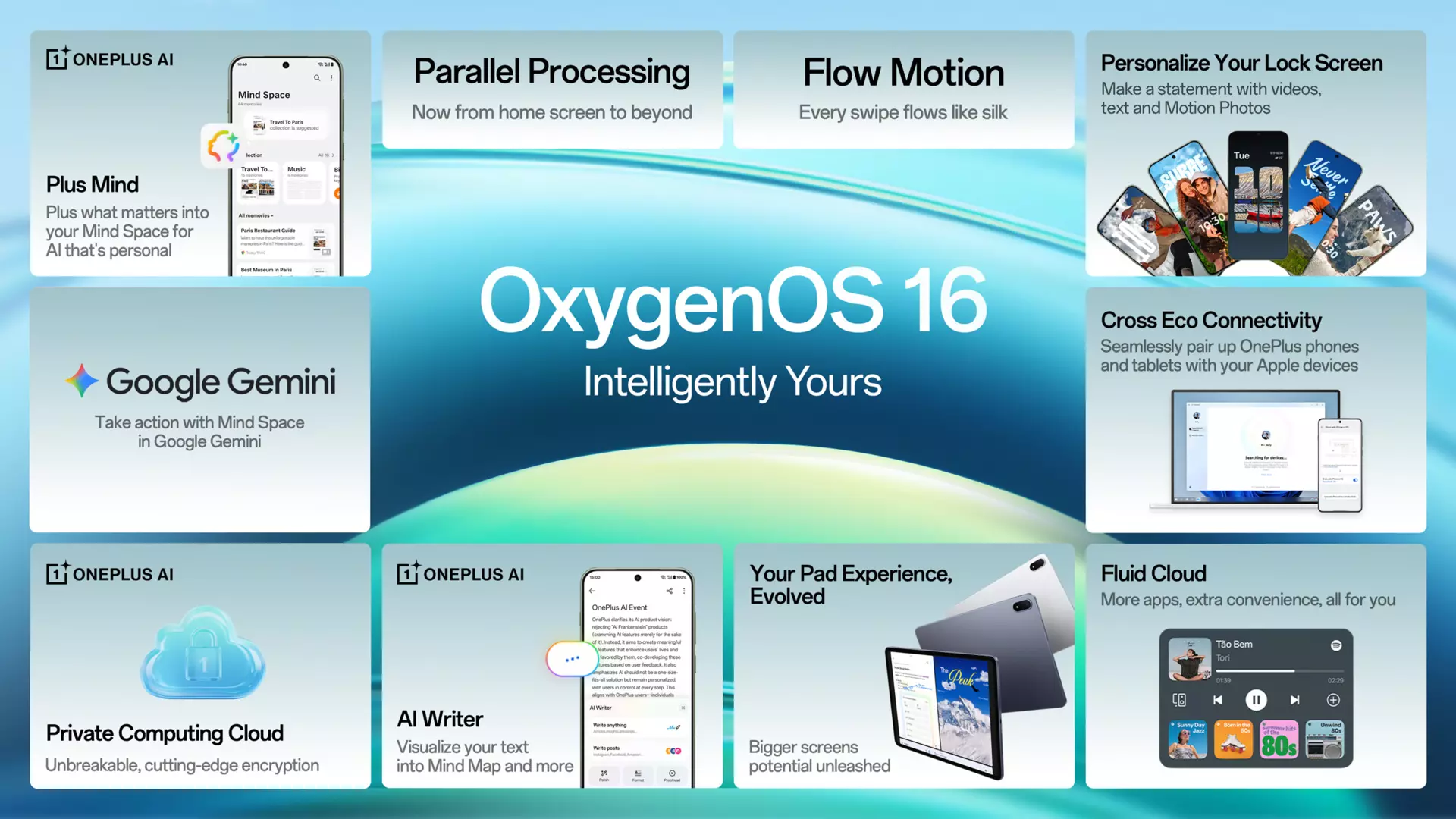
What’s New in Oxygen OS16?
The headline feature of OxygenOS 16 is undoubtedly the comprehensive AI integration, headlined by Plus Mind—a feature OnePlus is positioning as your “second brain.”
Plus Mind: Intelligent Information Management
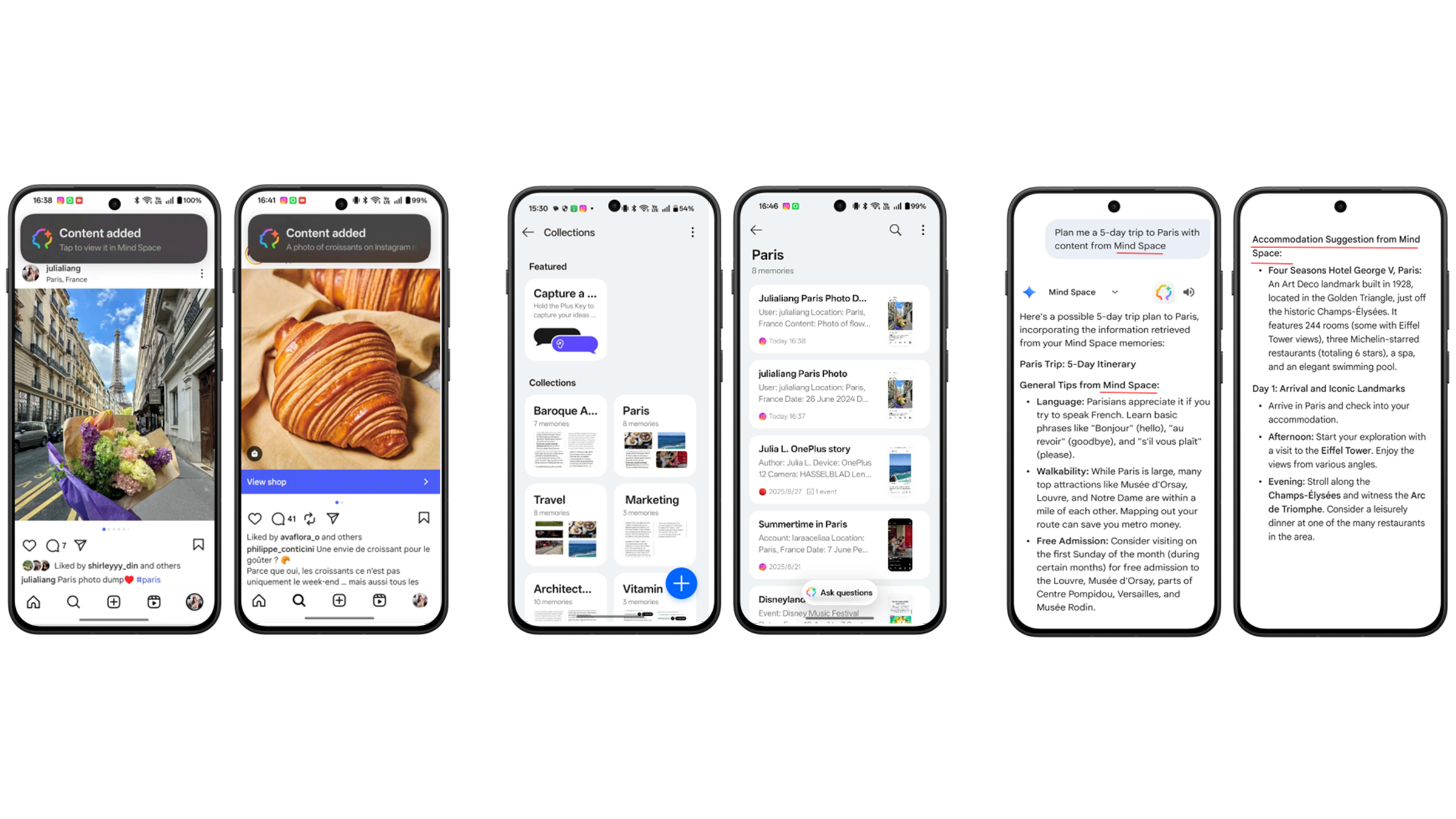
The Voice Note functionality within Plus Mind solves OnePlus’s modern workflow challenges. By long-pressing the Plus Key, users can instantly record 60-second voice notes that are automatically processed with AI-generated titles, full transcripts with timestamps, and intelligent tag suggestions. The system even identifies potential tasks and links notes to related content already stored in Mind Space.
What sets Plus Mind apart is its Smart Collections feature, which automatically groups similar items together. Save a recipe, restaurant review, and cooking video, and the system intelligently organizes them into a unified collection—eliminating the tedious manual sorting that plagues most note-taking applications.
The integration with Google Gemini elevates Plus Mind from a storage solution to an intelligent assistant. Users can vocally search their Mind Space content and, more impressively, ask Gemini to answer questions using the context of saved information. Planning a trip becomes exponentially easier when you can ask Gemini to “Plan me a 5-day trip to Tokyo with content from Mind Space,” and receive responses that pull from your saved flight details and hotel reservations.
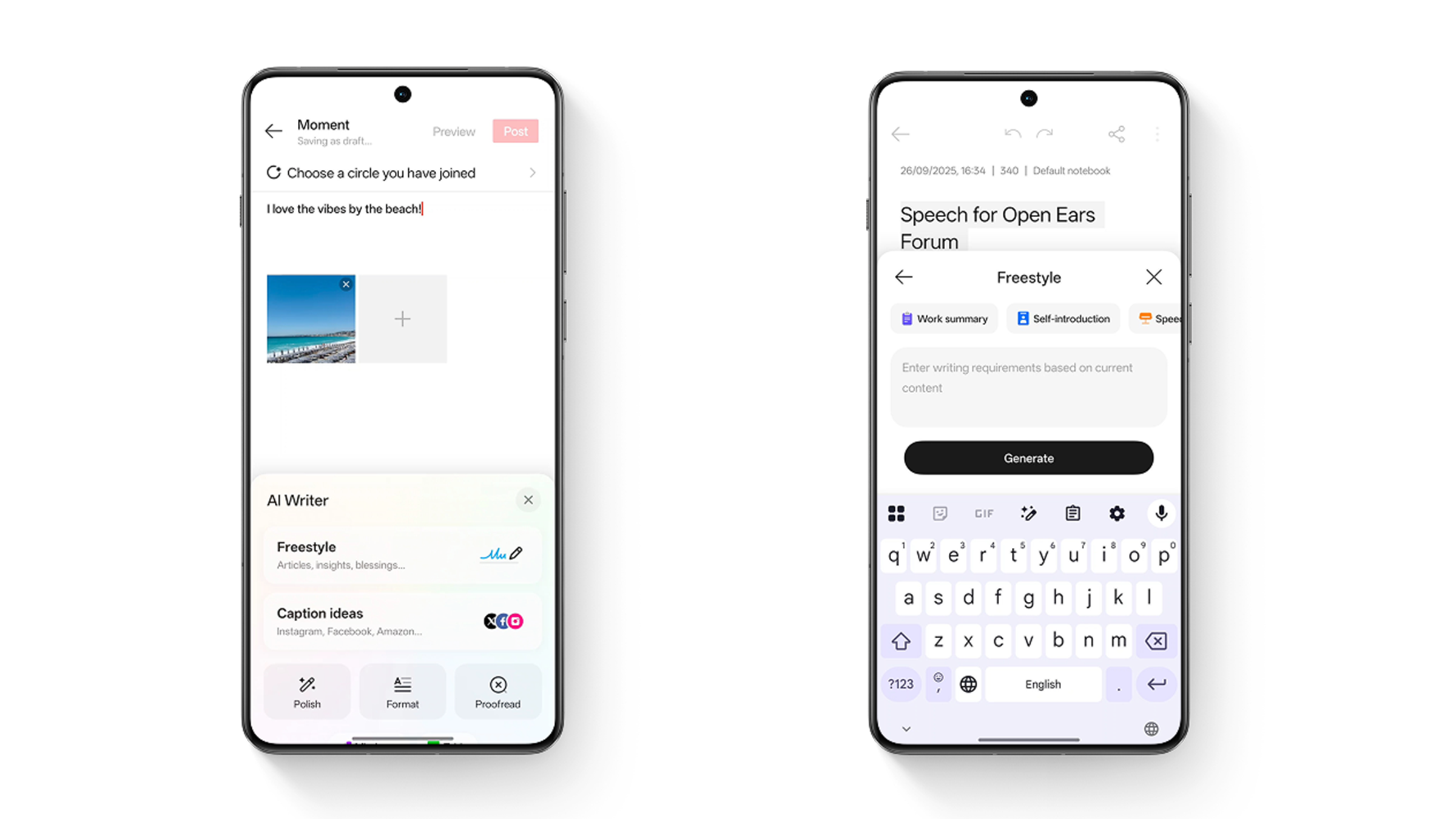
AI Writer and Recorder: Productivity Amplified
OxygenOS 16’s AI Writer addresses two common pain points: social media content creation and information visualization. The Smart Captions feature generates platform-specific captions for Instagram, X, and other social networks, while the Text to Mind Map and Table conversion tools transform written outlines into visual formats—perfect for brainstorming and project planning.
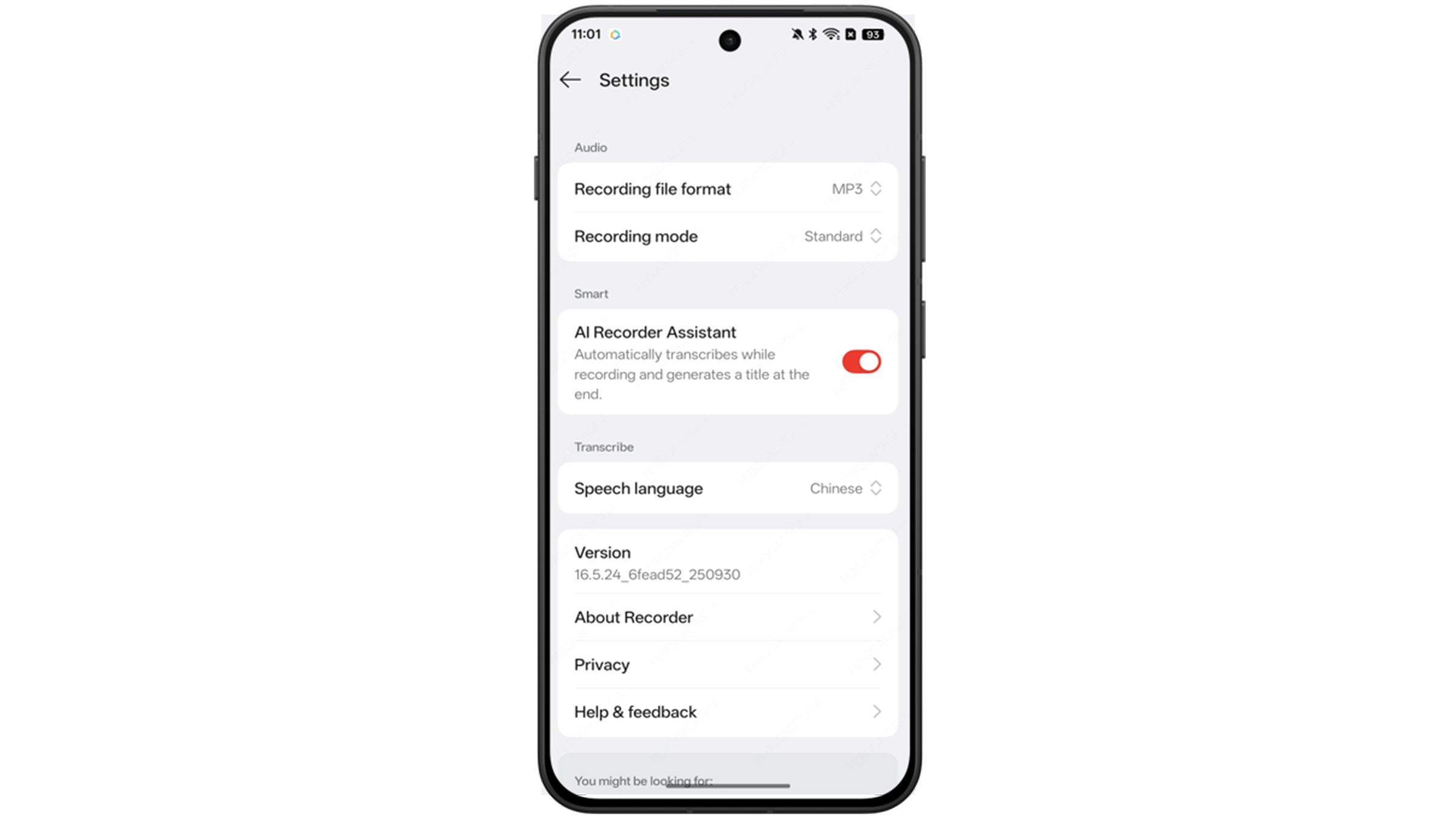
The AI Recorder Assistant brings enterprise-level meeting tools to everyday users. Automatic title generation and concise summaries make it easy to grasp key takeaways from lengthy recordings, while AI noise cancellation ensures recordings from busy cafés or crowded spaces remain clear and focused on human voices.
New OxygenOS 16 Features
OxygenOS 16 continues OnePlus’s push toward a unified multi-device experience with Phone Screen Cast to PC. This feature allows users to mirror and control their phone screen on their computer via USB or cloud connection, facilitating seamless presentations and comfortable app management with traditional input devices.
This cross-platform functionality represents OnePlus’s recognition that modern users don’t live on a single device—they flow between phone, tablet, and computer throughout their day, and their operating system should accommodate that reality.
Performance: Fast and Smooth
True to the brand’s identity, OxygenOS 16 emphasizes performance optimization. The Heavy-Duty Stability improvements come from rigorous testing under extreme conditions: rapid app switching, simultaneous gaming and video calls, and extended social media scrolling sessions.
The introduction of Seamless Parallel Animations creates a more cohesive experience where every interaction—from app switching to notification shade gestures—flows naturally with system-wide fluid animations. These aren’t merely aesthetic improvements; they contribute to the perception of responsiveness that defines premium software experiences.
Creative Tools: Empowering Mobile Photography and Videography
AI Portrait Glow: Solving Difficult Lighting Scenarios
Portrait photography on smartphones has always struggled with challenging lighting conditions. AI Portrait Glow intelligently addresses “dead light” caused by backlight, top light, or low light situations, ensuring naturally lit, flattering portraits regardless of environmental conditions.
Motion Photo Enhancements
OxygenOS 16 expands Motion Photo capabilities with two significant additions. The Collage feature creates quality-preserving compositions where subjects can dynamically break through grid boundaries for artistic effect. The Slow-mo function transforms Motion Photos into cinematic moments by allowing users to apply slow-motion effects to specific segments during editing.
All-Round Video Editor
The built-in video editor brings comprehensive editing capabilities directly into OxygenOS, including trimming, splitting, merging, speed adjustment, background music addition, and conversion between video and Motion Photo formats. This eliminates the need for third-party apps for most content creation tasks.
Personalization Reimagined: Flux Theme and Beyond
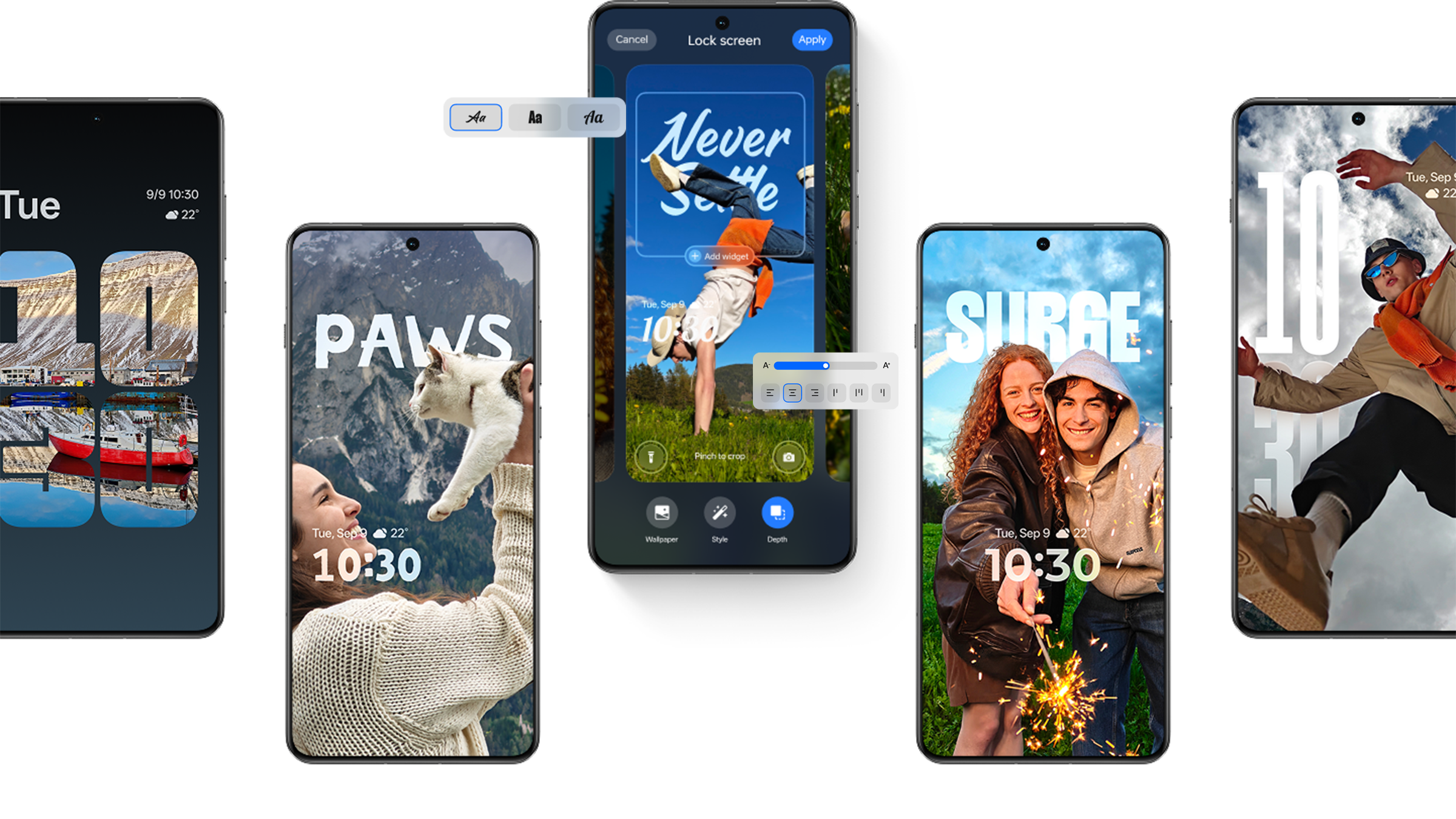
The Flux Theme introduces dynamic lock screens featuring Motion Photos or videos with deep-depth effects. Full lock screen text customization includes various fonts, sizes, and colors, with AI-suggested captions based on wallpaper content.
Home screen improvements include additional icon and widget sizes, category-sorted app drawers, and expanded Fluid Cloud support for food delivery, travel navigation, live sports scores, media players, and timers—providing more at-a-glance information without opening apps.
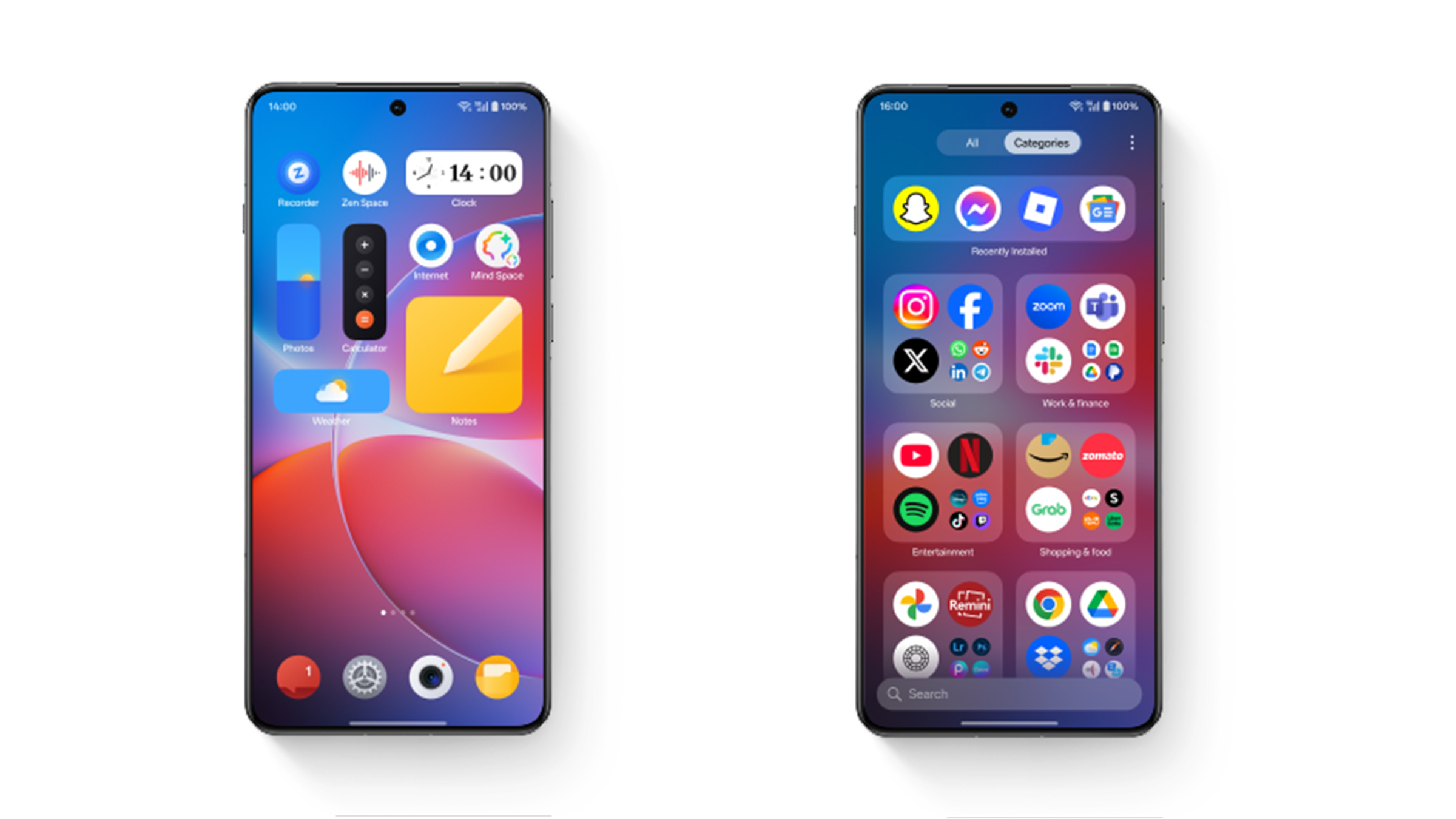
The Airy Vibes aesthetic brings softer, more harmonious visuals through increased use of rounded corners and Gaussian blur effects system-wide. The Optical Lights effect, now featured in Compass and Calculator apps, adds tactile and beautiful visual feedback.
Security First: Private Computing Cloud Architecture
OnePlus positions security as foundational rather than supplementary, introducing an industry-leading architecture that protects information based on sensitivity and processing requirements.
Private Computing Cloud: Hardware-Level Protection
The Android-first Private Computing Cloud with CPU and GPU Protection represents a significant security advancement. This architecture intelligently routes data based on sensitivity and processing demands, with highly sensitive information processed in a secure environment featuring hardware-level security, GPU and CPU protection, and safeguarded data transfer through the Trusted Execution Environment.
The critical guarantee: even OnePlus cannot access user data or results processed in this environment. This represents a meaningful commitment to privacy in an era of increasing concern about data collection.
Plus Lock: Advanced Device Protection
For devices shipping with OxygenOS 16 pre-installed, Plus Lock introduces two powerful security features. Call to Lock allows users who’ve lost their phone to remotely lock it by calling customer service, rendering the device virtually unusable through comprehensive hardware key, data port, and system function restrictions.
SIM Lock automatically locks the phone when the SIM card is removed without authorization, providing immediate theft protection. Both features are initially available in India, with broader rollout likely dependent on regional requirements and customer service infrastructure.
Rollout Timeline: When Your Device Gets Updated
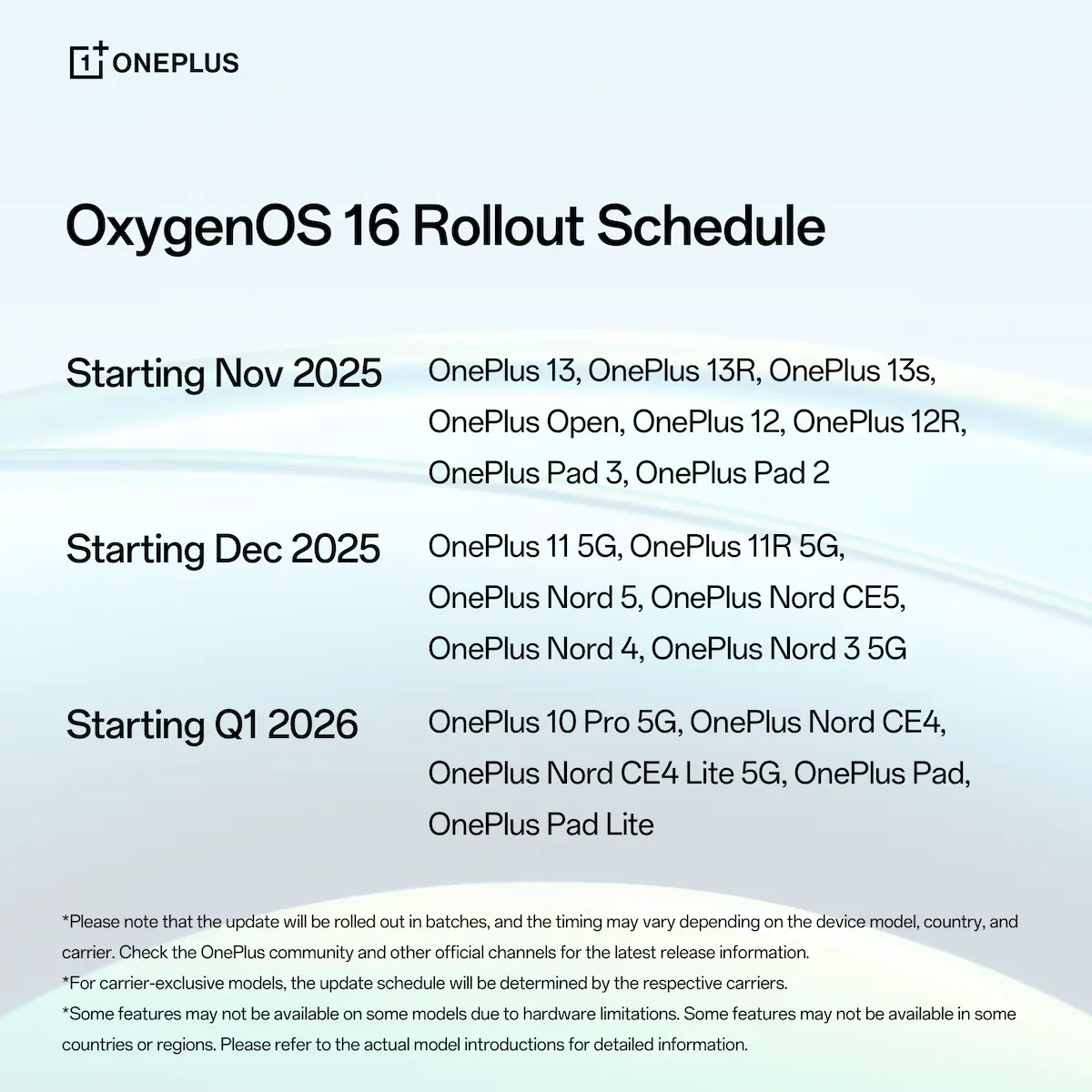
OnePlus has committed to a phased rollout schedule for OxygenOS 16 across their device lineup. The OnePlus 13 and 13R received open beta access immediately following the announcement, with stable releases planned for November 2025.
The update schedule extends support to older devices including the OnePlus 10 Pro—a pleasant surprise for users of the 2022 flagship. However, the rollout timeline varies by region, and updates release in phases to ensure stability and quality.
Community Response
The OnePlus Community response reveals both excitement and concerns. Users appreciate the feature additions but express frustration about feature fragmentation. The OnePlus dialer, for instance, is exclusive to devices shipping with OxygenOS 16, disappointing OnePlus 12 and 13R owners who want this feature.
Privacy-conscious users have questioned Mind Space’s data handling, particularly regarding AI cloud computing claims versus on-device processing assurances. OnePlus’s Private Computing Cloud architecture appears designed to address these concerns, though education about how the system works will be crucial for user confidence.
Battery life remains a persistent concern, with users reporting increased drain on OxygenOS 15, hoping OxygenOS 16 addresses these issues. The stability improvements and heavy-duty testing suggest OnePlus is prioritizing system efficiency alongside new features.
The Verdict
OxygenOS 16 represents thoughtful evolution rather than revolutionary change. The AI integrations feel practical rather than gimmicky, addressing real workflow challenges rather than simply adding “AI” buzzwords to marketing materials.
The cross-device functionality acknowledges modern multi-device usage patterns, while performance optimizations maintain OnePlus’s core identity. Security enhancements demonstrate maturity in addressing growing privacy concerns without sacrificing functionality.
However, feature fragmentation—particularly regarding the OnePlus dialer and Plus Mind exclusivity—risks alienating existing users who feel their recent flagship purchases are being treated as second-tier devices. OnePlus must balance the business reality of differentiating new products with maintaining goodwill among their enthusiast community.
Download Oxygen OS 16 for OnePlus devices
The download options for Oxygen OS 16 open beta version based on Android 15 will be available on October 30, 2025. Stay tuned and checkout the schedule.
How to Install Oxygen OS 16?
Here is the Upgrade guide via Local OTA update
Note: This method may erase all the contents of the phone, please be sure to backup first. Some applications may be lost after upgrading or downgrading.
- Download the latest ROM zip package from above.
- Copy the ROM rollback package to the phone storage.
- Go to Settings -> About device -> Version -> Click Build number 7 times and enter the password, now you are in the developer mode.
- Go back to Settings -> About device -> Up to date -> Click the top right button -> Local install -> Click on the corresponding upgrade package -> Extract -> Upgrade -> System upgrade completed to 100%.
- After the update is complete, click Restart.
- Upgrade successful.
Stay tuned for more!
Meet Expressive Launcher — A Fresh Way to Android
We're looking for beta testers to help shape the next great Android launcher. Try it early, share your feedback, and be part of something new.

How to join the beta
