
Google’s March 2026 Pixel Drop Brings Desktop Mode, Custom Icons, New Circle to Search!

The March 2026 Pixel Drop has arrived, making your devices even more helpful through automatic software updates that deliver new and upgraded features to your phone, tablet, earbuds, and watch. From smarter AI-powered tools powered by Gemini to enhanced accessibility options and a surprise SpongeBob SquarePants collab, this is one of the most feature-packed Pixel Drops in recent memory.
These updates are rolling out in phases starting today, depending on your carrier and device. To access them, ensure your Android version and apps are up to date, then look for a notification from the My Pixel app to explore how your device has evolved.
Here’s everything you need to know about Google’s March 2026 Pixel Drop, broken down by feature, with full details on device and regional availability.
Summary: Is the March 2026 Pixel Drop Worth the Hype?
In short: yes. The March 2026 Pixel Drop delivers a remarkably wide-ranging set of updates that improve everything from day-to-day convenience to accessibility, security, creativity, and productivity. Here’s a quick recap of the headline features:
- Circle to Search now lets you shop entire outfits and virtually try on clothes
- At a Glance adds commute alerts, live scores, and market trends to your lock screen
- Gemini becomes more agentic, handling tasks like grocery planning and ride booking
- Desktop Mode turns your Pixel phone into a multi-window productivity hub via USB-C
- Guided Frame goes offline and expands to more languages for improved accessibility
- Scam Detection reaches France, Italy, Spain, Mexico, Germany, and Japan
- SpongeBob theme packs bring fun, limited-time customization (until May 1, 2026)
Google’s March 2026 Pixel Drop: Every New Feature Coming to Your Pixel Phone, Watch, and Tablet
Find the Look — Full Outfit Shopping from a Single Circle
Shopping inspiration can strike anywhere — on social media, in a YouTube video, or even a photo you saved months ago. With the new “Find the Look” feature in Circle to Search, you can circle an entire outfit and Google will identify and surface every individual piece — tops, bottoms, shoes, accessories, and everything in between. Gone are the days of trying to hunt down each item one by one. One circle does it all.
This is a significant leap forward for visual shopping and style discovery, and for fashion lovers or anyone who regularly draws inspiration from online content, it’s a genuinely transformative quality-of-life improvement.
Availability: Requires a Pixel 10 or newer. Available where AI Overviews or AI Mode is supported. Not available in France.
Try It On — Virtual Fitting Room Right in Circle to Search
The second Circle to Search upgrade is arguably even more exciting: virtual try-on. Spot a jacket you love while scrolling your feed? Circle to Search can now help you visualize how it might look on you before you buy.
Here’s how it works: use Circle to Search to find similar styles to what you’re looking at, tap a product you’re interested in, and select the “Try It On” button. From there, you can either upload a photo of yourself or choose from a selection of models to see how the item looks in seconds. It’s a smart, friction-free way to reduce buyer’s remorse and shop with more confidence.
Availability: US, Canada, UK, Japan, Australia, and India. Users must be 18+. Requires Pixel 10 or newer.
Now Playing App — Your Personal Music Discovery History
Music lovers, this one’s for you. The Now Playing app (downloadable from the Google Play Store) keeps a running history of all the songs that have played around you throughout the day. Previously, Now Playing would identify songs passively but the history was easy to lose track of. The new dedicated app brings all your discoveries and favorites together in one place, and tapping any song opens it directly in your preferred music streaming app.
Whether you heard something great at a café, a shop, or a friend’s place, you’ll never forget a song again.
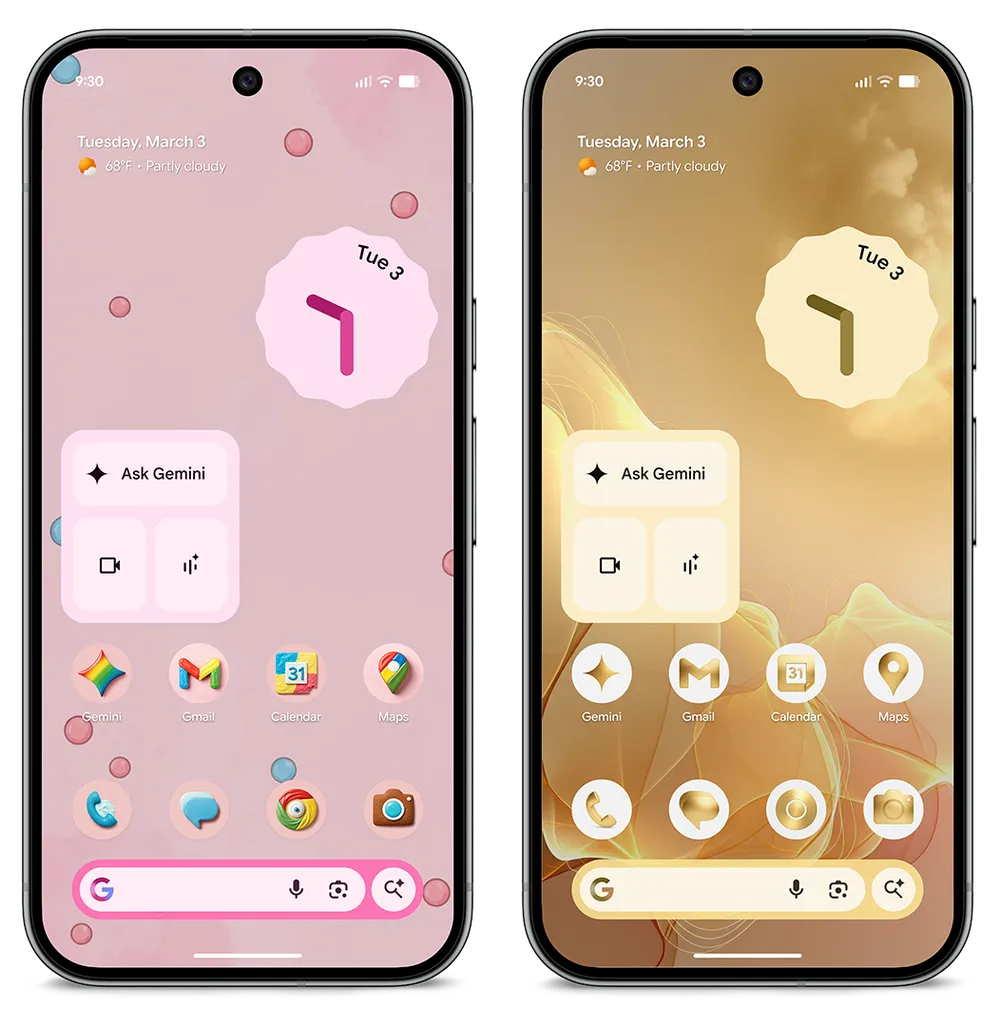
Custom Icons — Redesign Your Entire Home Screen in Seconds
Personalization just got a whole lot easier. With the new Custom Icons feature, you can choose from five distinct icon styles to give your entire home screen a cohesive, consistent look. Rather than having a mismatched collection of app icons from different developers, your phone’s home screen can now carry a unified visual identity — whatever style reflects your personality.
This is the kind of thoughtful polish that makes a big visual difference with minimal effort and a better use of AI.
At a Glance Expands with Commute Info, Live Sports Scores, and Market Trends
Google’s At a Glance widget on the lock screen has always been a smart way to surface what matters most at a glance. The March 2026 Pixel Drop adds three major new categories of information:
Real-Time Commute Alerts
Planning your morning commute just got smarter. At a Glance now shows real-time transit information and delay alerts, so you can adjust your route or timing before you even unlock your phone. This requires a connection to your Google account and Google Maps, and is available globally except in Europe and the UK (at this time).
Device note: Available on Pixel 7 and newer, excluding Pixel Tablet.
Live Sports Scores
Never miss a big play again. At a Glance now surfaces live sports scores for the teams you follow on Google. Whether it’s a nail-biting final quarter or a last-minute goal, you’ll see it right on your lock screen the moment it happens.
Device note: Not available on Pixel Tablet.
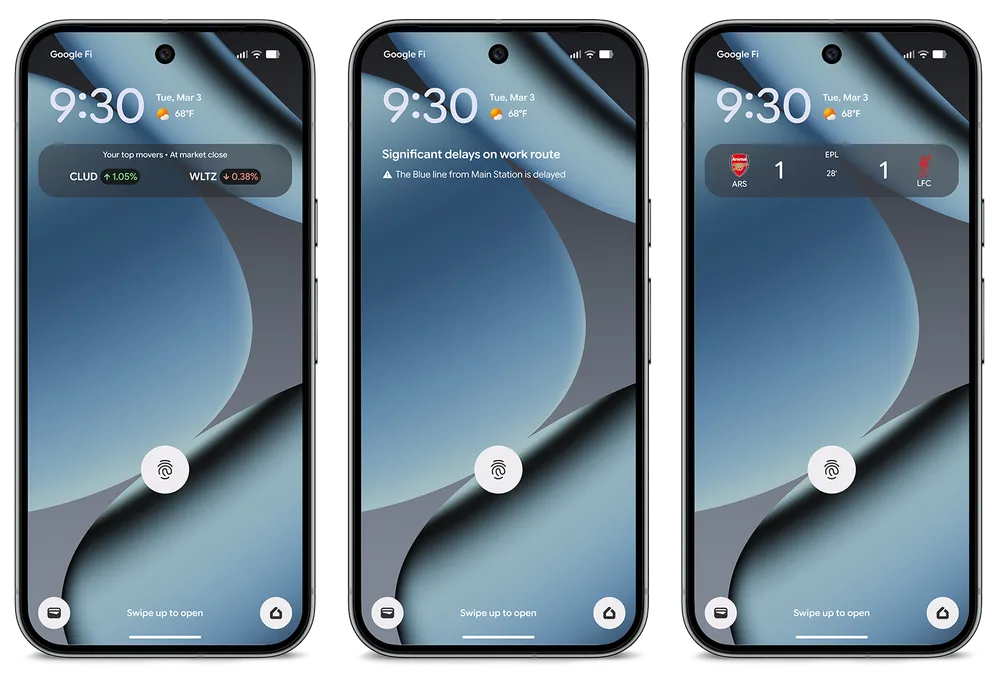
Stock Market Trends
For investors and finance-minded users, At a Glance now surfaces real-time market trends from Google Finance directly on the lock screen. Stay ahead of moves in the market without having to open a separate app.
Device note: Not available on Pixel Tablet. Requires connection to Google Finance.
Magic Cue — Let Gemini Recommend Restaurants from Within Your Texts
Here’s a feature that feels like it was pulled straight from a futuristic product demo: Magic Cue. When you’re texting with friends and the conversation turns to where to eat, Magic Cue detects the context and lets you know that Gemini can help find the perfect restaurant right from within the conversation.
One tap opens a Gemini window with restaurant recommendations curated to the context of your chat — no app switching, no copying and pasting addresses. You stay in the moment with your friends while Gemini does the legwork.
Availability: Pixel 10, Pixel 10 Pro, Pixel 10 Pro XL, and Pixel 10 Pro Fold. Select countries and languages. Users must be 18+.
Gemini Handles Your Busy Work — Groceries, Rides, and More
The line between AI assistant and AI agent keeps blurring, and Gemini’s new agentic task management feature is a prime example. Long-press the power button and ask Gemini to handle routine tasks for you: planning your next grocery order, booking a ride, or reordering your usual delivery.
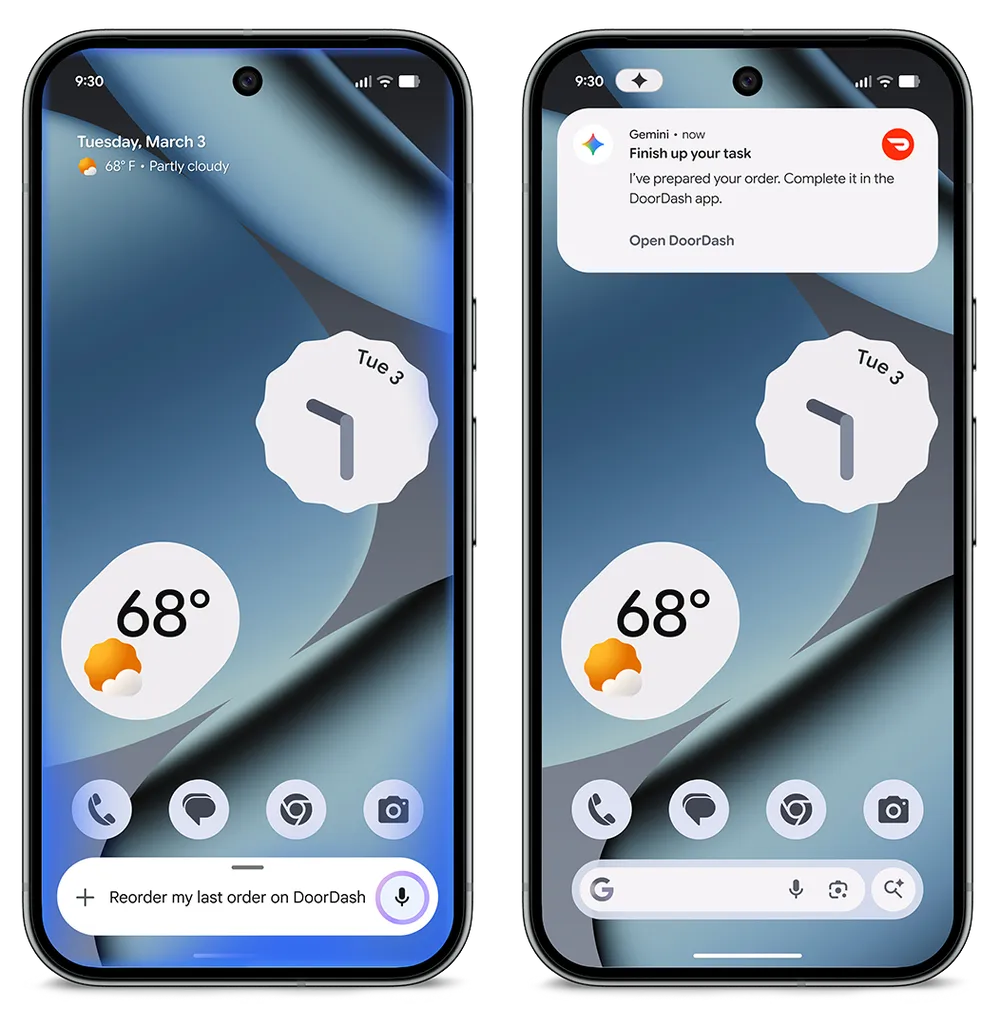
Gemini works with your apps in the background while keeping you in control — you can view the task in progress or end it at any time. This isn’t Gemini just giving you information; it’s Gemini doing things on your behalf.
Availability: Rolling out as a beta feature in the Gemini app over the next few days. Select apps only. Users must be 18+.
Comfort Display — A Calmer, Easier-on-the-Eyes Screen
Spending long hours staring at a screen? Google’s new Comfort Display feature is designed to reduce digital eye strain by intelligently softening high-intensity hues and toning down saturated colors on your display. The result is a calmer, more grounded visual experience that’s easier to sustain throughout the day — without compromising on clarity.
It’s a subtle but meaningful addition, especially for users who spend significant time on their devices for work or entertainment.
Availability: Pixel 10, Pixel 10 Pro, Pixel 10 Pro XL, and Pixel 10 Pro Fold.
Guided Frame Expands — More Languages and Offline Support
Guided Frame is one of Pixel’s most important accessibility innovations, providing real-time audio and haptic feedback to help users with blindness or low vision take great photos independently. In this Pixel Drop, it gets two significant upgrades:
- Expanded language support — Guided Frame is now available in more languages, making it accessible to a broader global audience.
- Offline scene description — You no longer need an internet connection to use scene description. Your Pixel can now describe what’s in your camera’s viewfinder even without connectivity, which is a crucial improvement for users in areas with poor signal or when travelling.
Whether capturing a sunset, a landscape, or a group portrait, these enhancements ensure that more people can frame every shot independently and confidently.
Online scene description: Pixel 6 and newer.
Offline scene description: Pixel 10, Pixel 10 Pro, Pixel 10 Pro XL, and Pixel 10 Pro Fold.
SpongeBob SquarePants Theme Packs — Limited-Time Customization
In what might be the most fun addition to this Pixel Drop, Google has partnered with SpongeBob SquarePants for a set of limited-edition seasonal theme packs. One tap changes your wallpaper, icons, GIFs, and sounds to a Bikini Bottom-inspired aesthetic tied to the latest SpongeBob movie. It’s a playful, vibrant customization option for fans of all ages.
Availability: Available until May 1, 2026. Don’t miss it if you’re a fan!
Connected Cameras Supports More External Cameras
Content creators and streamers will love this update. Connected Cameras now supports an expanded range of external cameras, including webcams, DSLR cameras, and other Pixel phones — all connectable via USB. You can use compatible social apps to stream from multiple angles, making it easier to create immersive, professional-grade video content without investing in a full studio setup.
Compatible apps include Facebook, YouTube, Instagram, TikTok, and Snapchat.
Availability: Pixel 6 and newer. Requires USB connection with cameras supporting the USB Video Class specification.
Journal App AI Features Come to Pixel 9
The Journal app — one of Pixel’s most thoughtful wellness-focused features — is expanding its AI capabilities to the Pixel 9 series. Features rolling out include:
- Reflection — AI-guided prompts to help you look inward
- Revisit Topics — Surfacing past journal entries around themes to help you spot patterns
- Mood ID — Identifying your mood based on your entries
- Image prompt feedback — Give a thumbs up or down on image-based prompts to personalize your journaling experience
These features make the Journal app a more powerful companion for mental wellness, self-expression, and building meaningful daily reflection habits.
Availability: Pixel 9 and newer. Device language must be set to English or Japanese.
Desktop Mode Comes to Pixel Phones and Pixel Tablet
One of the most practically exciting features of this Pixel Drop is the arrival of desktop mode on Pixel phones, along with a refined desktop windowing experience on Pixel Tablet.
Pixel Phone Desktop Mode
Connect your Pixel phone to an external monitor via USB-C and it transforms into a full multi-window desktop environment. You can run multiple apps side-by-side, tackle complex multitasking, and leave your laptop at home for lighter workdays. It’s the simplest path to a desktop-like setup using hardware most people already carry.
Availability: Pixel 8 and newer. Requires USB-C DisplayPort for external monitor connection.
Pixel Tablet Desktop Windowing
On Pixel Tablet, desktop windowing lets you run multiple apps simultaneously in free-form windows — resize them, overlap them, drag them anywhere on the screen, just like you would on a conventional laptop or desktop computer.
Availability: Pixel 10, Pixel 10 Pro, Pixel 10 Pro XL, and Pixel 10 Pro Fold.
Pixel Watch + Pixel Phone Security Just Got Smarter
One of the standout safety features of this Pixel Drop is an enhanced layer of security that ties your Pixel Watch and Pixel phone together in new and practical ways.
Walk-Away Lock
If you leave your phone behind — whether by accident or in a suspicious situation — your Pixel Watch will now send you an instant alert and automatically lock your phone as soon as you move out of Bluetooth range. It’s a simple but powerful safeguard against phone theft or loss.
Availability: Pixel 8 and newer + Pixel Watch 2 and newer.
Watch as an Identity Verification Tool
Your Pixel Watch can now be used to speed up identity checks on your phone, enabling smooth, secure access without fumbling with passwords or PIN codes. This makes everyday interactions — unlocking apps, verifying payments, and more — noticeably faster.
Availability: Pixel 8 Pro and newer (excluding Pixel 8 and A-series devices) + Pixel Watch 3 or Pixel Watch 4.
Global Expansion — More Regions and Languages Get Fan-Favorite Features
Google is continuing its push to bring Pixel’s best features to more users worldwide:
Scam Detection Expands to 6 New Countries
Scam Detection in Phone by Google uses on-device AI to detect speech patterns commonly associated with phone scams and warns you in real time during calls. It’s now available in France, Italy, Spain, Mexico, Germany, and Japan — a major expansion that brings this important safety feature to millions more Pixel users.
Availability: Pixel 9 and newer (excluding A-series). Note: Scam Detection is not 100% accurate. Always use caution with unknown callers.
Call Notes Comes to India
Users in India can now use Call Notes to record phone conversations and generate a full AI-powered transcript automatically. It’s an incredibly practical feature for business calls, interviews, or any conversation you want to reference later.
Availability: Pixel 10, Pixel 10 Pro, Pixel 10 Pro XL, and Pixel 10 Pro Fold in India.
AI Notification Summaries in Japanese
Users with their phone set to Japanese can now take advantage of AI-powered notification summaries, which condense busy notification streams into concise, easy-to-digest updates — helping you catch up faster without reading every individual alert.
Availability: Pixel 9 and above (excluding Pixel 9A). English and Japanese only.
Some of the most exciting features — including Try It On, Magic Cue, Offline Guided Frame, and Call Notes — are reserved for the Pixel 10 series. But there’s still plenty here for owners of Pixel 7, 8, and 9 devices to enjoy.
Feature Availability and Device Eligibility
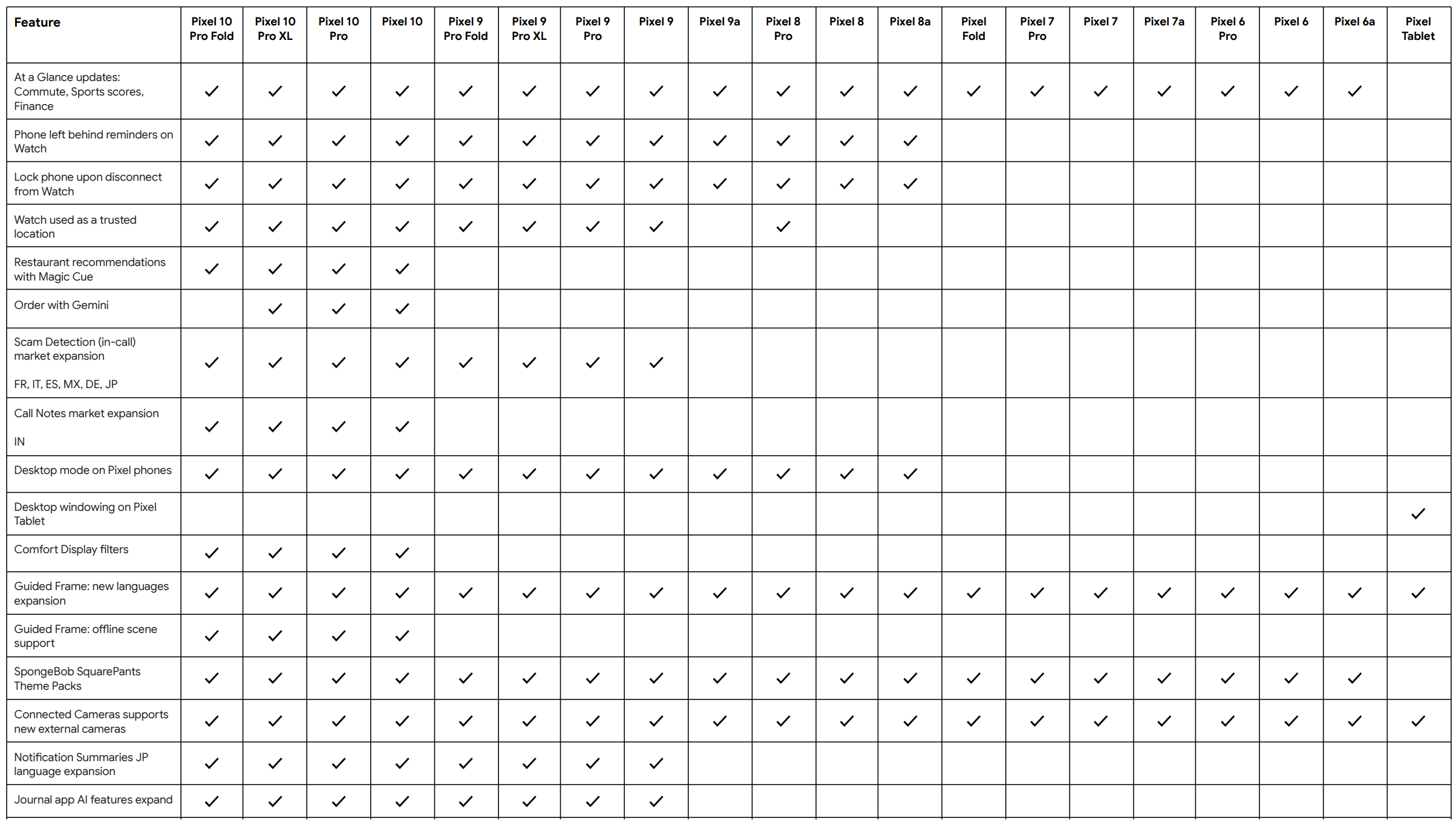
Feature availability varies by device, region, carrier, and language. For complete details, see the following section for Google’s full feature availability chart.
How to Get the March 2026 Pixel Drop
- Go to Settings > System > Software updates on your Pixel device
- Tap Check for updates and install any available updates
- Also update all your apps via the Google Play Store
- Watch for a notification from the My Pixel app highlighting all the new features
The rollout is happening in phases, so if you don’t see it yet, it should arrive over the coming weeks.
Method 2: Manual Installation
Alternatively, you can get Android 16 on select Pixel devices by downloading the full Factory Images listed below and install them via the new Android Flash Tool portal.
You will need to enable USB Debugging (ADB access) and OEM Unlocking before flashing the Android 16 stable image.
For advanced users, manual installation options include:
- Android Flash Tool Files (Install)
- Factory Image Files (Downloads)
- Apply OTA images — can be installed without data reset and bootloader unlocking
- Installation Instructions (Install)
- Download Android 16 GSI (Generic System Image)

