
Android 16 QPR3 Beta Update Features Vulkan 1.4 GPU Support (Download)

The Android beta program has rolled out its latest update, and the Android community is buzzing with discoveries. Android 16 QPR3 Beta 1 rolled out today based on Google’s December 2025 Feature Drop for Pixel devices, bringing platform improvements, performance optimizations, and several user-requested features that have been years in the making. Here’s everything new in Android 16 QPR3.
Android 16 QPR3 Beta 1 introduces several notable enhancements to the Pixel experience, including native flashlight brightness control, Vulkan 1.4 GPU support, and improved call screening compatibility with Advanced Protection. The removable At a Glance widget offers increased home screen flexibility for users who prefer minimal interfaces.
However, beta software inherently comes with trade-offs. Installation issues affect some users, particularly those with newer Pixel 10 devices. Battery life and stability concerns make this release unsuitable for users who depend on their devices for critical tasks.
If you’re comfortable with beta software limitations and have a backup device or can tolerate potential issues, Android 16 QPR3 Beta 1 offers an exciting preview of upcoming features. For most users, waiting for the stable public release in early 2025 provides a better experience without compromising device reliability.
Android 16 QPR3 Beta 1: New Features, Installation, and Downloads
If you’re a Pixel owner wondering whether to join the beta program, curious about the new features, or concerned about potential issues, this comprehensive guide covers everything you need to know. We’ll walk through the major changes, installation process, common problems users are experiencing, and expert tips for a smooth beta experience.
What Is Android 16 QPR3 Beta 1?
Quarterly Platform Releases (QPRs) are Google’s method of delivering substantial feature updates between major Android versions. Android 16 QPR3 Beta 1, released in December 2025, carries build numbers CP11.251114.006 for most Pixel devices and CP11.251114.004.A1 specifically for the Pixel 7a.
This release includes the December 2025 security patches alongside new platform features, bug fixes, and performance optimizations. Unlike minor security updates, QPR releases often introduce meaningful user-facing improvements that enhance the overall Android experience.
Major New Features in Android 16 QPR3 Beta 1
Built-in Flashlight Brightness Control
One of the most celebrated additions is native flashlight brightness adjustment. Android users have long relied on third-party apps for this basic functionality, making its inclusion in the system UI a welcome change. You can now adjust flashlight intensity directly from the quick settings panel, eliminating the need for workarounds or additional apps.
This feature addresses a common frustration where the standard flashlight brightness was either too dim for outdoor use or unnecessarily bright for close-range tasks. The granular control now available puts users in command of their device’s LED intensity.
Removable At a Glance Widget
The At a Glance widget, which displays weather, calendar events, and other contextual information on your home screen, can now be removed or hidden on select devices. Early adopters discovered this feature by long-pressing the widget, selecting settings, and toggling “Show on home screen.”
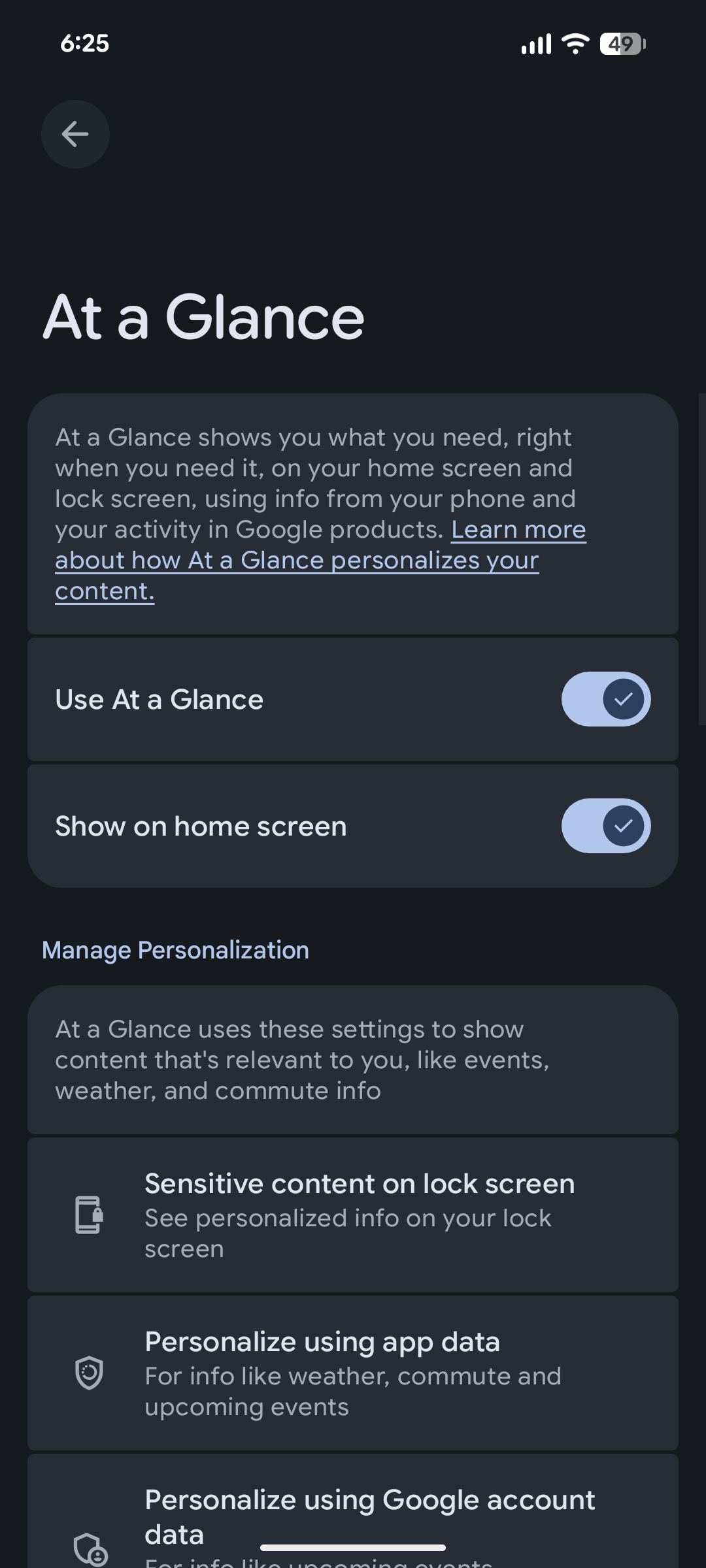
However, availability appears inconsistent across devices. Some Pixel 8 users report immediate access, while Pixel 9 Pro XL owners initially saw nothing. The feature seems to require a Google Play System update followed by a device restart. This staggered rollout suggests server-side activation controlling feature availability.
Vulkan 1.4 GPU Driver Support
For gaming enthusiasts and graphics-intensive app users, Android 16 QPR3 Beta 1 brings Vulkan 1.4 support through updated GPU drivers. This means a significant advancement in graphics rendering capabilities, particularly for the Pixel 10 series which received specific driver updates from Imagination Technologies.
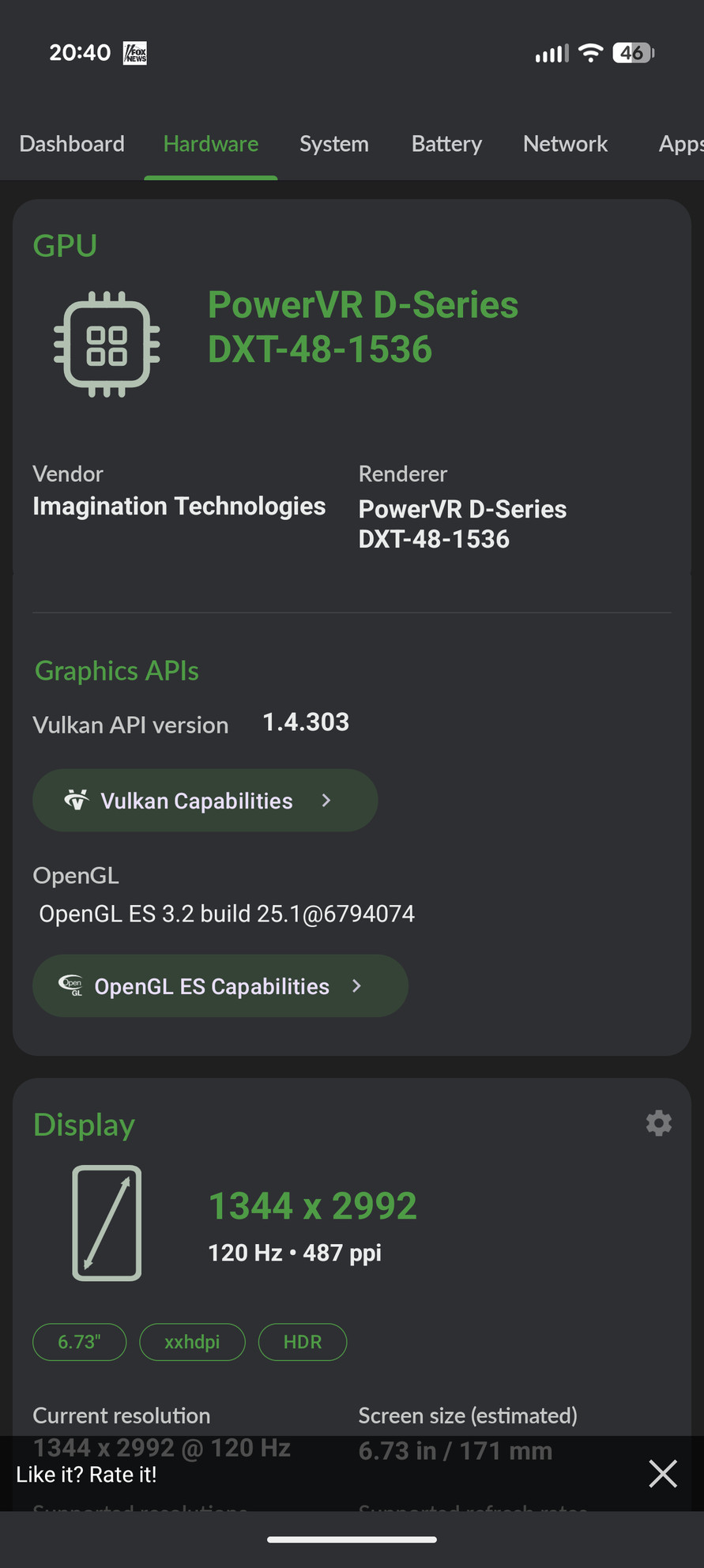
Vulkan 1.4 enables more efficient graphics processing, potentially improving game performance, reducing power consumption during GPU-intensive tasks, and allowing developers to implement more sophisticated visual effects. While casual users may not notice immediate differences, this update lays groundwork for future gaming and graphics applications.
Enhanced Call Screening with Advanced Protection
Google has resolved a longstanding conflict between Advanced Protection and call screening features. Previously, users enrolled in Advanced Protection could not select “maximum” or “medium” call screening levels. This limitation forced security-conscious users to choose between comprehensive device protection and effective spam call filtering.
The fix allows Advanced Protection users to access all call screening options, eliminating an unnecessary trade-off between security features. This change particularly benefits users in high-risk categories who rely on Advanced Protection while also dealing with persistent spam calls.
User Interface and Settings Reorganization
Several interface refinements improve system navigation and organization. Device Health and Support now occupies its own dedicated settings page rather than being buried within other menus. Various settings have been relocated for more intuitive access, including the 2G protection toggle.
A new folder opening animation has been introduced, though user reception remains mixed. Some find it visually appealing but slightly slower than previous animations. These subtle interface changes reflect Google’s ongoing effort to refine Android’s user experience through iterative improvements.
Eligible Pixel Devices
Android 16 QPR3 Beta 1 supports an extensive range of Pixel hardware:
- Pixel 6, 6 Pro, and 6a
- Pixel 7, 7 Pro, 7a, and Fold
- Pixel 8, 8 Pro, and 8a
- Pixel 9, 9 Pro, 9 Pro XL, 9 Pro Fold, and 9a
- Pixel 10, 10 Pro, 10 Pro XL, and 10 Pro Fold
- Pixel Tablet series devices
This comprehensive support demonstrates Google’s commitment to providing extended beta access across multiple device generations. Even Pixel 6 owners from 2021 can participate, ensuring a large testing base for Google’s development team.
How to Enroll in the Beta Program
Joining the Android beta program requires just a few steps:
- Visit the official Android Beta Program website
- Sign in with the Google account associated with your Pixel device
- Select your eligible device from the list
- Confirm enrollment and accept program terms
- Wait for the over-the-air (OTA) update notification
- Download and install the beta update
Once enrolled, your device automatically receives all subsequent beta updates until you manually opt out. The initial update size varies depending on your current Android version, with some users reporting downloads ranging from 555MB to over 2GB.
OTA Download Links
- Apply OTA images — can be installed without data reset and bootloader unlocking
- Factory Image Files (Downloads)
- Android Flash Tool Files (Install)
- Installation Instructions (Install)
- Download Android 16 GSI (Generic System Image)
Common Issues and Installation Problems
Update Installation Failures
A notable number of users, particularly those with Pixel 10 series devices and some Pixel 9 owners, report being unable to download or install the update. The system displays “Preparing system update” before immediately reverting to “Your system is up to date” without installing anything.
This issue has persisted since QPR2 Beta 3 for some users, suggesting an underlying update mechanism problem rather than device-specific defects. As of the initial release, OTA update files for Pixel 10 devices weren’t immediately available, though factory images were accessible for manual installation.
For those experiencing persistent installation failures, sideloading the update manually often resolves the issue. Users who previously sideloaded updates report successful automatic installation of subsequent beta releases, indicating the manual installation may fix whatever prevents OTA updates from working.
Desktop Mode and Minor Bugs
Some users express interest in desktop mode improvements, though specific changes haven’t been widely documented in this release. Additionally, a persistent bug affecting the At a Glance weather icon continues to frustrate users with attention to detail. The icon fails to update properly between daytime and nighttime states, displaying daytime graphics even after sunset.
Despite multiple bug reports across several Android 16 versions, this cosmetic issue remains unresolved. While minor, it exemplifies how small interface inconsistencies can impact user experience, particularly for those who notice such details.
Auto-Themed Icons Color Inversion Issue
Beta testers report ongoing problems with auto-themed icons exhibiting color inversion issues. Similarly, status bar elements get cut off on one display corner when devices are in landscape orientation, particularly affecting the Pixel 10 Pro. These interface glitches, while not functionality-breaking, detract from the polished experience users expect from Pixel devices.
Should You Install Android 16 QPR3 Beta 1?
If you’re currently running Android 16 QPR2 Beta and want to exit the program without data loss, timing is crucial. Google explicitly warns that you must opt out before installing QPR3 Beta 1. Installing this update and then opting out will trigger a mandatory factory reset, erasing all device data per standard beta program guidelines.
Additionally, users may encounter data corruption issues when exiting the beta program after installing QPR3 Beta 1. Google recommends either leaving before taking this build or waiting until QPR3 Beta 2 for a safer exit path. This represents an unusual exit window that requires careful attention from beta participants.
Understanding Beta Software Limitations
Beta releases exist for testing purposes, not as daily driver software for most users. If you’re considering enrollment, understand these fundamental truths about beta software:
Expect reduced battery life: Beta builds frequently exhibit suboptimal power management as Google refines new features and system optimizations. Don’t judge battery performance during beta testing.
Anticipate instability: Crashes, freezes, and unexpected behavior occur more frequently in beta software. Critical apps may become incompatible or malfunction.
Accept update hassles: As documented, installation problems are common. You may need technical knowledge to manually sideload updates or troubleshoot issues.
Source 1, Source 2, Join Telegram Channel.
