
Stable Android 16 QPR2 update Released with December 2025 Security Patch


Google has officially begun rollout of its December 2025 software update for Pixel devices, bringing important bug fixes and performance improvements to users worldwide. It also brings Android 16 QPR2 out of beta into the stable channel. This monthly update targets all supported Pixel devices running Android 16, addressing critical issues ranging from display problems to emergency calling functionality.
Most importantly, Google has also begun rolling out the stable Android 16 QPR2 update alongside the December 2025 security patch for Pixel devices ranging from the Pixel 6 series through the latest Pixel 10 lineup, including tablets and foldable models.
What’s new in Android 16 QPR2 stable?
Android 16 QPR2 introduces lockscreen widgets accessible by swiping left for a new feed. A subtle refinement allows you to tap the two-line clock to make it thicker with haptic feedback. Enable this feature through Settings > Display & touch > Lock screen > Widgets on lock screen. Google notes that while anyone can view these widgets without unlocking your device, authentication is required before opening any app.
Customize your lockscreen by long-pressing to remove or resize widgets, with an “Add widgets” option in the top-left corner featuring a redesigned picker with “Featured” and “Browse” tabs.
Building on last month’s AI message summaries, Android 16 QPR2 introduces a notification organizer that groups lower-priority alerts into categories like “News,” “Promotions,” and “Social Alerts” at the bottom of the notification shade. When minimized, app icons appear stacked on the right.
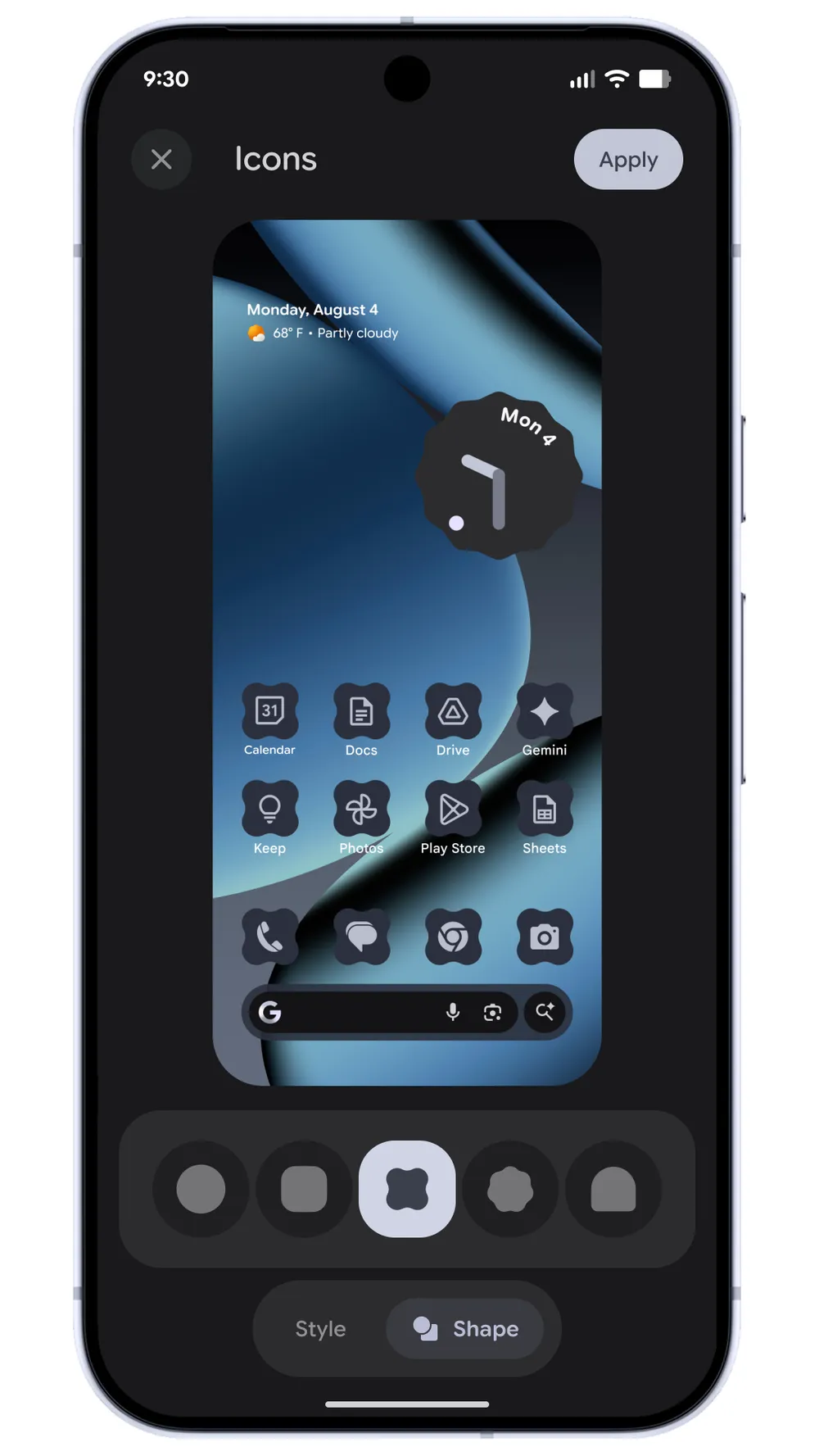
Custom icon shapes are now available under Wallpaper & style > Icons. Beyond the standard circle, you can choose from a rounded square and three additional options that apply exclusively to your homescreen. This functionality aligns with Themed icons, which Android 16 QPR2 now generates for every app.
Long-pressing an app icon now displays “Remove” and plus buttons for quickly adding shortcuts to your homescreen.
The Pixel Launcher search bar features slightly larger microphone, Lens, and AI Mode icons with more vibrant Dynamic Color implementation.
Live Caption has been integrated into the bottom of the volume slider, eliminating the need to open the full sheet. Disabling “Live Caption in volume control” removes it from both locations.
Additional Material 3 Expressive design elements appear throughout the Settings app, including Notification history with full app icons and new card shapes, plus Security & privacy refinements. Other notable changes include:
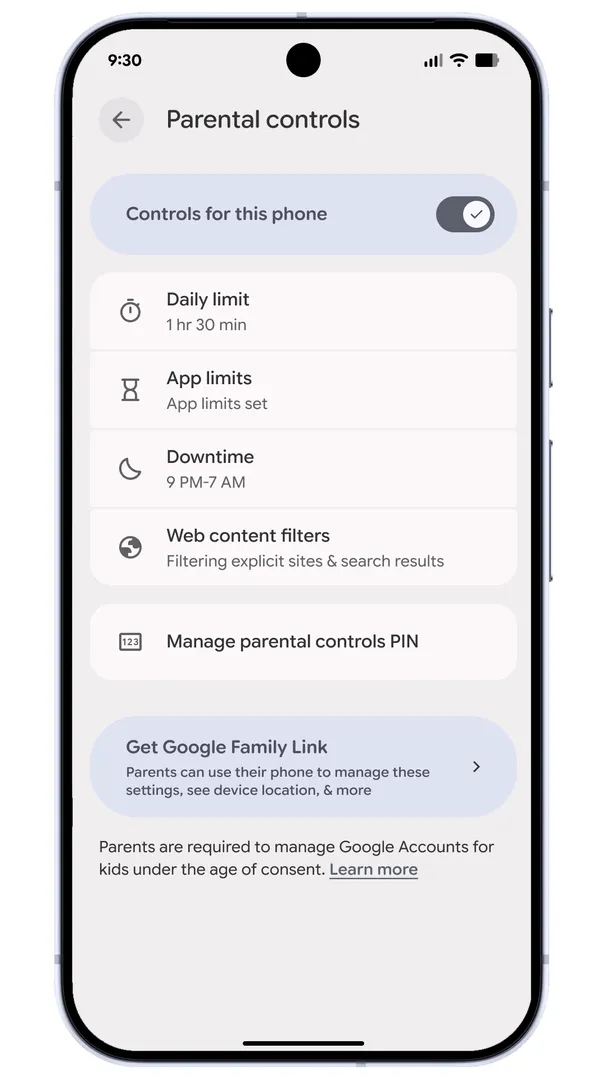
Parental controls have been separated from Digital Wellbeing in Settings, offering dedicated tools to limit screen and app time, set downtime schedules, and more.
Enhanced HDR brightness under Display & touch now includes an intensity slider ranging from Dimmer to Brighter.
An Expanded dark theme option automatically applies dark mode to most apps that lack native support, complementing the Standard theme.
Health Connect can now directly record steps tracked by your device.
What’s new in Google Pixel December 2025 Update?
The December 2025 update supports an extensive range of devices. This includes the Pixel 6, 6 Pro, 6a, Pixel 7 series, Pixel 8 family, Pixel Tablet, Pixel Fold devices, and the complete Pixel 9 and Pixel 10 lineups.
The rollout follows Google’s typical phased approach, meaning updates will arrive gradually over the coming week, depending on your carrier and specific device model. Users should watch for system notifications indicating the update’s availability, though checking manually through device settings remains an option for those eager to install immediately.
Major Display and Graphics Fixes
The most significant improvements in this update address persistent display issues that have plagued users. The Pixel 10 series receives multiple critical fixes for screen-related problems, including solutions for screens flashing or remaining black, occasional hanging or freezing, and brightness issues requiring manual screen toggling to restore normal levels.
For Pixel Foldable device owners, particularly those with the Pixel 10 Pro Fold, Google has addressed a specific issue causing the inner display to flicker or go black when launching certain games. This fix should significantly improve the gaming experience on these premium foldable devices.
The update also resolves a frustrating problem where the Always-On Display wouldn’t respond immediately when users attempted to unlock their devices, a quality-of-life improvement that will be appreciated during daily use.
Battery and Charging Improvements
Battery management receives important attention in this update. Google has fixed an unusual bug where the battery icon would display as blank or show a question mark on the status bar under certain conditions—a disconcerting issue that could leave users unsure about their device’s actual charge level.
Additionally, the update corrects problems with the 80% charge limit setting, a feature designed to extend battery longevity by preventing full charges. Users who rely on this battery preservation feature will appreciate the improved accuracy.
Enhanced System Stability and Performance
Beyond specific bug fixes, Google emphasizes general improvements to system stability and performance throughout the update notes. The framework receives multiple enhancements, including fixes for memory leaks caused by splash screens not closing properly—an issue that could gradually degrade performance over extended use.
Picture-in-Picture mode stability has been improved, particularly during display changes, while sensor-related features receive fixes for memory allocation failures that previously caused stability issues.
Communication and Connectivity Refinements
The telephony improvements deserve special attention, as Google has addressed instability issues with emergency calling functionality on Pixel 6 series devices. Emergency services access represents a critical phone function, making this fix particularly important for user safety.
Bluetooth connectivity problems preventing connections with certain devices or accessories have been resolved across multiple device generations. WiFi performance and stability improvements specifically target the Pixel 8 family, including the Pixel 8, 8 Pro, and 8a.
User Interface Polish and Refinements
The update tackles numerous user interface quirks that affected daily usability. Keyboard flickering or failure to appear when searching the app drawer has been fixed, along with issues where Google Home controls would launch as a blank screen.
Navigation gestures receive attention, with fixes for swipe-up gestures failing to trigger overview screens or exit apps. The Quick Settings shade receives multiple improvements, and Google has addressed problems with overlapping UI elements in the notification shade.
One particularly annoying bug—where the notification shade would incorrectly display quick settings instead of notifications after unlocking—has been resolved, streamlining the notification experience.
Camera and Audio Enhancements
Camera stability improvements target the Pixel 9 and Pixel 10 series, with general enhancements for operation under certain conditions. While Google doesn’t specify exactly what these improvements entail, any camera stability enhancements benefit users who rely on Pixel devices for photography.
Audio crash issues affecting the Pixel 9 and Pixel 10 series have been addressed, eliminating occasional audio-related system crashes that could disrupt media playback or communication.
Fingerprint Unlock Reliability
Touch and biometric authentication receive attention, with fixes for fingerprint unlock failures under certain conditions on newer Pixel devices. Reliable biometric authentication remains essential for modern smartphone security, making this improvement valuable for daily device access.
Regional Software Information
The update maintains different build numbers for various regions. Global devices receive the BP4A.251205.006 build, while EMEA region Pixel 9 and Pixel 10 devices get the BP4A.251205.006.A1 variant. Japanese market devices receive the C1 variant, and Verizon’s Pixel 9a gets the B1 build. These regional variations ensure carrier-specific features and requirements are properly addressed.
How to Update Your Pixel Device?
Users can check for the update by navigating to Settings > System > System update on their Pixel devices. The phased rollout means some users may receive the update before others, even with identical device models. Patience is recommended if the update doesn’t appear immediately.
Google recommends ensuring devices are connected to WiFi and have adequate battery charge (or are plugged in) before beginning the update process. The installation typically requires a device restart, so users should plan accordingly.
