
Android Auto 16.5 Update Prepares for 3D Immersive Navigation and Ask Maps

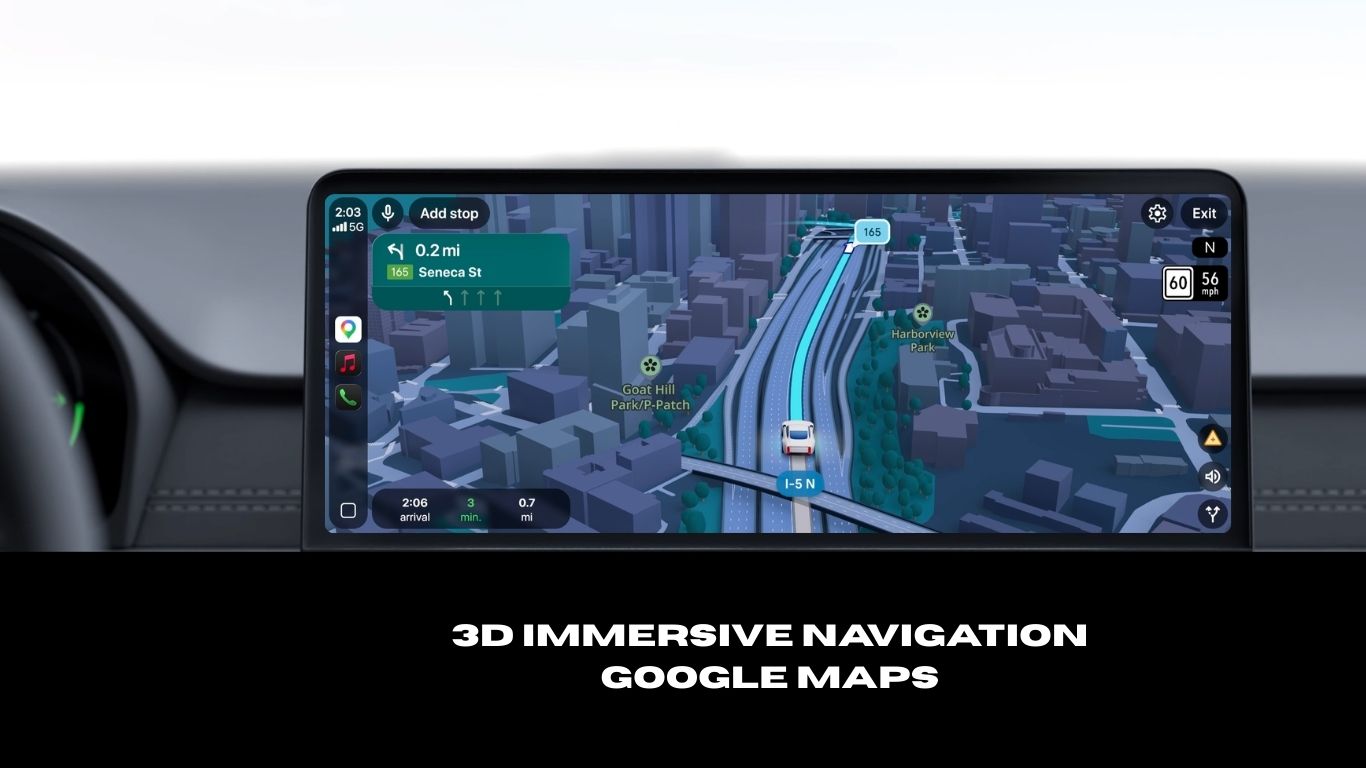
Google released the Android Auto 16.5 beta update today, featuring some bug fixes. The update also prepares for the upcoming Google Maps’ 3D Immersive Navigation feature and Ask Maps feature powered by Gemini. However, Gemini still hasn’t rolled out to Android Auto globally. While the company rarely provides detailed changelogs for its in-car software, this version comes on the heels of major visual shifts and under-the-hood preparation for Google Maps and Gemini AI integration.
The previous Android Auto 16.3 stable update introduced new featured the following:
1. The “Wavy Progress Bar” Mystery
In version 16.0, Google introduced a Pixel-inspired “wavy” progress bar for media playback (Spotify, YouTube Music). However, many users reported that this new UI broke steering wheel playback controls.
- The Update: Reports suggest that Android Auto 16.1 may have reverted this change for some users to ensure stability while Google fixes the control issues. If your progress bar returned to a straight line, this is likely why.
2. Preparation for Gemini AI
Google is in the middle of a phased rollout to replace Google Assistant with Gemini AI in the car. While version 16.1 doesn’t “unlock” Gemini for everyone (as it is a server-side switch), the backend code in this update contains the necessary hooks to support more natural, context-aware voice interactions.
3. Media Player Layout Adjustments
Following the Material 3 design philosophy, version 16.1 continues to refine the media player. The play/pause button has moved to the left side of the controls in many apps, a controversial change intended to make the interface more “driver-centric.”
4. General Bug Fixes
- Improved connection stability for wireless Android Auto adapters.
- Reduced latency in Google Maps navigation on older head units.
- Fixes for “No Signal” errors on certain Samsung and Pixel devices.
New Google Maps Update for Android Auto
Google Maps has just received one of its most significant updates yet, introducing smarter, more intuitive tools for both everyday navigation and discovery. Rather than relying on multiple searches, users can now ask natural questions and get personalized answers drawn from over 300 million mapped places and a global community of 500 million contributors.
1. Ask Maps
Ask Maps is the standout new feature, bringing a conversational interface directly into the app. Instead of typing keywords and sifting through reviews, users can ask real-world questions the same way they’d ask a well-traveled friend.
Picture this: you’re in an unfamiliar city, your phone battery is nearly dead, and you need somewhere to charge it fast. In the past, you’d search “coffee shop,” click through individual listings, scroll past photos, and hunt for a review mentioning power outlets — tedious at best.
With Ask Maps, a single question is all it takes. The feature instantly analyzes available data and surfaces relevant recommendations alongside a tailored map view, handling everything from finding a quiet café with outlets to locating public tennis courts with evening lighting.
2. 3D Immersive Navigation for Android Auto
While Ask Maps transforms how you plan, Immersive Navigation transforms how you drive. Google is calling this the biggest navigation overhaul in ten years — and the redesigned interface makes that claim easy to believe.
Navigating an unfamiliar city is mentally demanding. Interpreting a flat 2D map while managing multi-lane highways, complex interchanges, and sudden exits creates unnecessary stress. Google addresses this head-on by using Gemini AI to analyze Street View imagery and aerial photography, rendering your surroundings in rich, accurate 3D.
The result is a map that feels spatial and alive. Buildings, terrain, and landmarks appear along your route, giving you a much clearer sense of where you are and what’s coming. Critical road details — traffic lights, crosswalks, stop signs, and lane markings — are also highlighted so drivers can anticipate turns, merges, and lane changes well before they arrive.
Here’s a closer look at what’s new:
- Spatial and Structural Realism — The map now renders buildings, overpasses, and terrain in full 3D, while also surfacing granular details like individual lanes, crosswalks, and traffic signals for unmatched situational awareness.
- Look-Ahead Smart Zoom — To eliminate last-second lane scrambles, the map dynamically adjusts its perspective, using a wider view and transparent building overlays so you can see what lies ahead in plenty of time.
- Humanized Voice Guidance — Robotic, mechanical directions are gone. Voice prompts have been redesigned to sound natural and conversational — less “In 500 feet, keep right,” and more “Go past this exit and take the next one for Illinois 43 South.”
- Intelligent Route Tradeoffs — Processing over 5 million traffic updates per second, Maps no longer just reroutes you silently. It now explains the reasoning behind route changes, helping you make informed decisions — such as opting for a slightly longer road to avoid stop-and-go congestion.
When will Android Auto receive Google Maps new features?
Google has begun rolling out Ask Maps to users in the United States and India on both Android and iOS devices, with Android Auto expected in the near future. Immersive Navigation is launching first in the United States and will gradually expand to additional regions and compatible devices.
The navigation upgrade will also integrate with several platforms, including smartphones, Apple CarPlay, Android Auto, and vehicles that come with built-in Google systems.
- Ask Maps: Rolling out now in the U.S. and India for iOS and Android, with desktop support following shortly.
- Immersive Navigation: Rolling out today across the U.S., expanding over the coming months to iOS, Android, CarPlay, Android Auto, and vehicles with Google built-in.
Download Android Auto 16.5 APK
Get the latest Android Auto 16.5.16120 beta from the official Play Store or download the APK from below.


APK Download
Starting with Android 11, Google released apps in Split APKs (multiple APKs) format. This means the app is split into several packages, including the base and config APK files. This resolves the compatibility issue and enables the installation of apps like the Google APK on any Android device with varying DPI, screen resolution, screen size, architecture, and more.
- Android Auto 16 stable download
- APK Download
- APK Server
- APK Mirror (rename .APKM to .ZIP)
- Then Install Split APKS/XAPK/APKM/ZIP using SAI Installer (FOSS)
