
Samsung Rolls Out One UI 8.5 Beta 6: Key Bug Fixes and newer Android 16 Upgrades


Samsung is steadily pushing toward a stable Android 16 release with the rollout of the One UI 8.5 Beta 6 update for eligible Galaxy devices. The latest firmware, carrying version number ZZC7, weighs in at 985.19 MB. Alongside a host of system stability improvements, the update also packages the February 2026 security patch to keep your device protected against recent vulnerabilities.
This specific beta release focuses heavily on squashing persistent bugs to refine the daily user experience. A major fix addresses a frustrating proximity sensor issue that accidentally switched standard phone calls into video calls. The development team also resolved a connectivity glitch related to APs supporting MBSSID (Multiple Basic Service Set Identifiers, a technology that allows a single router to broadcast multiple Wi-Fi network names). Other notable interface improvements include better visibility for the Gmail search box in dark mode, fixes for Gallery crashes when starting new projects, and corrected Toast pop-ups (the small, temporary on-screen notification messages) during DeX connections.
Beta 6 builds directly on the foundation laid by the recent Beta 5 (version ZZAO) update. That previous release tackled a different set of user interface glitches, such as forced closures in display settings and visibility issues with the Now Bar recommendation cards. With these targeted bug fixes in Beta 6, the software is getting significantly smoother as we approach the highly anticipated public release.
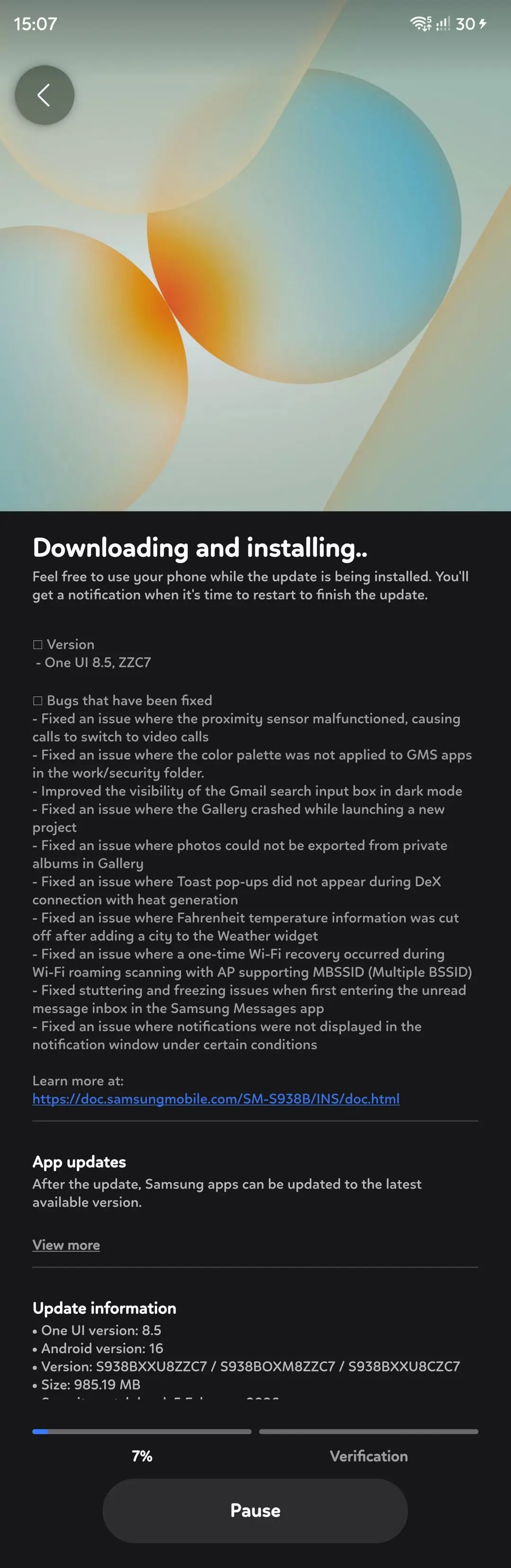
What’s new in Samsung One UI 8.5 Beta 6?
- Version – One UI 8.5, ZZC7
- Bugs that have been fixed
- Fixed an issue where the proximity sensor malfunctioned, causing calls to switch to video calls
- Fixed an issue where the color palette was not applied to GMS apps in the work/security folder.
- Improved the visibility of the Gmail search input box in dark mode
- Fixed an issue where the Gallery crashed while launching a new project
- Fixed an issue where photos could not be exported from private albums in Gallery
- Fixed an issue where Toast pop-ups did not appear during DeX connection with heat generation
- Fixed an issue where Fahrenheit temperature information was cut off after adding a city to the Weather widget
- Fixed an issue where a one-time Wi-Fi recovery occurred during Wi-Fi roaming scanning with AP supporting MBSSID (Multiple BSSID)
- Fixed stuttering and freezing issues when first entering the unread message inbox in the Samsung Messages app
- Fixed an issue where notifications were not displayed in the notification window under certain conditions
- Update information
- One UI version: 8.5
- Android version: 16
- Version: S938BXXU8ZZC7 / S938BOXM8ZZC7 / S938BXXU8CZC7
- Size: 985.19 MB
- Security patch level: 5 February 2026
Version 5 – One UI 8.5, ZZAO
- Bugs that have been fixed
- Fixed an issue with the Bixby > Labs > Create wake-up phrase
feature - Fixed an issue where two “View Previous Image” buttons appeared
when using the sketch conversion feature in the Gallery - Fixed issues with the text, icons, and AOD visibility of Now Bar/Now
Brief recommendation cards - Fixed a forced close issue when changing the camera area settings
in Settings > Display - Fixed an issue where the lock screen style of Basic mode was
changed in Modes and Routines - Improved animation related to notification cards
What’s new in One UI 8.5?
One UI 8.5 delivers comprehensive content creation capabilities from initial concept through final sharing. The upgraded Photo Assist enables continuous image generation, allowing uninterrupted editing without requiring intermediate saves. Users can navigate their complete edit history and select their preferred outcomes with ease.
Content sharing becomes more intuitive through Quick Share enhancements that recognize people in photos and automatically suggest sending images to appropriate contacts.
Multi-device management is simplified with new cross-device functionality for file handling, network sharing, and inter-device communication. Audio Broadcast enables effortless communication with nearby LE Audio-compatible devices via Auracast technology. Beyond media streaming, users can now broadcast their voice using their Galaxy phone’s built-in microphone—ideal for group settings such as guided tours or events.
Storage Share enhances Galaxy ecosystem integration by displaying files from other Galaxy devices—including tablets and PCs—directly within the My Files app. Users can also access their phone’s files from other Samsung devices, including televisions.
One UI 8.5 strengthens device protection while maintaining transparent control over security settings. Theft Protection safeguards phones and personal data if devices are lost or stolen. Failed Authentication Lock provides an additional security layer by automatically locking the screen after multiple unsuccessful identity verification attempts via fingerprint, PIN, or password. Identity Check now protects additional settings, offering expanded security coverage.
The One UI 8.5 beta program launched for Galaxy S25 series users on December 8 in select markets: Germany, India, Korea, Poland, the UK, and the United States.
How to download One UI 8.5 Beta 5?
Eager to be among the first to experience One UI 8.5? You can sign up through the Samsung Members app available on your compatible Galaxy device. Beta participants will get early access to the new features and can provide feedback to help refine the final release.
- How to Sign up for One UI 8.5 Beta Program
- One UI 8.5 beta leaked firmware downloads
- Samsung One UI 8.5 full changelog
- One UI 8.5 Beta features

