Major Google Maps Update brings 3D Immersive Navigation and Ask Maps to iOS, Android, CarPlay, and Android Auto

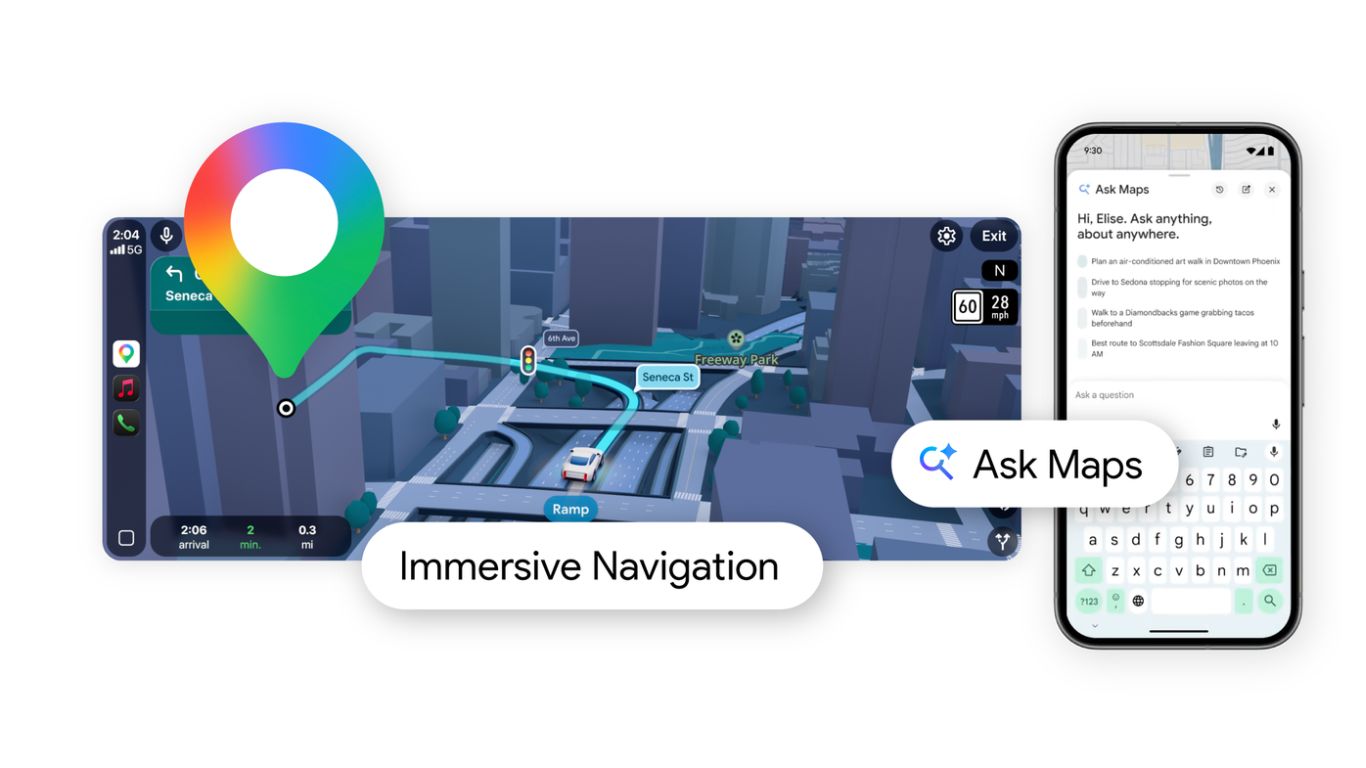
Google recently announced Gemini AI for the Maps app followed by an overhaul of the GMaps logo. Today,Google Maps is taking another major leap forward by integrating advanced artificial intelligence from Gemini, Google’s AI model. Ask Maps and Immersive Navigation. These updates transform the traditional navigation experience into something more intelligent, interactive, and personalized, making exploration as simple as having a conversation.
Today, the search giant unveiled Gemini for Google Maps alongside an AI-focused redesign. Just like most Google apps, Maps also gets a new Gemini icon at the top of the app while navigation is on. This replaces the former Google Assistant icon with a Gemini one. The AI will also give you useful alerts about traffic jams. The feature is called Proactive traffic alerts. Google Lens inside Maps is also now powered by Gemini AI.
Google Maps’ New Gemini AI Features
Google Maps now offers a smarter way to explore the world. Instead of performing multiple searches, users can simply ask questions and receive personalized answers backed by data from more than 300 million mapped places and a global community of over 500 million contributors. This shift moves mapping technology beyond simple directions and toward an intelligent discovery platform.
1. Ask Maps
One of the most innovative additions to Google Maps is Ask Maps, a conversational feature that lets users ask complex real-world questions directly in the app. Rather than typing keywords or browsing through endless reviews, users can interact with the map naturally, much like chatting with a knowledgeable guide.
We’ve all been there. You’re in a new city, your phone is at 5%, and you need to charge it. Normally, you’d search for “coffee shop” on Maps, click on individual profiles, scroll through photos, and read reviews to see if anyone mentions accessible wall outlets. It’s tedious and frustrating.
With Ask Maps, this friction is gone. Google has introduced a conversational interface that lets you ask complex, real-world questions just as you would a local concierge.
This feature is designed to handle everyday scenarios that traditional search tools struggle to answer. Someone might ask where they can charge their phone quickly without waiting in a crowded café, or whether there are public tennis courts with lights available for evening play. Instead of forcing users to research multiple locations, Ask Maps instantly analyzes available data and presents helpful recommendations alongside a customized map view.
How Ask Maps Changes the Game:
Hyper-Specific Queries: You can type or say, “My phone is dying — where can I charge it without having to wait in a long line for coffee?” Ask Maps bypasses the manual research phase entirely. It parses through data from over 300 million places and insights from 500 million user contributors to deliver a curated, conversational answer.
Deep Personalization: The AI doesn’t just know the world; it knows you. If you ask for a cozy spot to meet friends midway between two locations, Ask Maps factors in your past preferences (like your affinity for vegan food) and tailors its recommendations accordingly.
Actionable Itineraries: Planning a road trip to the Grand Canyon? Ask Maps can suggest hidden hiking trails, recommend scenic stops, and even give you tips on securing entry tickets. From the chat interface, you can seamlessly book reservations, save lists, or instantly start navigation.
2. Immersive Navigation: Taking the Guesswork Out of the Drive
If Ask Maps is about what to do, Immersive Navigation is entirely focused on how to get there safely and stress-free. Google is dubbing this the biggest navigation update in a decade, and looking at the UI overhaul, it’s easy to see why.
Driving in an unfamiliar, bustling city is a high-cognitive-load task. Trying to interpret a flat 2D map while navigating five-lane highways, complex overpasses, and sudden exits is a recipe for anxiety. Google is solving this by using Gemini to analyze fresh Street View and aerial imagery, bringing your map to life in vivid 3D.
Immersive Navigation changes that by introducing a vivid three-dimensional representation of the environment around the driver. Using AI analysis of Street View imagery and aerial photographs, the map recreates buildings, terrain, and landmarks along the route. This spatial awareness makes it easier for drivers to understand their surroundings and recognize important visual cues.
In addition to the 3D visuals, the system highlights critical road details such as traffic lights, crosswalks, stop signs, and lane markings. These visual cues help drivers prepare for turns, merges, or lane changes well in advance, reducing confusion in complex traffic situations.
Key Features:
Spatial and Structural Realism: The map now reflects buildings, terrain, and overpasses around you in 3D. More importantly, it highlights critical granular details like individual lanes, crosswalks, stop signs, and traffic lights, giving you unparalleled spatial awareness.
Look-Ahead Smart Zoom: To prevent those terrifying last-second lane merges, the map dynamically adjusts. It uses transparent buildings and a broader perspective to help you see what’s coming up well in advance.
Humanized Voice Guidance: Robotic, hyper-technical directions are out. The voice guidance has been revamped to sound more natural—like a friend in the passenger seat. Instead of “In 500 feet, keep right,” you’ll hear, “Go past this exit and take the next one for Illinois 43 South.”
Intelligent Route Tradeoffs: Maps processes over 5 million traffic updates per second. Now, instead of just forcing you onto a new route, it explains the tradeoffs conversationally—such as choosing a slightly longer route to avoid heavy stop-and-go traffic, or taking a faster route that requires a toll.
Rollout Timeline
Google has begun rolling out Ask Maps to users in the United States and India on both Android and iOS devices, with desktop support expected in the near future. Immersive Navigation is launching first in the United States and will gradually expand to additional regions and compatible devices.
The navigation upgrade will also integrate with several platforms, including smartphones, Apple CarPlay, Android Auto, and vehicles that come with built-in Google systems. This broad compatibility ensures that the new features can enhance navigation across multiple driving environments.
- Ask Maps: Rolling out now in the U.S. and India for iOS and Android, with desktop support following shortly.
- Immersive Navigation: Rolling out today across the U.S., expanding over the coming months to iOS, Android, CarPlay, Android Auto, and vehicles with Google built-in.
The era of basic point-A-to-point-B navigation is officially over. With Gemini in the driver’s seat, Google Maps isn’t just showing us the world anymore—it’s helping us understand it.
Download Google Maps APK
Google released the Google Maps update today. Get the latest update from Play Store. APK downloads will be available soon.