
Stable Android Auto 15.9 Released: Get Cast Feature and Gemini AI


Google recently announced Gemini AI assistant is currently rolling out to Android Auto for select regions and devices, bringing conversational artificial intelligence to over 250 million vehicles worldwide. However, shortly after, Google said Gemini AI for cars will be available for all cars and Android Auto accounts by early 2026.
A Google community manager identified as Anish K. writes. “We’re adjusting our previously announced timeline to make sure we deliver a seamless transition, and will continue our work to upgrade Assistant users to Gemini on mobile devices into 2026. We’ll share more details on our plans in the coming months.”
As for what’s new in Android Auto 15.9, it gets AndroidX MediaRouter library integration. Which means, cast feature is now available in Android Auto!
Android Auto gets the Cast feature
The latest Android Auto APK adds the media router library. The AndroidX MediaRouter library, part of Android Jetpack, enables applications to discover and connect to remote playback devices, including Google Cast-enabled TVs and Bluetooth speakers. It provides a consistent interface across different Android versions for routing audio and video streams.
This is the code we found in the Android Auto during our APK breakdown:
<public type="id" name="mr_art" />
<public type="id" name="mr_cast_checkbox" />
<public type="id" name="mr_cast_close_button" />
<public type="id" name="mr_cast_divider" />
<public type="id" name="mr_cast_group_icon" />
<public type="id" name="mr_cast_group_name" />
<public type="id" name="mr_cast_group_progress_bar" />
<public type="id" name="mr_cast_header_name" />
<public type="id" name="mr_cast_list" />
<public type="id" name="mr_cast_meta_art" />
<public type="id" name="mr_cast_meta_background" />
<public type="id" name="mr_cast_meta_black_scrim" />
<public type="id" name="mr_cast_meta_subtitle" />
<public type="id" name="mr_cast_meta_title" />
<public type="id" name="mr_cast_mute_button" />
<public type="id" name="mr_cast_route_icon" />
<public type="id" name="mr_cast_route_name" />
<public type="id" name="mr_cast_route_progress_bar" />
<public type="id" name="mr_cast_stop_button" />
<public type="id" name="mr_cast_volume_layout" />
<public type="id" name="mr_cast_volume_slider" />
<public type="id" name="mr_chooser_list" />
<public type="id" name="mr_chooser_ok_button" />
<public type="id" name="mr_chooser_ok_button_container" />
<public type="id" name="mr_chooser_route_desc" />
<public type="id" name="mr_chooser_route_icon" />
<public type="id" name="mr_chooser_route_name" />
<public type="id" name="mr_chooser_route_progress_bar" />
<public type="id" name="mr_chooser_search_progress_bar" />
<public type="id" name="mr_chooser_searching" />
<public type="id" name="mr_chooser_title" />
<public type="id" name="mr_chooser_wifi_learn_more" />
<public type="id" name="mr_chooser_wifi_warning" />
<public type="id" name="mr_chooser_wifi_warning_container" />
<public type="id" name="mr_chooser_wifi_warning_description" />
<public type="id" name="mr_close" />
<public type="id" name="mr_control_divider" />
<public type="id" name="mr_control_playback_ctrl" />
<public type="id" name="mr_control_subtitle" />
<public type="id" name="mr_control_title" />
<public type="id" name="mr_control_title_container" />
<public type="id" name="mr_custom_control" />
<public type="id" name="mr_default_control" />
<public type="id" name="mr_dialog_area" />
<public type="id" name="mr_expandable_area" />
<public type="id" name="mr_group_expand_collapse" />
<public type="id" name="mr_group_volume_route_name" />
<public type="id" name="mr_media_main_control" />
<public type="id" name="mr_name" />
<public type="id" name="mr_picker_close_button" />
<public type="id" name="mr_picker_header_name" />
<public type="id" name="mr_picker_list" />
<public type="id" name="mr_picker_route_icon" />
<public type="id" name="mr_picker_route_name" />
<public type="id" name="mr_picker_route_progress_bar" />
<public type="id" name="mr_playback_control" />
<public type="id" name="mr_title_bar" />
<public type="id" name="mr_volume_control" />
<public type="id" name="mr_volume_group_list" />
<public type="id" name="mr_volume_item_icon" />
<public type="id" name="mr_volume_slider" />
New Gemini features for Android Auto
Unlike traditional Google Assistant, which requires precise phrasing and specific commands, Gemini understands natural conversation. You can speak casually, change topics mid-conversation, and have back-and-forth exchanges just as you would with a knowledgeable passenger.
This conversational capability means you’re no longer constrained by memorizing exact phrases. Instead of saying “Navigate to the nearest gas station,” you can simply ask, “Hey Google, I’m running low on fuel. What’s good around here?” Gemini will understand your intent and provide contextual recommendations based on your location, route, and preferences.
Android Auto has recently revealed new features, with new Home Screen widgets and Gemini AI activations for some.
1. Discover Hidden Gems Like a Local Expert
One of Gemini’s most impressive capabilities is its integration with Google Maps, transforming how you discover and explore places along your route. Google claims the AI acts as your personal travel advisor, drawing insights from countless reviews and real-world data.
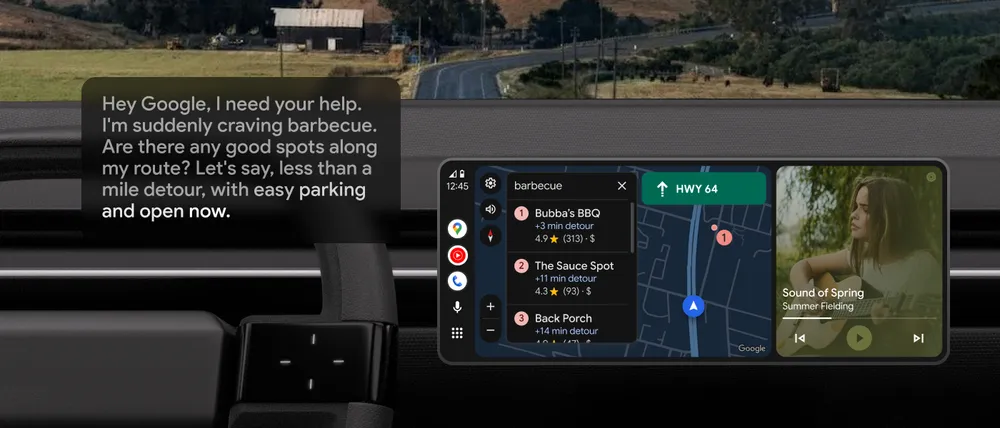
Imagine you’re on a road trip and suddenly craving specific cuisine. Rather than pulling over to search your phone, you can simply say, “Hey Google, I need your help. I’m suddenly craving barbecue. Any good spots along my route that are open now, near my destination?” Gemini will analyze your current location, route, and destination to suggest restaurants that match your criteria.
But the conversation doesn’t stop there. You can continue naturally: “Tell me about their most popular dishes” or “Is this place dog-friendly?” Gemini pulls information from user reviews to answer questions about specific menu items, ambiance, wait times, and more. It’s like having a friend who’s intimately familiar with every city you pass through.
2. Message Management Reimagined
Communication while driving has always been a challenge—balancing safety with staying connected. Gemini solves this through intelligent message handling that goes far beyond simple dictation.
Traditional voice-to-text systems require you to speak your entire message perfectly or start over from scratch if you forget something. Gemini changes this completely. You can compose messages naturally, add information as you think of it, and make edits without frustration.
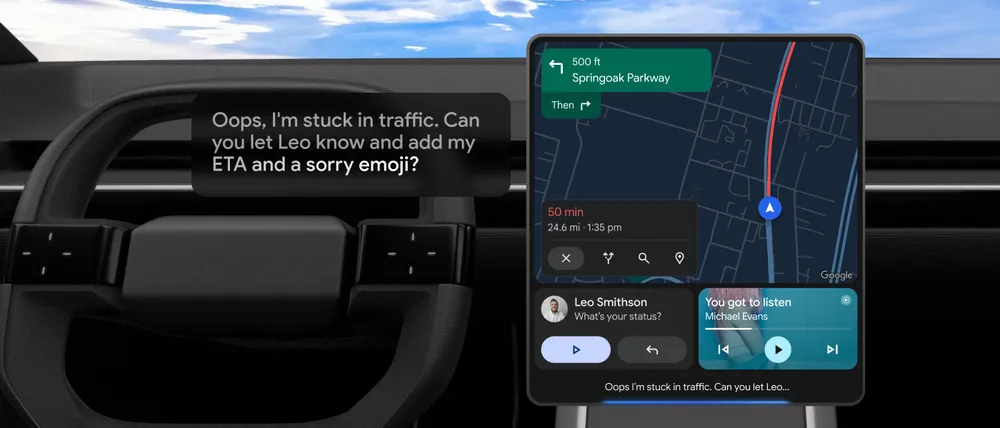
For example: “Oops, I’m stuck in traffic. Can you let Leo know and add my ETA and a sorry emoji?” Gemini will compose an appropriate message, calculate your estimated arrival time based on current traffic conditions, and include an emoji that fits the context.
Need to add more? Just continue: “One more thing. Can you also ask if he wants to grab coffee after the game? And please translate the message into Spanish.” Gemini handles multi-step requests seamlessly, translating into over 40 languages while maintaining the conversational tone of your original message.
When multiple messages arrive while you’re driving, Gemini can summarize them as a group, helping you understand what’s happening without reading each individual notification. This feature is particularly valuable during busy periods when you need to stay informed but can’t safely interact with your phone.
3. Transform Drive Time into Productive Time
The daily commute often feels like lost time—hours spent in transit that could be used more productively. Gemini’s Gmail integration turns this perspective on its head, allowing you to manage your inbox safely while driving.
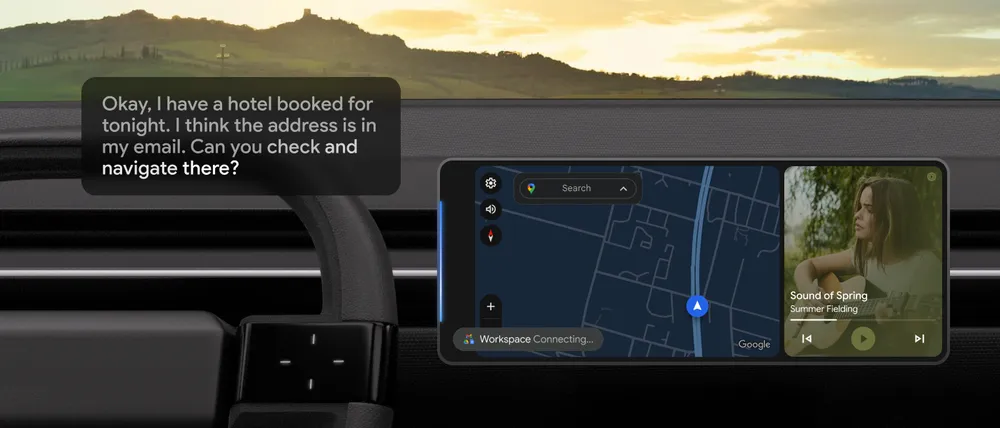
Need to find reservation details buried somewhere in your email? Simply ask: “Okay, I have a hotel booked for tonight. I think the address is in my email. Can you check and navigate there?” Gemini searches your Gmail, extracts the relevant address, and immediately begins navigation—all through a single natural request.
You can also request summaries of unread emails to stay on top of important communications without the distraction of reading individual messages. This capability is especially valuable for professionals who need to remain responsive but can’t afford the safety risk of checking their phone while driving.
Beyond email, Gemini integrates with multiple productivity platforms including Google Calendar, Google Tasks, Google Keep, Samsung Calendar, Samsung Reminder, and Samsung Notes. Check your schedule, add to-do items, or capture ideas—all through natural conversation. Google has indicated that third-party app support will expand over time, further enhancing productivity possibilities.
4. Curate the Perfect Soundtrack Effortlessly
Music and audio entertainment are integral to the driving experience, but finding the right content often requires too much attention. Gemini makes soundtrack selection as simple as describing what you want.
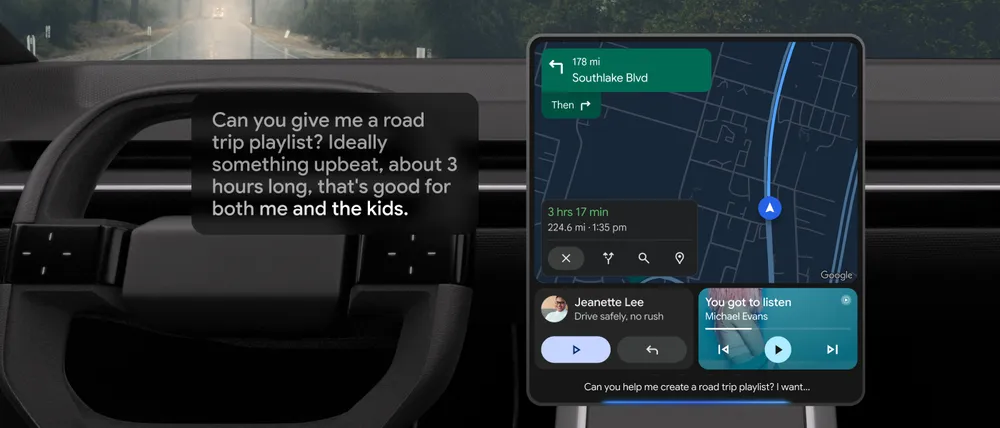
Instead of browsing through playlists or remembering specific song titles, describe your ideal listening experience: “Can you give me a road trip playlist? Ideally something upbeat, about 3 hours long, that’s good for both me and the kids.” Gemini understands the context—you want family-friendly music with energy that matches a long drive—and curates accordingly.
The system works with popular platforms including YouTube Music and Spotify, giving you access to millions of songs without the complexity of manual searching. You can be creative with your requests too: “It’s raining. Can you play songs perfect for a rainy drive?” Gemini interprets the mood you’re seeking and delivers appropriate music.
5. Continuous Conversation Through Gemini Live
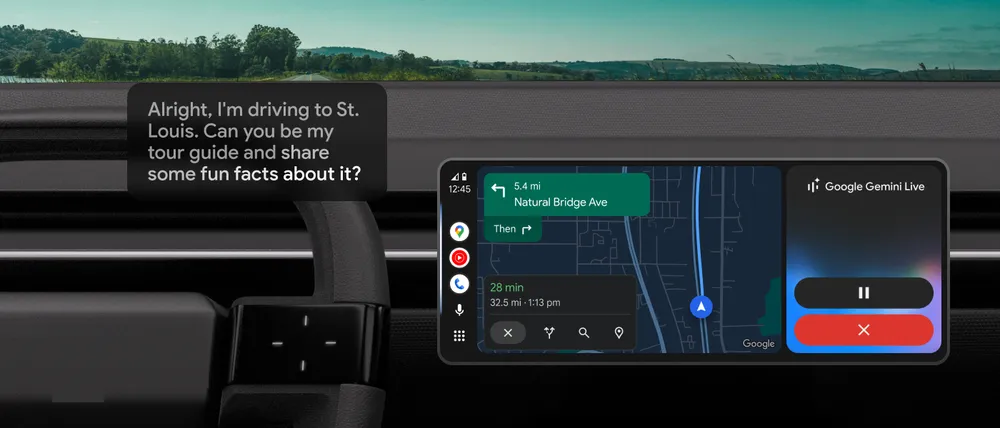
Perhaps the most innovative feature is Gemini Live, a beta capability that enables extended, natural conversations on virtually any topic. By saying “Hey Google, let’s talk live,” you enter a conversational mode that feels remarkably human.
This feature opens up entirely new use cases for in-car AI. Planning a trip? Ask Gemini to act as your tour guide: “Alright, I’m driving to St. Louis for a wedding. Can you be my tour guide and share some fun facts about it?” The conversation can flow naturally through multiple topics without requiring you to restart or reframe your questions.
Need to prepare for an event? Continue seamlessly: “Thanks for teaching me all about St. Louis. Changing topics, the rehearsal dinner is at his parents’ house, and I’d like to get them a small something. What are some good ideas?” Gemini maintains context across these topic shifts, providing relevant suggestions based on your previous conversation.
You can even use drive time for rehearsal and preparation: “Great, glad we got the gift settled. I am giving a wedding speech on Saturday. Let’s practice.” Gemini can act as your practice audience, providing feedback and helping you refine your delivery—all while you’re safely heading toward your destination.
Download stable Android Auto 15.9 APK
Get the latest Android Auto 15.9.655104 stable from the official Play Store or download the APK from below.


APK Download
Starting with Android 11, Google released apps in Split APKs (multiple APKs) format. This means the app is split into several packages, including the base and config APK files. This resolves the compatibility issue and enables the installation of apps like the Google APK on any Android device with varying DPI, screen resolution, screen size, architecture, and more.
- Android Auto 15.9 stable download
- APK Download
- APK Mirror (rename .APKM to .ZIP)
- Then Install Split APKS/XAPK/APKM/ZIP using SAI Installer (FOSS)
