
New Google Pixel Camera 10.1 Update 2 Released (APK Download)


Google published a new minor Google Pixel Camera 10.1 update today. Depending on your Pixel device, it can be anywhere from 3MB and 100MB in size. The original Pixel Camera 10.1 is a massive 1.4 GB device. This is due to Google’s inclusion of a specialized Gemini AI model and sophisticated tools like camera coach in the camera app, which aid in taking the ideal photo. Get the latest Pixel Camera 10.1.076.821848723.18 APK here.
The new camera app from Pixel 10 series features Camera Coach, Pro Res Zoom, Auto Best Take, natural language photo editing, enhanced zoom capabilities, Gemini integration, and many features that we unveiled during our APK analysis of the update file.
The integration of Gemini AI throughout the camera experience helps users with composition coaching and editing assistance. Google asserts that AI can be a collaborative creative partner rather than just a passive tool.
What’s new in Pixel Camera 10.1
The latest Pixel Camera 10.1 update brings several meaningful improvements that users may like:
Redesigned Camera Interface
The most immediately noticeable change is the new camera UI that makes navigation between photo and video modes significantly easier. This streamlined interface should help users quickly switch between different shooting modes without the previous confusion many experienced.
Enhanced RAW Photography Workflow
For photography enthusiasts, the update includes substantial RAW improvements that enhance the editing workflow. This is particularly beneficial for users who prefer to have maximum control over their post-processing workflow and want to extract the best possible image quality from their shots.
Pro Controls for Advanced Users
The most exciting addition for serious photographers is the introduction of Pro Controls, which unlock advanced camera settings including manual shutter speed and ISO adjustments. However, these features are currently exclusive to the Pixel 8 Pro, leaving users of other models hoping for broader availability in future updates.
High-Resolution 50MP Photography
The update also enables high-resolution 50MP photography for richer detail capture, though like the Pro Controls, this feature is limited to the Pixel 8 Pro. This capability allows photographers to capture incredibly detailed images that can be cropped extensively while maintaining quality.
Best Pixel camera 10.1 features
Auto Best Take
Auto Best Take harnesses AI to detect group photo moments, instantly analyzing up to 150 frames to pinpoint when everyone looks their best. If no single perfect frame exists, it seamlessly creates a composite Best Take photo where each person shines. That elusive family reunion shot with everyone facing the camera and smiling? Now it’s within reach.
Add Me
Add Me uses AI to merge two photos from the same session and location, ensuring everyone appears in the final image—even the photographer. Whether capturing a breathtaking sunset with a friend or gathering with colleagues at a holiday party, you can include multiple people or even your pets in the frame.
Camera Coach
Camera Coach serves as your real-time photography mentor, guiding you toward picture-perfect shots. When activated, your Pixel leverages Gemini models to analyze your scene and provide tailored recommendations on framing, composition, lighting, camera modes and more. As you learn these essential photography principles, you’ll gain the confidence to apply them independently.
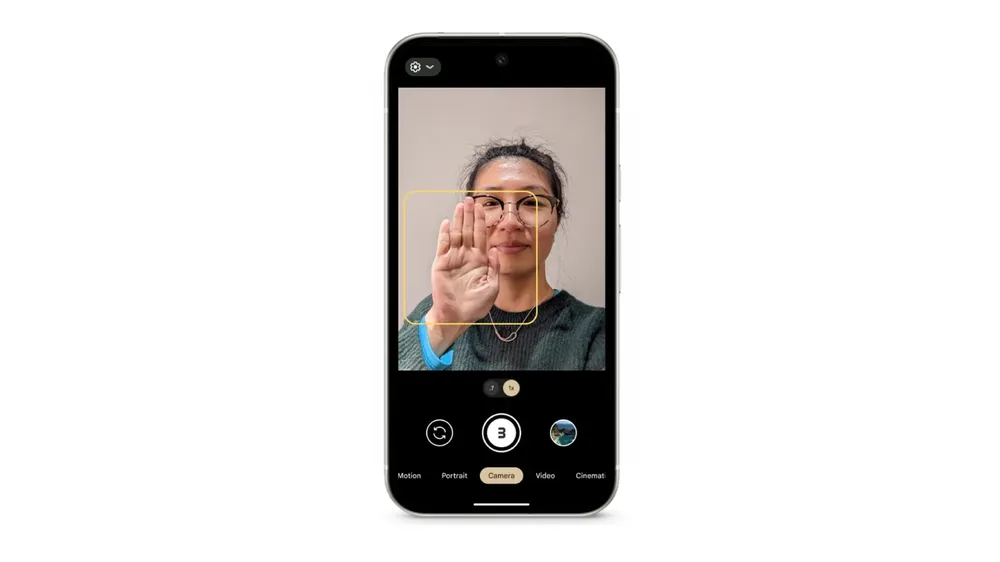
Palm Timer
Palm Timer eliminates the frantic rush to join group photos after setting up your phone. Simply position or prop up your device, then raise your palm toward the camera as if signaling “we’re ready.” Lower your hand to trigger the countdown and capture the moment.
Conversational Editing
Through the Google Photos app on your Pixel, conversational editing enables intuitive, natural adjustments to your images. Request changes like “remove the tree behind our heads” or “add a rainbow over the group” to give your photos the perfect final touch.
Bug Fixes
Google Pixel Camera 10.1 update 2 may have addressed the following issues:
Despite these improvements, several long-standing issues continue to plague Pixel camera performance:
Video Jitter Problem Persists
One of the most frustrating issues for Pixel users – constant video jitter. Multiple users in the forums discussion confirmed that the video jitter issue is still present on their Pixel 10 Pro devices after installing the update. This has been a persistent problem that users have been hoping Google would address for quite some time.
Camera app crashing
The latest Pixel camera 10 app update still constantly crashes on my Pixel 9 Pro XL. Users find the same results as the past 2 uploads. It’s also worth mentioning that the original .20 is the only one that seems to work well on most Pixel devices running Android 16.
Sensor Transition Problems
The janky sensor transitions between different camera lenses. While some users report slight improvements on newer models like the Pixel 10 Pro compared to earlier generations, the transitions still don’t match the smoothness of competitor devices like the iPhone. The issue appears to be partly hardware-related due to sensor placement, making it challenging to resolve through software updates alone. This update may have fixed it.
Performance and Functionality Concerns
Some users reported that editing 50MP photos has become significantly slower and more laggy following the update. This performance degradation affects the user experience when applying filters or adjusting settings like shadows and highlights, which could be particularly frustrating for users who frequently work with high-resolution images.
Additional issues plaguing the Pixel Camera, expected to have been fixed in the latest update:
- Rapid-fire burst photography at full resolution
- More dedicated shooting modes or customizable profiles
- Better video mode management (users currently need to switch between 4K and 1080p to access certain features like action stabilization)
What did we find in the Google Pixel Camera 10.1 Update?
Our APK Breakdown of the Google Pixel Camera 10.1 revealed the following code.
More Material 3 Expressive design updates for the following elements:
<public type=”color” name=”settingslib_expressive_color_main_switch_bar_bg” />
<public type=”color” name=”settingslib_expressive_color_main_switch_text” />
<public type=”color” name=”settingslib_expressive_color_switch_thumb” />
<public type=”color” name=”settingslib_expressive_color_switch_thumb_icon” />
<public type=”color” name=”settingslib_expressive_color_switch_track” />
New RAW features added in Pixel Camera 10.1. The code “Pixel Automatically Frame Your Photo Using Hints DA Dynamic” suggests automatic framing of the photos while using raw feature. RAW gets more Gemini AI integration with “Scene Descriptions from Gemini” and “Pixel Choose How to Take Your Photo”
We found the following code exclusive to Pixel Camera 10.1 and above.
<public type=”raw” name=”W_Pixel_Automatically_Frame_Your_Photo_Using_Hints_DA_Dynamic” />
<public type=”raw” name=”W_Pixel_Choose_How_to_Take_Your_Photo_DA_Dynamic” />
<public type=”raw” name=”W_Pixel_Get_Scene_Descriptions_from_Gemini_DA_Dynamic” />
The following code suggests new features:
<public type=”string” name=”capture_and_review_activated_action_description” />
<public type=”string” name=”capture_and_review_activated_description” />
<public type=”string” name=”capture_and_review_deactivated_action_description” />
<public type=”string” name=”capture_and_review_deactivated_description” />
<public type=”string” name=”sudCardViewFontFamily” />
<public type=”string” name=”sudFontExpressive” />
<public type=”string” name=”sudFontSecondary” />
<public type=”string” name=”sudFontSecondaryMedium” />
<public type=”string” name=”sud_back_button_label” />
<public type=”string” name=”sud_less_info” />
<public type=”string” name=”sud_more_button_label” />
<public type=”string” name=”sud_more_info” />
<public type=”string” name=”sud_next_button_label” />
Google Pixel Camera 10.1 APK Download
Download new Pixel Camera 10.1.076.821848723.18 APK is now available for download from Android 16 or later. It is a bundled APKs or APKM or ZIP file and not a simple APK file.
Google Pixel Camera 10.1 targets Android 16+ only. Therefore, only devices running a stable Android 16 or QPR2 Beta will receive this update.
Starting with Android 11, Google released apps in Split APKs (multiple APKs) format. This means the app is split into several packages including the base and config APK files. This solves the compatibility issue and helps install apps like the Google Camera APK on any Android device featuring different dpi, screen resolution, screen size, architecture, and more.
- Download Pixel Camera 10.1 APK for phones
- APK Mirror (rename .apkm to .zip)
- Installation
Get Pixel Camera 10.1 from Play Store
Alternatively, you can download the app update from the Play Store here.


