
Stable Wear OS 6 Released with October Update: Force Download Android 16 on Pixel Watch

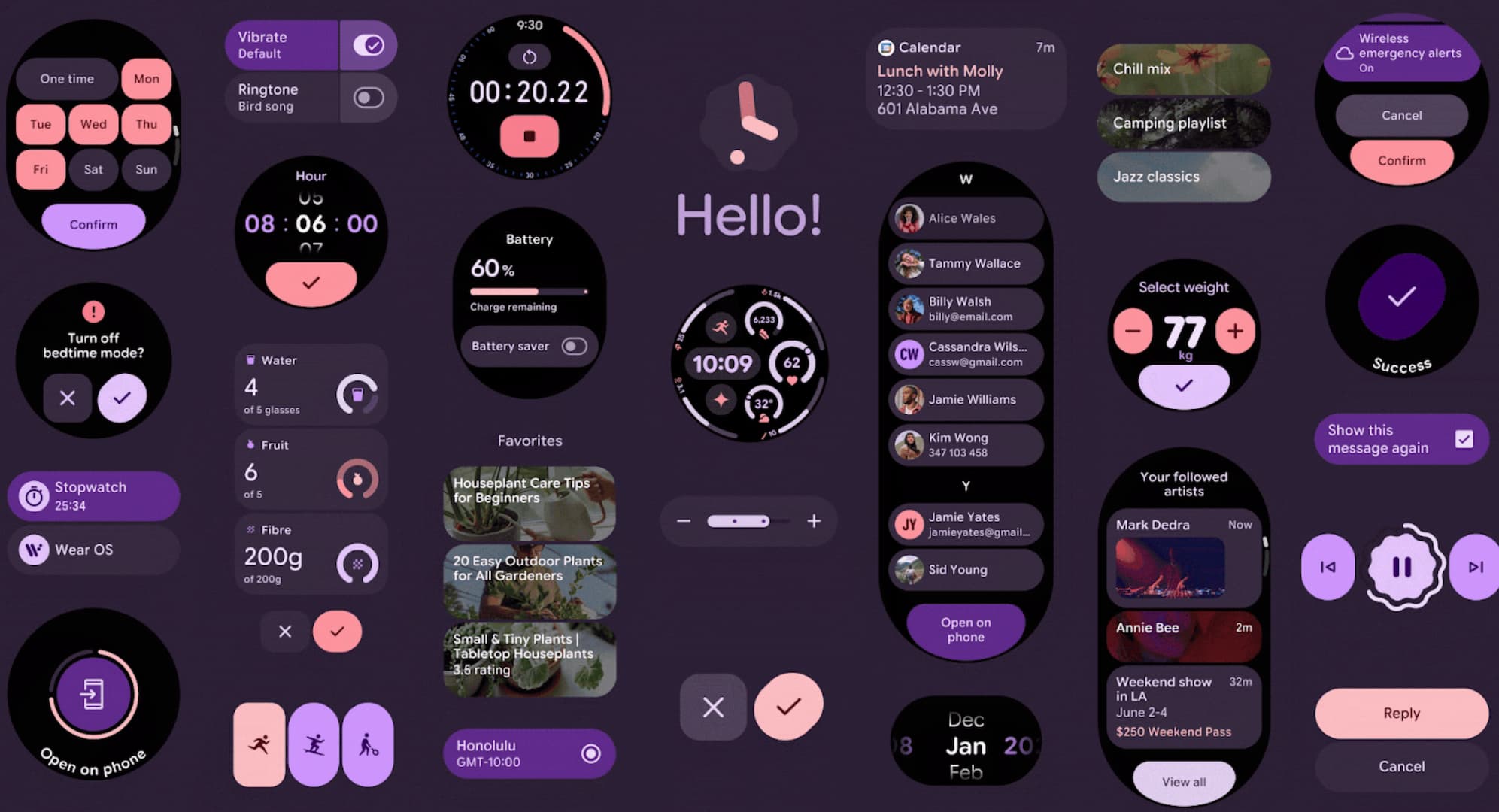
The wait is finally over for Pixel Watch owners. Google has officially begun rolling out the highly anticipated October 2025 software update, delivering WearOS 6 to eligible devices. This significant update marks a major milestone in Google’s smartwatch ecosystem, bringing a comprehensive design refresh like Material 3 Expressive, Gemini AI, and several practical improvements that enhance the functionality of the Google Pixel Watch lineup.
According to the official announcement from the Google Pixel Watch Support Team, the October 2025 update began its phased rollout today, with distribution continuing over the coming weeks. This staggered approach is standard practice for major software updates, as the rollout depends on various factors, including carrier partnerships and specific device models.
Users should expect to receive a notification directly on their watch once the software update becomes available for their particular device. This notification-based system ensures that users don’t miss the opportunity to upgrade to the latest software version, though patience may be required as the update reaches different regions and carriers at different times.
However, we have a way to force download the update right on your Pixel Watch. Reportedly, Pixel Watch 3 and Pixel Watch 2 users can download the Wear OS 6 OTA update immediately. For Pixel Watch 1, the update seems to have been delayed. Stay tuned.
The global software version for Pixel Watch 2 and Pixel Watch 3 is BP3A.250905.014.W3, which includes the BC25 update package containing all the new features and improvements.
Full Feature List: What’s new in Wear OS 6?
Wear OS 6 focuses on Material 3 Expressive design, offers 10% better battery life, enhanced components for round displays, and improves security with passkeys. It also brings new Watch Faces, including Facer, IMEFLIK, WatchMaker, Pujie, and Recreative. IN addition, you can download the new Pixel Watch 4 watch faces now.
The new featrues in on the software update page says:
BC25 Styles & Component Adoption
- Dynamic color theming
- Rounded fonts & icons
- New Wear 6 components (Edge buttons, Pickers, Dialogs, Scrollbar, etc.)
- Updated Tile templates/layouts
Google Maps auto-launch on Wear OS watches
- Stay on track with directions that auto-launch on your smartwatch when you walk or bike with the latest version of Google Maps app
Safety Check Timer Extension
- Users can add time to an active Safety Check.
Device Applicability
Applicable updates are available for the following models:
- Pixel Watch 2
- Pixel Watch 3
Here are the detailed features for Wear OS 6.
Material 3 Expressive
Wear OS 6 introduces Material 3 Expressive, a fresh design system that takes full advantage of the circular display format found on most smartwatches. This isn’t just a visual refresh—it’s a complete rethinking of how users interact with their wearable devices.
The new design language prioritizes personalization, offering users experiences that feel more modern, relevant, and distinct. What makes this particularly exciting is that Material 3 Expressive isn’t limited to Wear OS—it’s coming to Android and all Google apps across these platforms later this year, creating a cohesive ecosystem experience.

Dynamic Color Theming
One of the most visually striking features of Material 3 Expressive is the introduction of dynamic color theming. This automatically generates a color scheme for apps and tiles that matches the colors of the watch face (currently confirmed for Pixel watches). This feature creates a more unified, personalized experience that adapts to user preferences without any additional configuration.
Apps using the new Wear Compose Material 3 and Wear ProtoLayout Material 3 libraries will benefit from:
- Updated and extended color schemes
- Refined typography and shapes
- Automatic alignment with the system font (on Wear OS 6+ devices)

Gemini for Wear OS
The biggest change is Gemini assistant coming to smartwatches. Google officially announced that Gemini is replacing the legacy Google Assistant on Android phones, Wear OS, Android Auto, and even Android TV/Box.
Take a look at Gemini working on Wear OS:
Gemini is coming to your Wear OS smartwatch sooner than later with natural talking language. No need for awkwardly typing into a tiny watch screen or tap every time you want the buggy assistant to work.
Gemini can connect to your apps. So you can ask about anything, including opening times of a restaurant, about emails you sent to your friends and get the answer right on your wrist — without needing to pause the work you are doing and pull out your phone.
Enhanced User Experience with Improved Components
Edge-Hugging Button
The new EdgeButton component is specifically designed for circular displays, hugging the edge of the screen to maximize the available space. This intuitive design comes in four standard sizes and represents a clever solution to the unique challenges of designing for a round interface.

Transforming Lists with Fluid Motion
The TransformingLazyColumn introduces expressive motion that follows the contours of the circular display. This component allows for customizable collapsing behaviors when scrolling, with elements like cards scaling down as they approach screen edges—creating a more intuitive visual hierarchy.
Complementing this is the new ScrollIndicator, featuring refined visual and motion design to help users better visualize their progress through lists. This indicator appears by default when using TransformingLazyColumn and ScreenScaffold components.
Three-Slot Tile Layout
To improve consistency across the Tiles carousel, Wear OS 6 introduces a standardized three-slot tile layout:
- A title slot at the top
- A main content section in the middle
- A bottom slot for additional functions
This structured approach works seamlessly across different screen sizes while making information more glanceable and improving the user’s ability to take quick actions.

Performance Improvements
Perhaps one of the most welcome aspects of Wear OS 6 is that all these visual enhancements don’t come at the expense of battery life. In fact, Google claims that watches updating from Wear OS 5 to Wear OS 6 can see up to 10% improvement in battery life thanks to platform optimizations.
This addresses one of the long-standing challenges with smartwatches—balancing rich functionality with the need for all-day battery life. Users no longer need to choose between attractive visuals and longer time between charges.
Watch Face Enhancements
Watch face developers haven’t been forgotten in this update. Wear OS 6 brings version 4 of the Watch Face Format, offering new customization options including:
- Animated state transitions between ambient and interactive modes
- Support for photo watch faces
- A new API for building watch face marketplaces
Google partnered with well-known watch face developers including Facer, TIMEFLIK, WatchMaker, Pujie, and Recreative in designing this new API. All of these developers will be bringing their unique watch face experiences to Wear OS 6 using Watch Face Push.

From left to right, Facer, Recreative and TIMEFLIK watch faces have been developing marketplace apps to work with watches running Wear OS 6.
These additions provide watch face creators with more tools to deliver unique, personalized experiences to users.
Security and Authentication Improvements
Starting with Wear OS 5.1 on Google Pixel Watch devices (and continuing in Wear OS 6), the CredentialManager API introduces passkeys to Wear OS with a platform-standard authentication UI.
This unified API simplifies implementation for developers while providing users with consistent authentication experiences. The system supports passkeys, passwords, and Sign in With Google, while still allowing developers to maintain other authentication solutions as backups.
Most importantly, this enables users to authenticate directly from their watch without needing their phone nearby—a significant step toward making smartwatches more independent devices.
Enhanced Media Controls
Users listening to media content will appreciate the enhanced controls available on devices running Wear OS 5.1 or later:
- Fast-forward and rewind functionality for podcasts
- Access to playlists through a new menu
- Additional controls for shuffle, like, and repeat options
Developers with existing implementations of action buttons and playlists will benefit from these features with minimal additional effort.
How to download Wear OS 6 on Pixel Watch?
- Disconnect your watch from your phone. (It is better to download the update directly on your smartwatch)
- Connect your Pixel Watch to WiFi network.
- On your watch, go to Settings > System Update > Check for update.
- Download and install the Pixel Watch update.
- Enjoy your latest update.
Force update Pixel Watch
- Go to the system update screen on your watch
- Find the little watch icon on the update screen.
- Keep tapping it until it forces the OTA update download notification.
