
Downlaod One UI 8 Watch Beta for Galaxy Watch 6 Series Starting with the United States

Samsung has officially launched the highly anticipated One UI 8 Watch Beta Program, with OTA downloads now available for Galaxy Watch 6 models (including Bluetooth, Classic, and T-Mobile variants) across the United States. This comprehensive update introduces numerous health-focused features designed to enhance daily wellness routines, incorporating all improvements previously announced in Samsung’s Android 16-based beta program for Galaxy Watch 5 and newer devices.
US users with compatible devices on select carriers, including T-Mobile, can now access the One UI 8 Watch Beta Program for their Galaxy Watch 6 and Classic models. The update arrives with firmware build ZYI4 and requires approximately 1.7 GB of storage space, while also delivering the latest September 2025 security patch for enhanced device protection.
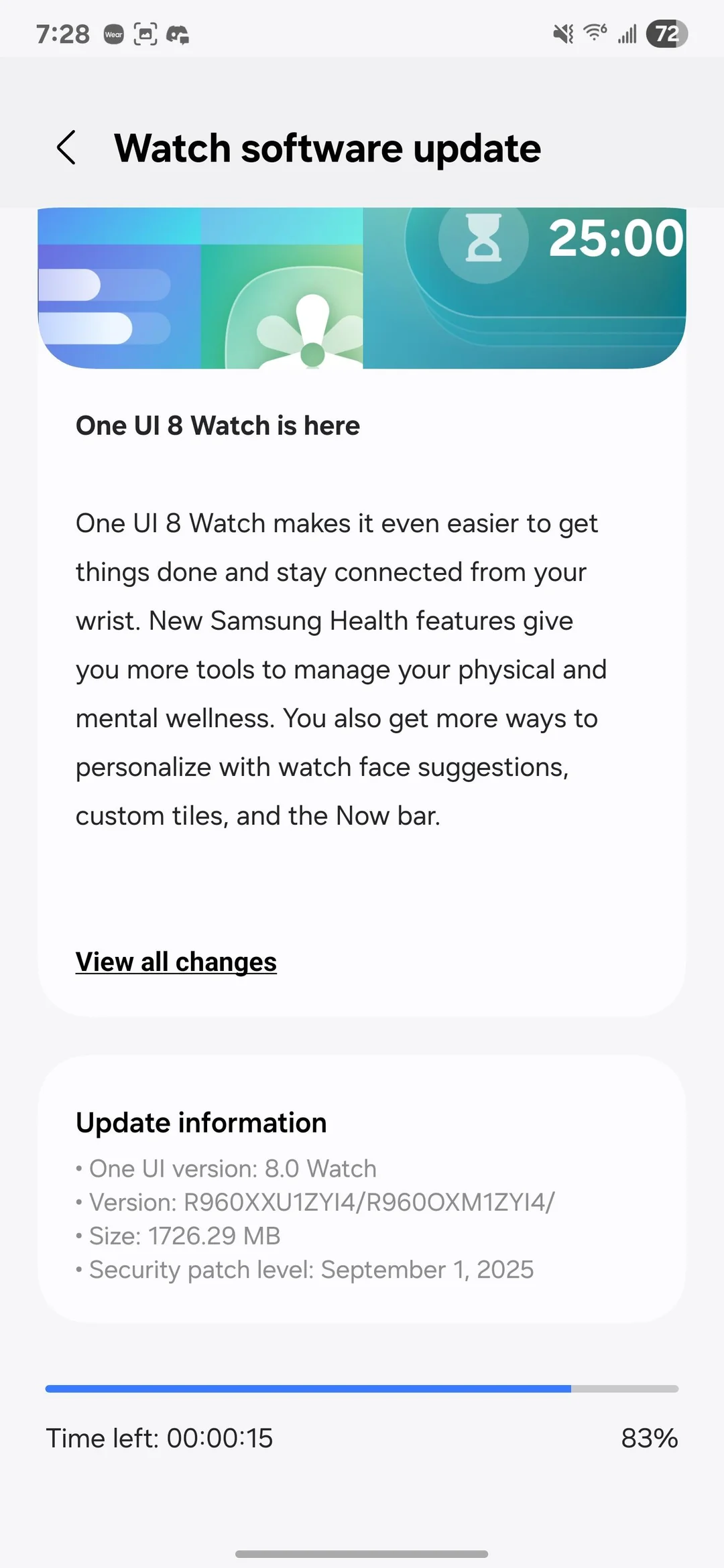
Samsung’s One UI 8 Watch update builds upon the solid foundation of previous software iterations, introducing an extensive collection of features that support comprehensive sleep monitoring, advanced heart health tracking, enhanced fitness capabilities, and intelligent nutrition guidance. The platform empowers users to develop and sustain healthier daily habits through sophisticated biometric monitoring systems and personalized wellness recommendations tailored to individual needs.
One UI 8 Watch Full Changelog
One UI 8 Watch Upgrade focuses on 4 core features Bedtime Guidance, Vascular Load, Running Coach, Antioxidant Index. See all features in detail here — Samsung’s One UI 8 Watch Beta Program announced. The One UI 8 Watch full changelog is listed below, detailing all the features.
Get things done
Stay on top of important tasks with the Now bar
Check the information you need right now and start essential features straight from your watch face. Ongoing tasks will appear in the Now bar at the bottom of your watch face so you can check key information quickly.
Do more with double pinch
Just pinch your thumb and index finger together twice to scroll through notifications, control music, take pictures, and more. You can also customize what happens when you double pinch on the watch face, music controller, as well as alarm, calendar, and reminder alerts. Choose the actions you need most in each situation.
Mark reminders as important
Mark reminders as important by tapping the Star icon. Important reminders will appear at the top of your reminder list to make sure you notice them.
New charging effects
When your watch is charging, the new screen layout and animations make it easier to check the current battery level and remaining charging time.
Stay connected
Easily respond to notifications and alerts
Use gestures to quickly respond to notifications and alerts. When a notification appears, you can double pinch to view the details or send a reply. You can also shake your wrist to return to the watch face.
Enhanced notification view
Notifications on your watch are now easier to use with an attractive new design. Notifications from the same app are stacked vertically, allowing you to view more notifications with fewer swipes.
Smarter notification settings It’s now easier to decide how to receive notifications from your phone on your watch. If you choose Smart device selection, notifications will appear on your phone only when you’re using it and on your watch when you’re not using your phone. If you choose Always show on both, notifications will always appear on both your phone and watch.
Upgrade your health
Bedtime guidance
Get to sleep at the right time so you wake up feeling refreshed. The new Bedtime guidance feature analyzes your sleep data and recommends the best time to go to sleep each night.
Mindfulness
Manage stress and anxiety in your daily life with the new Mindfulness feature in Samsung Health. You can keep track of your moods and emotions and practice breathing exercises to reduce stress.
Tailored to you
Find the perfect watch face
It’s now easier to find the watch face that’s right for you. Just choose a few keywords such as your preferred style, color, and information to show. The best matches will be suggested from our collection of more than 300 watch faces.
Recommended watch faces
Discover new watch faces that you might like. Watch faces with colors, style, or information similar to your current watch face will be recommended on the watch face selection screen.
Create your own tiles
Create your own custom tiles that show the information you need. You can even combine information from different apps into a single tile. You can include weather information, calendar events, reminders, and more.
Personalized Apps screen
Featured apps now appear at the top of your Apps screen to give you quick access to the apps you need the most. Apps will be featured based on how often you use them and other usage patterns. You can also view your apps as a list with names instead of only icons.
Choose calendars to show on your watch
You can now choose which calendars to show in the Calendar app on your watch. You can show all of the same calendars that are on your phone or customize to show only the calendars you need.
Learn more at: https://doc.samsungmobile.com/SM-R960/XAA/doc.html
One UI 8 Watch Feature Compatibility Guide
Universal Health Features
Vascular Load, Running Coach, and Antioxidant Index work with Android smartphones running Android 10 or higher and require Samsung Health app version 6.30.2 or later. Note that Vascular Load and Antioxidant Index are currently experimental Labs features that can be disabled in Samsung Health settings if desired.
Sleep and Health Monitoring
Bedtime Guidance requires Android 11 or higher smartphones with Samsung Health app version 6.30.2 or later. This feature analyzes three days of sleep data to provide personalized recommendations based on your sleep pressure and circadian rhythm patterns. These features are designed for wellness purposes and should not be used for medical diagnosis or treatment of sleep disorders.
Device-Specific Requirements
Galaxy Watch Ultra and Later Models
- Vascular Load monitoring requires wearing your Galaxy Watch during sleep for at least three nights within a 14-day period
- Antioxidant Index measurements are taken by placing your finger (preferably thumb for optimal accuracy) on the device’s rear sensor for five seconds. Users with uneven skin texture may experience measurement variations
Galaxy Watch 7 Series and Later Models
- Running Coach functionality requires completing an initial fitness assessment to establish your running level before accessing personalized training programs
Beta Program Eligibility
The One UI 8 Watch Beta Program is currently available to users in Korea and the United States who own Galaxy Watch 5 series or newer devices.
Sleep Apnea Detection
Available as an over-the-counter software application on compatible Galaxy Watch models paired with Galaxy smartphones, this feature detects signs of moderate to severe obstructive sleep apnea in adults aged 22 and older through two-night monitoring periods. This on-demand feature is not suitable for users previously diagnosed with sleep apnea and should not replace professional medical consultation. Availability varies by region, carrier, and device model.
Important Disclaimers
All Samsung Health features are intended for general wellness and fitness tracking only. Measurements serve as personal reference data and should not substitute professional medical advice. A Samsung account login is required for full functionality.
How to download One UI 8 Watch Beta?
Users with Watch 7 or Ultra will get a notice in Samsung Members app to join the One UI 8 Watch Beta Program. Here is how to sign up for One UI 8 Beta Program?

