
How AI Is Changing Document Digitization: From Android Apps to Professional Scanners

Subscribe for Updates
Paper documents are still part of everyday life, from receipts and contracts to textbooks and business records. The difference today is how we digitize them. Thanks to AI, turning paper into searchable, editable digital files has become faster and more accurate than ever before.
For Android users, scanning apps like Google Drive, Microsoft Lens, and Adobe Scan make it easy to capture documents with just a smartphone. At the same time, AI is also making professional scanners smarter with features such as intelligent OCR, automatic page flattening, image enhancement, and smart cropping. Whether you’re scanning a few pages for personal use or digitizing large volumes of documents for work, AI-powered tools can simplify the entire document workflow. In this article, we’ll explore how AI is transforming document digitization, compare Android scanning apps with professional scanners, and help you decide which solution best fits your needs.
Why AI Is Transforming Document Digitization
AI is making document digitization faster, smarter, and more accurate. Beyond creating digital copies, it can automatically recognize text, enhance image quality, classify documents, and extract key information, reducing the need for manual work.
According to Gartner, AI can automate up to 80% of document processing tasks, helping organizations improve efficiency while reducing repetitive work. Combined with OCR, AI also creates searchable and editable documents, making information easier to organize, retrieve, and share. Whether for personal use or business workflows, AI is transforming document digitization into a more intelligent and productive process.
AI-Powered Android Scanning Apps
For most Android users, mobile scanning apps are the easiest way to start digitizing paper documents. Powered by AI, these apps can automatically detect document edges, correct perspective, enhance image quality, and apply Optical Character Recognition (OCR) to convert printed text into searchable digital files. Whether you’re scanning receipts, contracts, or study materials, AI helps make the process faster and more accurate.
Google Drive
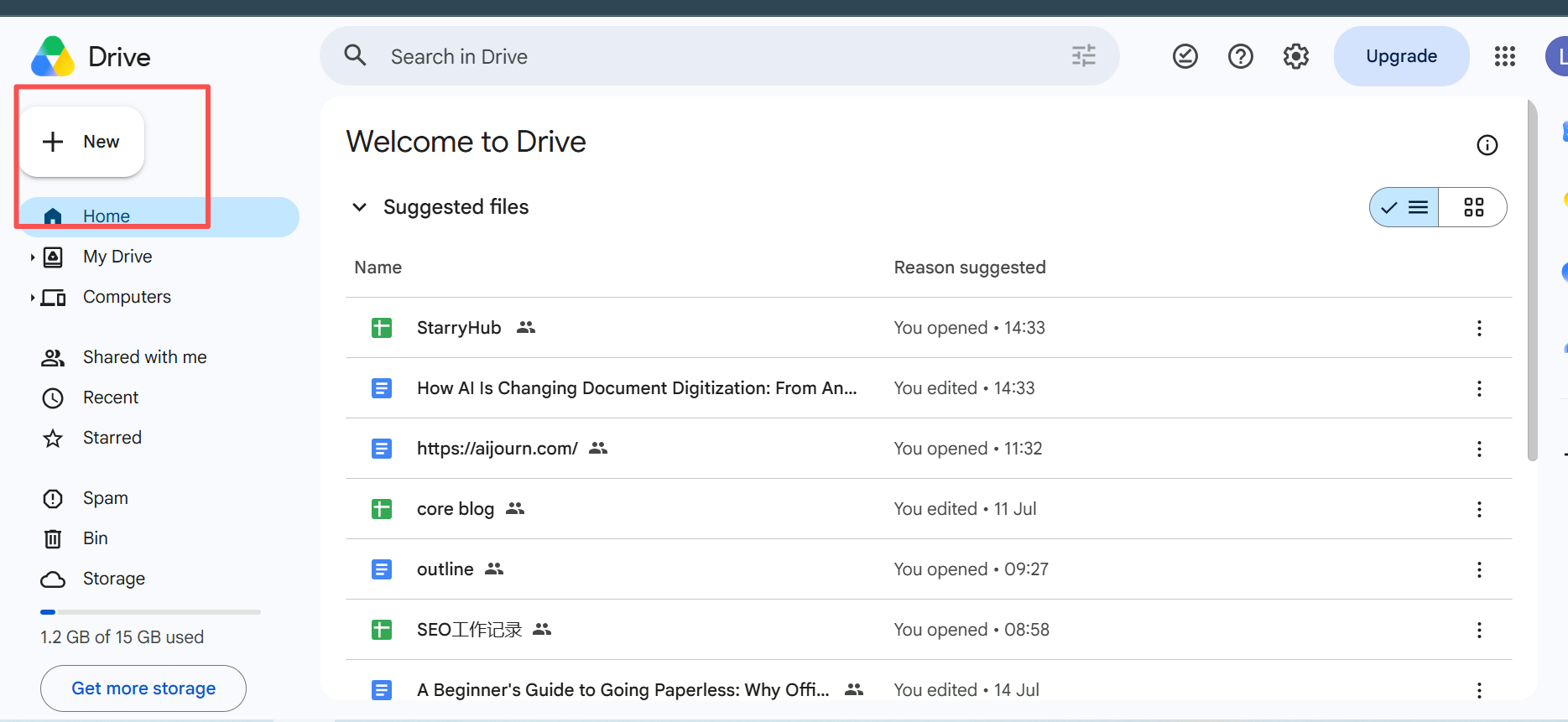
Google Drive offers a built-in document scanner that requires no additional software. Simply tap the “+” button, select Scan, and capture your document with your phone’s camera. AI automatically crops the page, adjusts the perspective, and enhances readability before saving it as a PDF directly to Google Drive. Because the file is stored in the cloud, you can access and share it across devices at any time.
Best for: Receipts, invoices, personal documents, and cloud backups.
Microsoft Lens
Microsoft Lens is designed for both personal and professional use. It offers multiple scanning modes, including Document, Whiteboard, Business Card, and Photo, allowing users to capture different types of content more effectively. AI improves text clarity and performs OCR, making scanned documents searchable and editable. Files can also be exported directly to Word, PowerPoint, OneNote, or OneDrive, making it an excellent choice for Microsoft 365 users.
Best for: Office documents, meeting notes, whiteboards, and business cards.
Adobe Scan
Adobe Scan focuses on creating high-quality PDFs with minimal effort. AI automatically detects page boundaries, removes shadows, sharpens text, and enhances image quality before generating a clean PDF. Built-in OCR converts printed text into searchable content, allowing users to quickly find information or continue editing documents in Adobe Acrobat.
Best for: Contracts, forms, reports, and multi-page PDF documents.
Which Android Scanning App Should You Choose?
All three apps use AI to simplify document digitization, but they serve slightly different needs. Google Drive is ideal for users who want a quick, built-in scanning solution with cloud storage. Microsoft Lens stands out for productivity and Microsoft Office integration, while Adobe Scan offers the best PDF optimization and OCR experience.
For everyday tasks such as scanning receipts, ID cards, handwritten notes, or occasional paperwork, Android scanning apps provide a fast and convenient solution.
Where Android Scanning Apps Reach Their Limits
Android scanning apps are convenient for everyday tasks, but they aren’t designed for every scanning scenario. Their performance is ultimately limited by the smartphone camera and the conditions in which documents are captured.
One of the biggest challenges is scanning bound books. Curved pages, shadows near the spine, and uneven lighting can make text difficult to read and reduce OCR accuracy. Similarly, scanning large documents such as A3 drawings, newspapers, or magazines often requires multiple shots or manual adjustments.
Efficiency is another limitation. While mobile apps work well for scanning a few pages, capturing dozens or even hundreds of documents one by one can quickly become time-consuming. Maintaining consistent image quality across large batches is also more difficult when relying on a handheld device.
For users who frequently digitize books, archives, contracts, or large volumes of paperwork, these limitations can affect both productivity and scan quality. In these situations, a dedicated document scanner with AI-powered image processing provides a faster and more reliable solution.

How AI Makes Professional Scanners Smarter
While smartphone apps rely mainly on software, modern document scanners combine AI-powered image processing with dedicated imaging hardware to deliver faster, cleaner, and more accurate digitization. This combination is especially valuable when scanning books, bound documents, or large volumes of paperwork.
AI Curve Flattening
One of the biggest challenges when scanning books is page curvature, which can distort text and reduce OCR accuracy. AI curve flattening automatically detects curved pages and corrects the distortion, producing flat, natural-looking scans without forcing the book completely open.
Intelligent OCR
AI-enhanced OCR goes beyond simply recognizing printed text. By improving image quality before text recognition, modern scanners can generate more accurate, searchable, and editable documents, making it easier to archive, retrieve, and reuse information.
Smart Auto Cropping
Instead of manually adjusting every page, AI can automatically detect document boundaries, crop unnecessary backgrounds, and straighten pages. This saves time while ensuring every scan has a clean and consistent appearance.
Automatic Finger Removal
When scanning books, it’s often necessary to hold pages open. AI finger removal automatically detects and removes fingers from the final image while preserving the original page content, reducing the need for post-editing.
Together, these AI-powered features significantly improve scanning efficiency and image quality. Whether you’re digitizing books, reports, historical archives, or business documents, modern document scanners can produce cleaner, more accurate digital files with far less manual effort.
Building a Smarter Document Workflow
The real power of AI goes beyond scanning documents—it helps create a smarter, more connected document workflow. Rather than treating scanning as the final step, AI enables documents to move seamlessly from paper into searchable, shareable, and actionable digital information.
A typical AI-powered workflow looks like this:
Paper Documents → Professional Scanner → OCR → Searchable PDF → Cloud Storage → Android Phone → AI Apps
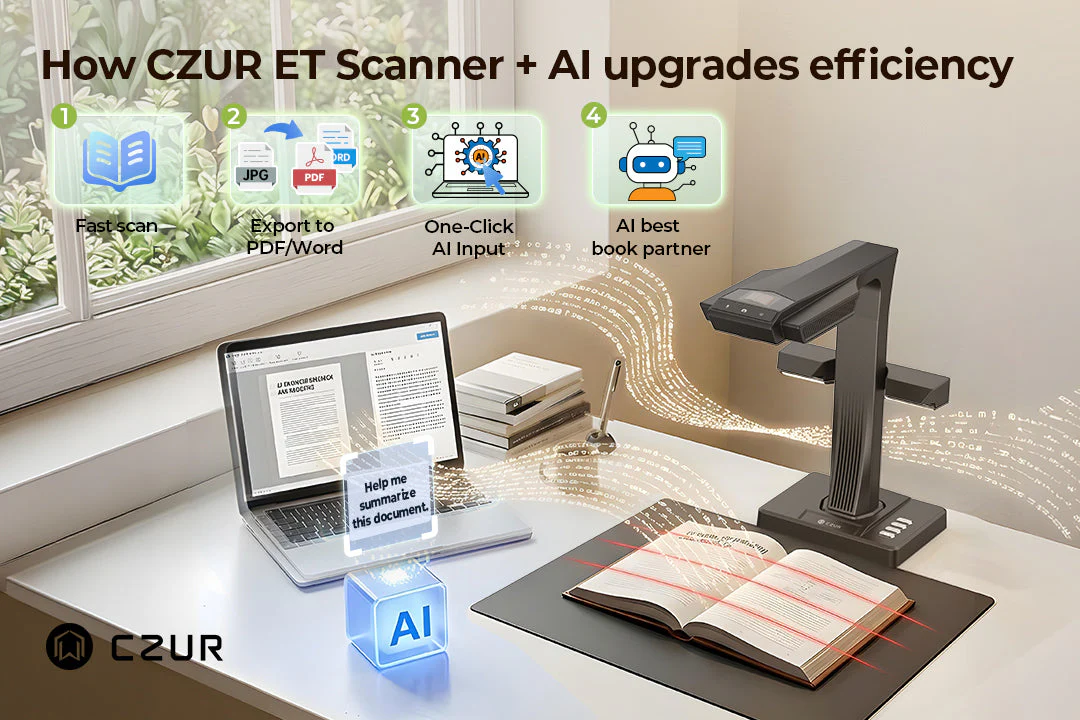
In this workflow, each tool has a different role. A professional scanner is responsible for capturing high-quality digital copies and converting them into searchable documents through OCR. Once the files are stored in cloud services such as Google Drive, OneDrive, or Dropbox, they become accessible from virtually anywhere.
Android devices then become the hub for everyday productivity. Users can review documents on the go, share files with colleagues, search for specific information, or use AI-powered apps like Gemini or ChatGPT to summarize reports, translate content, or extract key information in seconds.
By combining professional document digitization with cloud storage and AI applications, businesses and individuals can build a faster, more efficient paperless workflow without changing the way they work.
Conclusion
AI has made document digitization more accessible than ever. Android scanning apps are excellent for everyday tasks like receipts, forms, and personal documents, while professional scanners offer greater accuracy and efficiency for books, large archives, and high-volume workflows. The best solution depends on what you scan and how often you scan. For occasional use, a smartphone may be all you need. But if you regularly digitize documents or work with bound materials, a dedicated document scanner can deliver a faster, more reliable, and more professional scanning experience.
Meet Expressive Launcher — A Fresh Way to Android
The wait is over. Expressive Launcher has graduated from beta and is now stable and available to everyone on the Google Play Store. Download it today and experience a fresh way to customize your Android home screen.

Get started
