
Massive March 2026 Google Play System Update Released!

Subscribe for Updates
Google released a massive the 2026 Google Play System Updates, a distinct set of improvements separate from the monthly security patches. These updates enhance components such as the Google Play Store, Google Play Services, Android WebView, and Settings Services, among others.
While most smartphones receive over-the-air updates from their manufacturers, there is an additional layer of system updates that must remain current. Since Android 10, Google has maintained a dedicated channel known as Google Play system updates.
Unlike major Android version releases that happen annually, these updates occur every two weeks and touch multiple components of the Android experience. They encompass updates to the Android operating system itself, Google Play Store, Google Play services, and various system-level applications that work behind the scenes to keep devices running smoothly.
What makes these updates particularly significant is their reach across the Android ecosystem. They’re not limited to smartphones but extend to tablets, Android TV and Google TV devices, Android Auto-enabled vehicles, cars with Android Automotive OS, Wear OS devices, and even Chrome OS devices.
Typically, the Play System Updates provide improvements not only for Android OS but also for the Google Play Store, Google Play Services, Android WebView, Google Apps, and more.
What’s New in Google System Services: March 2026 Release Notes Breakdown
Google’s biweekly system service updates are easy to overlook — they arrive silently in the background, yet they shape the daily experience of billions of Android, Wear OS, TV, and PC users. The March 2026 release notes are packed with meaningful changes across security, connectivity, payments, gaming, and AI. Here’s a deep dive into everything that landed this month.
Why Google System Services Updates Matter
Before diving into the specifics, it’s worth understanding what these updates actually are. Google system services updates cover three core channels:
- Google Play services — the backbone layer powering authentication, location, notifications, and device APIs
- Google Play Store — the app distribution platform, constantly evolving its discovery and purchase experience
- Android System Intelligence / Private Compute Services — on-device AI and privacy-preserving compute layers
These updates roll out to phones, tablets, Android TV, Google TV, Android Auto, Android Automotive OS (cars with Google built-in), Wear OS, Chrome OS, and even Windows PCs (via Quick Share and Fast Pair). This cross-platform reach makes each release genuinely significant.
Google Play Services v26.12 — March 30, 2026
The final update of the month is one of the most feature-rich.
Wireless Emergency Alerts Get a Map View
This is arguably the most impactful safety improvement in the batch. Wireless Emergency Alerts — the loud, attention-grabbing notifications sent during natural disasters, AMBER alerts, and other crises — now include a map view directly within the alert notification. You can see the affected geographic area and your own location at a glance, without needing to open a separate app. For anyone who has ever received an alert and wondered “does this actually apply to where I am?”, this is a welcome and potentially life-saving addition.
Fast Pair Comes to Large Screens and Desktop PCs
Fast Pair, Google’s one-tap Bluetooth pairing technology, has expanded to desktop computers with Fast Pair for Large Screen. PC users can now quickly connect compatible Bluetooth accessories — headphones, mice, keyboards — to their desktop machines the same way Android phone users have been doing for years. This is a meaningful step toward a more unified Google device ecosystem.
System Updatability Improvements
Under the hood, system management updates across Auto, PC, Phone, TV, and Wear platforms improve Updatability — Google’s term for the infrastructure that allows the OS and services to be patched and updated more efficiently without requiring full firmware flashes.
Google Play Services v26.11 — March 23, 2026
Gemini, Search, Photos, Gmail, and Messages Integration
This update brings a notable feature package specifically for phones: new Android features from Gemini, Search, Photos, Gmail, and Messages. While Google hasn’t itemized every sub-feature here, this signals a deeper embedding of Gemini AI capabilities across core Android apps. Expect smarter contextual suggestions, improved search within apps, and AI-assisted workflows in messaging and email.
Maps API Expansion for Developers
Google expanded Maps-related APIs for Auto, Phone, TV, and Wear developers, enabling richer location-aware features in third-party apps across all form factors.
Device Storage and Stability Fixes
System management across all major platforms received updates focused on Device Storage and Stability — critical maintenance work that helps prevent slowdowns and crashes, especially on older or storage-constrained devices.
Google Play Store v50.7 — March 23, 2026
Smarter Review Search
Finding a specific review in an app’s “All Reviews” page can feel like searching for a needle in a haystack. With this update, you can now use search terms to filter and find reviews faster on the All Reviews page. This is a small but genuinely useful UX improvement for anyone doing due diligence before installing an app.
Google Play Services v26.10 — March 16, 2026
Wi-Fi Sync: Seamless Connectivity Across Your Devices
This is one of the most practically useful features of the month. Wi-Fi Sync allows trusted Wi-Fi networks to be shared and synchronized across a user’s personal device ecosystem. If you connect your phone to a new Wi-Fi network at a friend’s house, your tablet or PC can automatically gain access to that same network — no need to re-enter passwords on every device.
This is particularly valuable for households with multiple Android devices, and it positions Google’s ecosystem more competitively against Apple’s established iCloud Keychain Wi-Fi password sharing.
Google Play Store v50.6 — March 16, 2026
Try Before You Buy — Premium Games
Google Play is testing a limited-time trial model for select premium games, letting users play before committing to a purchase. This addresses one of the longstanding friction points in paid mobile gaming, where the lack of demos has historically pushed users toward free-to-play titles.
Wear OS Loading Animations
A small but polished touch: animated placeholders now appear while the Browse page loads on Wear OS devices. This reduces the jarring experience of staring at a blank screen while content fetches.
Google Play Services v26.09 — March 9, 2026
This update is one of the most feature-dense of the month.
Find Hub Gets Enhanced Security Options
Find Hub — Google’s device and item tracking platform — now includes additional security options. While specifics aren’t detailed in the release notes, this likely includes protections against unwanted tracking and more granular controls over who can locate your shared items.
Autofill and Credential Manager Coordination
A long-standing annoyance for Android users has been the occasional double-dialog situation, where both Autofill with Google and Credential Manager simultaneously try to help you sign in or save a password. This update ensures the two systems coordinate to prevent simultaneous dialogs, creating a smoother, less cluttered sign-in experience.
Wallet Enhancements: Pay from Your Wrist, Anywhere
Two major Wallet improvements landed here:
- Wear OS users can now pay at retail stores directly from their watch without launching the Wallet app. This is a significant quality-of-life improvement for contactless payments — previously requiring a few extra taps.
- Expanded support for digital credentials on Phone, which broadens the types of IDs and verifiable credentials that can be stored and presented digitally.
WebView Brightness Control
An interesting addition to Account Management: users can now control screen brightness within WebViews — the embedded browser windows used by many apps. This is a welcome accessibility improvement for in-app browsing.
Google Play Store v50.5 — March 9, 2026
This is the biggest Play Store update of the month, with several gaming-focused improvements.
PC Games on Play
Google is making a push into cross-platform gaming with PC Games on Play — a new feature allowing users to discover and play their mobile games on PC. Combined with the universal purchase feature below, this could be a significant move for Google’s gaming strategy.
Universal Game Purchases
Buy select games once and unlock access across phone, tablet, and PC. This mirrors Apple’s universal purchase model and is a strong incentive for users to buy premium titles through Google Play rather than platform-specific stores.
Wishlist with Price Drop Notifications
The revamped wishlist lets you save favorite games and receive notifications when prices drop — a feature that will be immediately useful for budget-conscious gamers eyeing premium titles.
Gamer Profile and Streaks — Faster Updates
Gamer Profile features like Streaks now update faster after game activity, making the social and achievement layers of Google Play Gaming feel more responsive and real-time.
Portrait Video on App Detail Pages
Selected apps can now feature **portrait-format videos in their “Latest update for Android TV: *Audit recording for user consent* has been enabled to enhance the screensaver/backdrop experience. This relates to how Android TV handles user consent when showing personalized content in the backdrop screensaver feature — important for privacy compliance, especially in European markets.
Themes and Takeaways from March 2026
Looking across all of March’s updates, a few clear strategic priorities emerge:
1. Ecosystem Unification
Wi-Fi Sync, Fast Pair for Large Screen, PC Games on Play, and universal game purchases all point to Google building tighter bridges between Android phones, tablets, Wear OS, and Windows PCs. The “Google device ecosystem” is becoming a more coherent concept.
2. Gaming Is a Serious Focus
Multiple Play Store updates this month were gaming-specific: trial play, universal purchases, price drop alerts, PC gaming integration, and faster Gamer Profile updates. Google is clearly investing in making Play a more compelling gaming platform.
3. AI Is Deepening Into Core Apps
The Gemini/Search/Photos/Gmail/Messages feature bundle in v26.11 signals that AI is no longer a separate feature — it’s being woven into the fabric of Android’s core experience.
4. Safety and Emergency Features Are Maturing
The map view in Wireless Emergency Alerts, combined with enhanced Find Hub security, shows Google is taking its role in user safety seriously.
5. Payments Are Getting Frictionless
Paying from a Wear OS watch without opening an app, and expanded digital credential support, continue Google’s push toward making Wallet the default identity and payment layer for Android.
How to download the latest Google Play System Updates?
- Google Play services: Go to Settings > Apps > Google Play services > About to see your current version.
- Google Play Store: Open the Play Store > tap your profile picture > Settings > About to see the version.
- Android System Intelligence: Found under Settings > Apps (you may need to show system apps).
If you’re not seeing the latest versions, ensure you’re connected to Wi-Fi and check for updates manually via the Play Store.
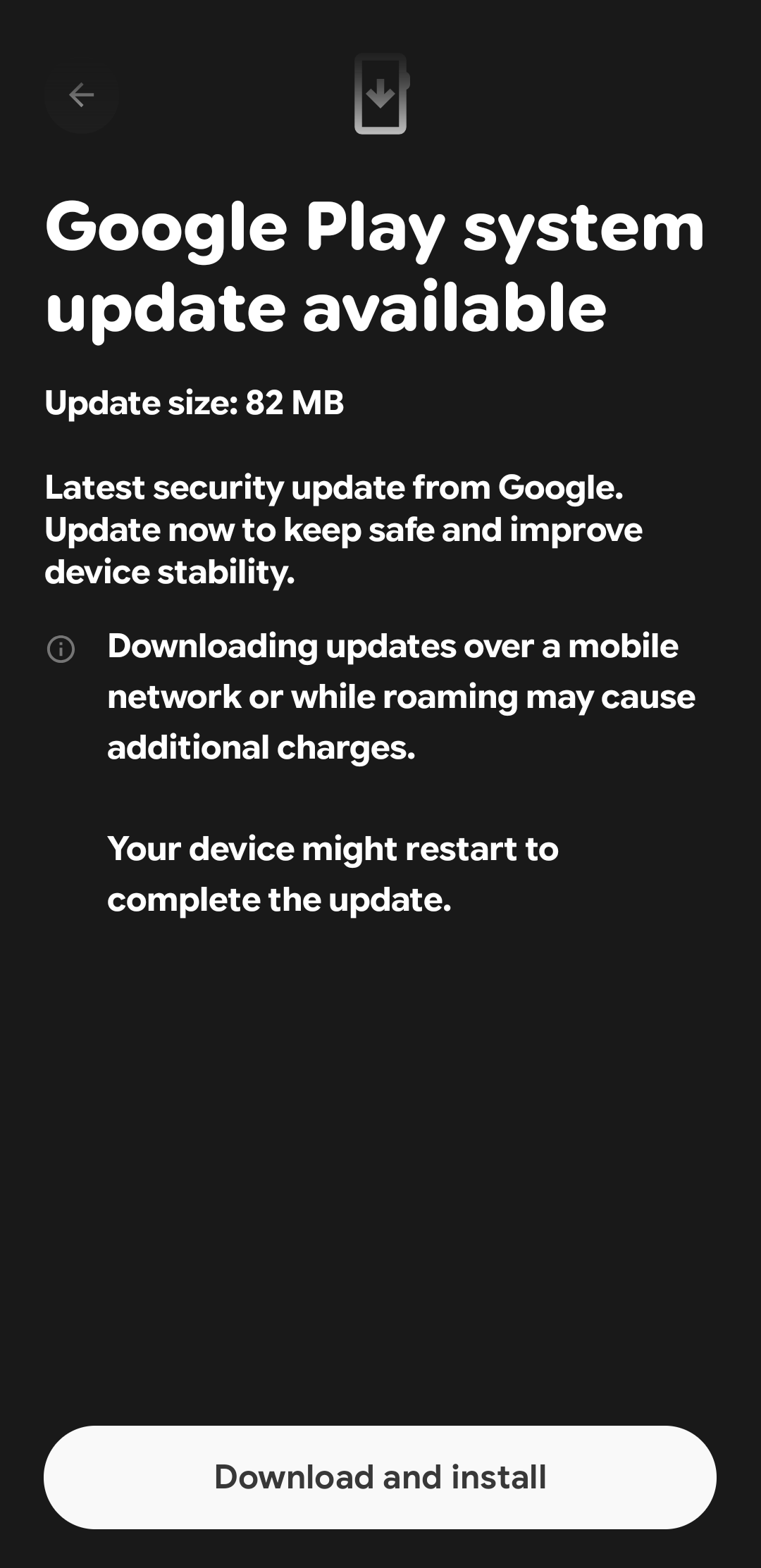
The Google Play System updates can be downloaded from Settings > Security and Privacy > Update > tap on Google Play System update.
This will download and install the latest version. If you haven’t updated it in a while, you will need to update it multiple times and start your phone.
There are two ways to get the latest Google System update manually.
- Navigate to Settings
- Security
- Tap on Google Play System Update
- Download and Install update
- Repeat until you reach the March 2025 update, at least.
On Samsung devices:
- Navigate to Settings
- About
- Software Information
- Tap on Google Play System Update
- Download and Install update
- Repeat until you reach the latest update, at least.

