
Download New Bixby AI APK from Samsung Galaxy S26 Ultra and One UI 8.5

Subscribe for Updates
Samsung just unveiled its newest and greatest Samsung Galaxy S26 Ultra device, featuring One UI 8.5 and a new Bixby version with AI integration. Hee, download the latest Bixby version wfrom the Galaxy S26 Ultra with the new features tested running on One UI 6 or newer Android Os versions.
Samsung has just made a bold move in the AI assistant space. With the announcement of the new Bixby in One UI 8.5, the company is repositioning its long-standing virtual assistant from a voice command tool into something far more useful. Samsung claims the new Bixby AI assistant is a genuinely conversational device agent. If you’ve ever fumbled through layers of settings menus trying to find that one elusive toggle, this update might be exactly what you’ve been waiting for.
What’s New in Bixby?
Let’s be honest — Bixby has had a rocky reputation. For years, it sat in the shadow of Google Assistant and Siri, often dismissed as a feature Samsung users accidentally triggered and quickly disabled. But the One UI 8.5 update signals a serious rethinking of what Bixby is supposed to be.
The core shift is this: Bixby is no longer just a command executor. It’s now designed to understand intent — the messy, imprecise way real humans describe what they want. You don’t need to know the exact name of a setting or the specific path to find it. You just describe your problem or your goal in plain language, and Bixby figures out the rest.
Device Control
One of the most genuinely practical improvements in this update is how Bixby handles device settings. Samsung’s own example illustrates this well: if you say “I don’t want the screen to time out while I’m still looking at it,” Bixby will activate the ‘Keep Screen on While Viewing’ feature automatically — no digging through Display settings required.
This is a small thing that represents a big idea. The settings menus on modern smartphones have become extraordinarily complex. There are hundreds of toggles, sub-menus, and options buried across multiple layers of the interface. Most users discover only a fraction of their phone’s capabilities because finding features is too cumbersome. Bixby’s new approach aims to democratize access to the full power of a Galaxy device.
Context-Aware Problem Solving
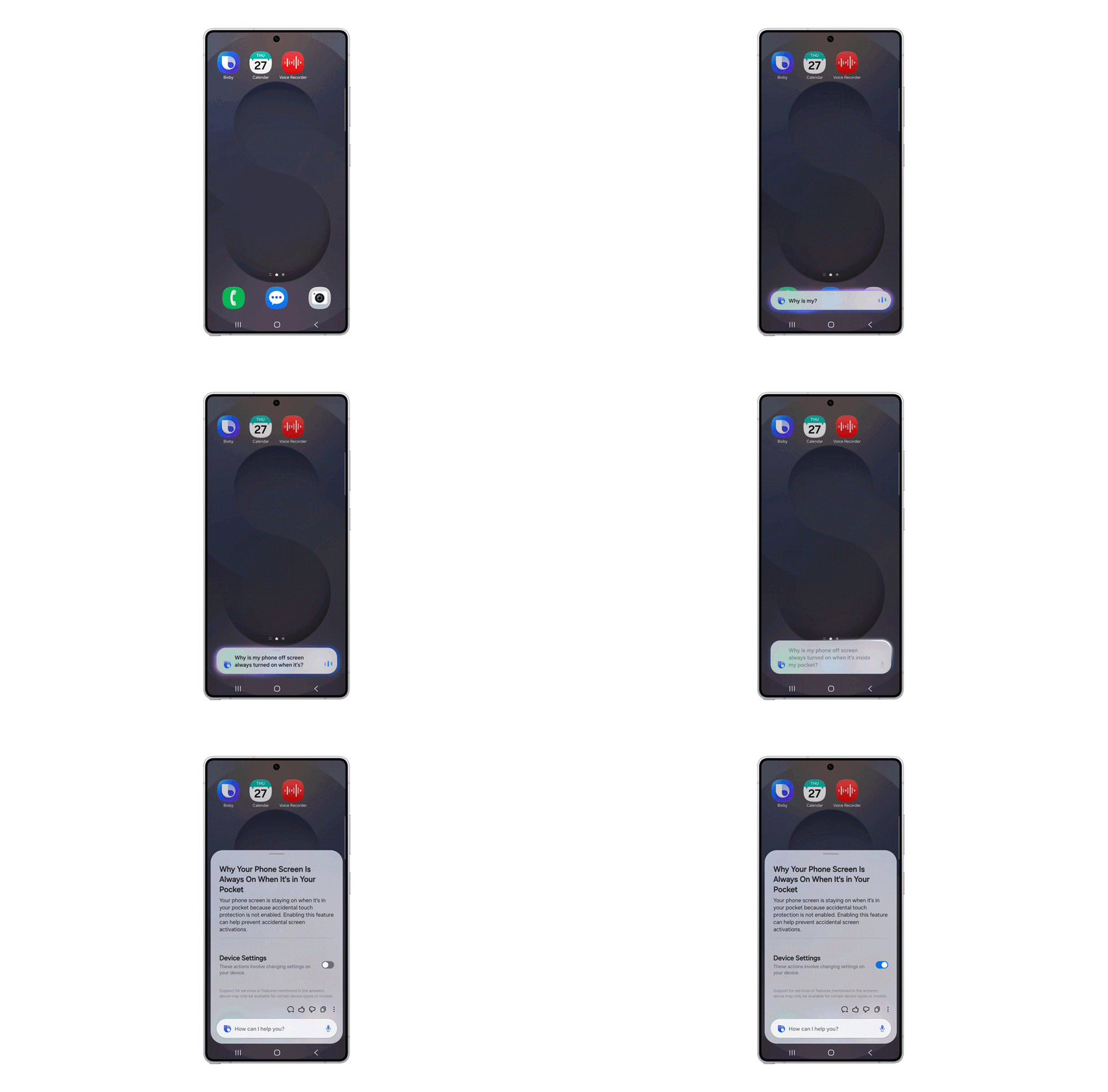
What makes this update particularly interesting is that Bixby doesn’t just execute commands — it can diagnose problems. Samsung gives the example of a user asking, “Why is my phone screen always on when it’s inside my pocket?” Rather than giving a generic tutorial, Bixby uses the context of the situation to identify relevant settings (like Accidental Touch Protection) and lets you toggle them on the spot.
This is a meaningful distinction. It’s the difference between a tool that does what you say and one that helps you understand what’s happening with your device. For tech-savvy users especially, this kind of guided troubleshooting could be transformative.
Reducing Trial and Error
Samsung also highlights that Bixby can identify your current settings before suggesting solutions. That means it tailors its response to your specific device state, rather than giving you a one-size-fits-all answer. This reduces the frustrating cycle of trying suggested fixes that don’t apply to your situation.
Real-Time Web Search
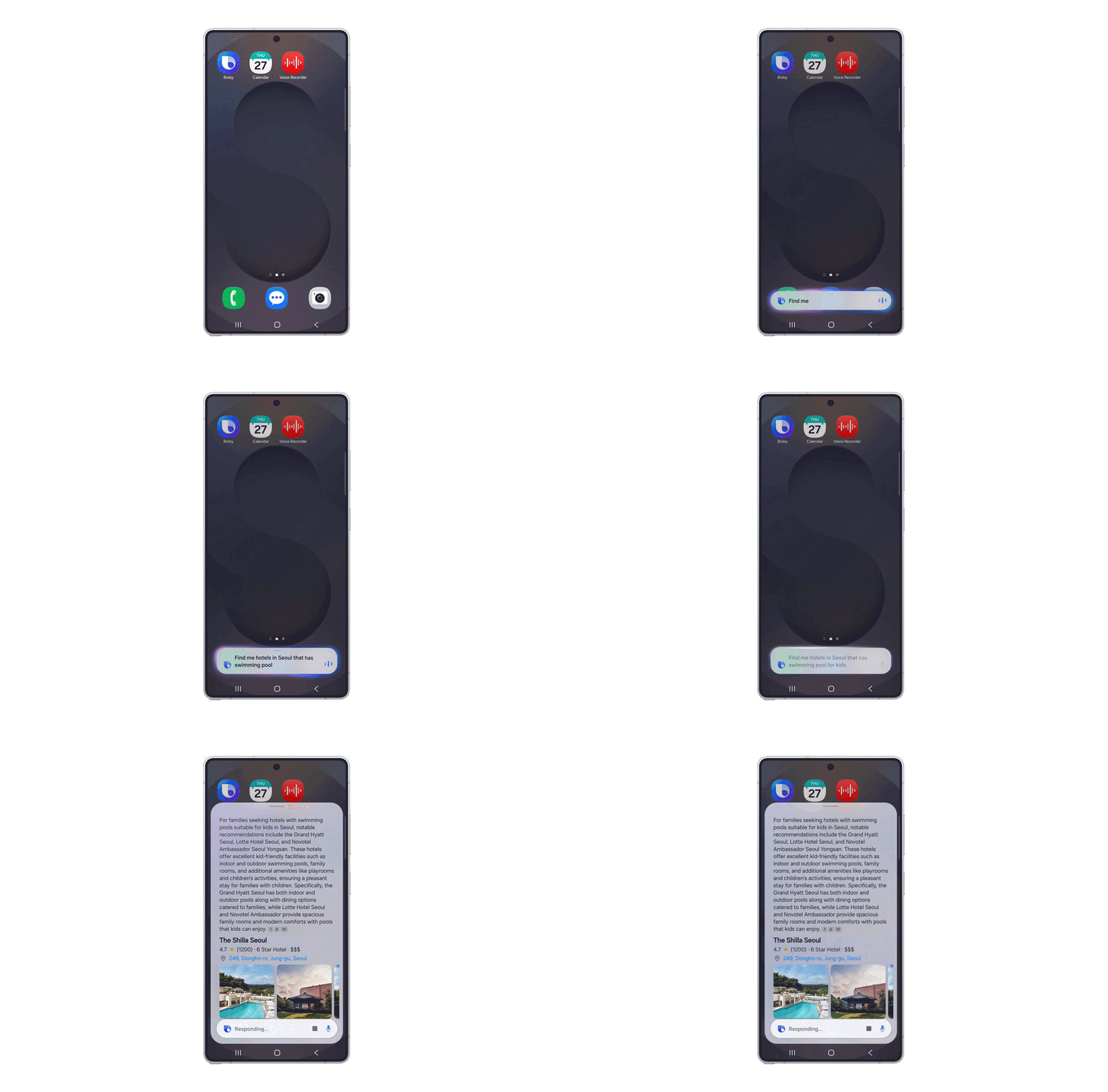
The second major pillar of the new Bixby is real-time web search — and the key word here is seamless. Previously, asking a question that required live information would typically punt you out to a browser or a separate app, breaking your focus and flow. Now, Bixby delivers web search results directly within its own interface.
Samsung’s example: “Find me hotels in Seoul that have swimming pools for kids.” Bixby processes this and surfaces relevant results without ever leaving the Bixby UI. For travel planning, quick lookups, or any query that requires current information, this creates a much more cohesive experience.
Access to live web data has become a baseline expectation for AI assistants in 2025 and 2026. Google’s Gemini, Apple Intelligence, and various third-party AI tools have all moved toward real-time information retrieval. Bixby’s addition of this capability signals that Samsung is serious about keeping its native assistant competitive rather than ceding that ground entirely to third-party alternatives.
Availability and Rollout
The new Bixby is launching as a beta program initially, with One UI 8.5 rolling out in Germany, India, Korea, Poland, the UK, and the US. Broader global expansion is planned to follow. Language support covers a solid range, including English (US and UK), German, Korean, French, Italian, Japanese, Mandarin Chinese, Spanish, and Portuguese — though Samsung notes that not all accents and dialects are fully recognized.
Alternatively, download the latest Bixby version from below and install it on your Samsung Galaxy device running One UI 8.5, 8, 7, and even OneUI 6. However, some features may be server-side.
Download Bixby from Galaxy S26 Ultra
Here, download Bixby 4.0.60.0 (arm64-v8a) (Android 14+) from Galaxy S26 Ultra.
- Download Bixby
- Bixby Live, Bixby Voice Wakeup
- APK Download (Thanks to Proshis_Saha_Swopna)
