
Google Play Store v49: Download Latest APK with Multi-App Downloads

Subscribe for Updates
The Google Play Store is the preferred destination for securely downloading Android applications and games. Recently, the App Store underwent a major redesign, featuring an integration of AI, quick question and answer sections, a review summary, and a rebranding of its logo. Here’s what’s new in the latest Google Play Store 49 and APK downloads.
Google System Services updates form the backbone of Android operating system upgrades. Instead of waiting months or years for a full Android version update, Google delivers continuous improvements directly through system services. These updates enhance security, stability, performance, and functionality across phones, tablets, Wear OS devices, Android TV and Google TV, Android Auto, Android Automotive, Chrome OS, and even PCs. This approach ensures that Google-certified Android devices remain modern, secure, and reliable throughout their lifecycle.
This strategy separates critical system components from the base OS. By updating Google Play services, the Google Play Store, Android WebView, Android System Intelligence, Private Compute Services, and Device Health Services independently, Google can deploy fixes and features faster while maintaining compatibility across diverse hardware.
According to the official Google System Services Release Notes and changelog documentation, these updates are delivered automatically by default, allowing users to benefit from improvements without manual intervention or disruptive system upgrades.
Latest Google System updates added Google Play Store v49 (2025-12-29) with the following features:
- [Phone] For users in the European Economic Area (EEA) and the UK, you can now find more information on app detail pages to help identify regulated medical device apps.
- [Phone] New feature that streamlines install for system services when initiated by a user.
- [Phone] With the new Ask Play experience, you’ll get an improved chat interface that lets you talk to the Play Store like a personal assistant.
- [Phone] You can now adjust controls for personalization and data collection directly in Play. You set what data is stored to your Google Account’s Play History and how Play uses it for personalization, with all controls available in the Play menu.
- [Phone] This update shows personalized content from your installed Travel apps in the Play Store.
- [Phone] With updates to the Notification Center, you can have a more personalized and organized notifications experience.
- [Phone] With a new verified badge, you can now easily identify brokerage apps in India that are registered with the Securities and Exchange Board of India (SEBI).
- [Phone] With this update, Play Store dialog size now aligns with Google Material 3.
- [Phone] New warning experience for apps that failed Play Protect verification.
- [Phone] You can now resume watch, read, and listen content from your installed apps right from the Play Store.
- [PC, Phone] Quests with a more flexible system, you can now choose which tasks to complete including optional ones that offer additional rewards.
- [Phone] You can now learn more about the trader and your right of withdrawal through the Google Play Terms of Service, linked on app, game, and book pages for users in the UK.
Play Store lets you download multiple apps simultaneously
Google Play Store now allows you to download multiple apps simultaneously. While this feature was available a long time ago, it was paused because phones would freeze or crash due to not enough memory. The feature is now back. However, it may be limited to downloading 2 apps at the same time to avoid freezing and lag.
Google Play Store AI feature — Ask Gemini AI about this app
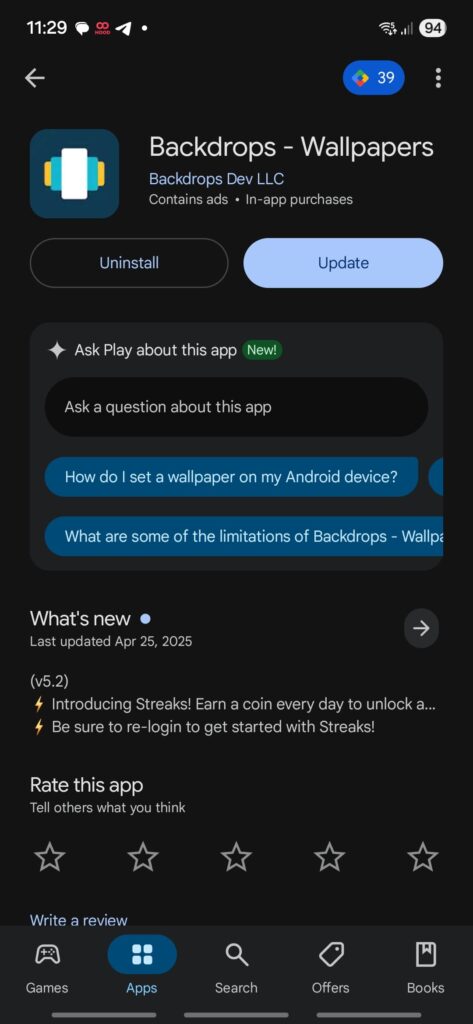
Play Store gets a new AI feature backed by Gemini, where you can ‘Ask Play about this app,’ and it answers your question. This is helpful to get answers before installing any particular app.
Google Play Store updates and system update delivery mechanisms
Google Play Store updates play a dual role in discovery and system maintenance. Beyond app distribution, the Play Store now supports Google system services automatic updates, streamlined installs for system components, and clearer warnings for apps that fail Play Protect verification. Users can also manage subscriptions, uninstall apps remotely, and resume content directly from Play listings, including core components such as Google Play services on the Play Store.
For advanced users, Google Play services uninstall updates remain an option, allowing rollback to factory versions for troubleshooting. Practical step-by-step guidance on this process has been widely covered, including explainers on how to uninstall Google Play services updates safely. This flexibility, combined with system-level update delivery, ensures reliability across a wide range of Google-certified Android devices.
Download latest Google Play Store APK
Download the new version of Google Play Store 49 here. You can also become a beta tester and get the latest update which definitely fixes the bug.
Play Store v49 APK Download
- Google Play Store 49 APK (Android 12+)
- Download APK Mirror (91 MB)
- Google Play Store 49 APK (Android 10+)
- Download APK Mirror (91 MB)
- Google Play Store 49 APK (Android 6.0+)
- Download APK Mirror (92 MB)
Play Store for Wear OS v49 APK Download
- Google Play Store (Wear OS) 49.2.23
- APK Mirror (15.35 MB)
- How to install Google’s Find Hub (Wear OS) APKM
Play Store Beta Tester
Download Google Play Services from the Play Store
Once you have the Play Store installed, you may want to update the Play Services app as it will bring you all the latest Android features from Google. It will also solve any performance issues or battery drain or standby issues on your smartphone caused by the Google Play Services.
Tip: You might also consider registering for the Play Services Beta version. This gives you latest features for testing.
How to update Google Play Store officially?
if you already have the Google Play Store available on your Android device, then update it officially from Google servers.
- First, see if the latest version of the Play Store is already installed.
- Launch the Play Store app.
- Tap on the profile icon in the top right corner.
- Go to settings.
- Scroll down and tap on “About”.
- Scroll down and find the “Play Store Version”.
- Tap on “Update Play Store” option.
- A new version will be installed.
